


At first glance, both platforms let you manage devices, enforce security policies, and automate part of your IT workload. The real difference is not just in the features, but in the type of company each solution was built for.
Jamf is designed for organizations that need very deep control over the Apple ecosystem. Factorial IT takes a broader approach to IT management: devices, access, software, and employee lifecycle operations, all connected to HR.
In other words: Jamf is an Apple specialist. Factorial IT aims to solve more layers of IT operations from a single platform. Understanding this difference clearly can help you avoid duplicated tools, manual processes, and an implementation that is more complex than it needs to be.
Comparison Table
| Criterion | Factorial IT | Jamf (Pro + Protect + Connect) |
|---|---|---|
| Use case | End-to-end IT management for SMBs | Apple device management |
| Operating systems | macOS, Windows, Linux, iOS, Android | macOS, iOS, iPadOS, tvOS, visionOS |
| Hardware management | Purchase, shipping, retrieval, and replacement included | Not included |
| SaaS management | Included: automated provisioning and deprovisioning | Not included |
| EDR | Integration with ThreatDown or SentinelOne | Jamf Protect (separate purchase, Apple only) |
| Identity management | Integrations with Okta, Google, Azure AD, and Entra ID | Jamf Connect (separate purchase) |
| HRIS integration | Native with 40+ systems (Factorial, Lucca, PayFit…) | No native HR layer |
| Onboarding automation | From HRIS entry to device, apps, and access | Zero-touch via Apple Business Manager |
| Offboarding automation | Automated access revocation and device lock | Manual or via scripting |
| Compliance and reporting | Evidence- and audit-oriented approach | General monitoring for Apple environments |
| Time to go-live | Simplified and guided approach | Technical and specialized deployment |
The Key Differences Between Factorial IT and Jamf
The difference between these two platforms is not only functional. It is a difference in approach.
1. Jamf Goes Deeper on Apple. Factorial IT Covers More Layers of Day-to-Day IT.
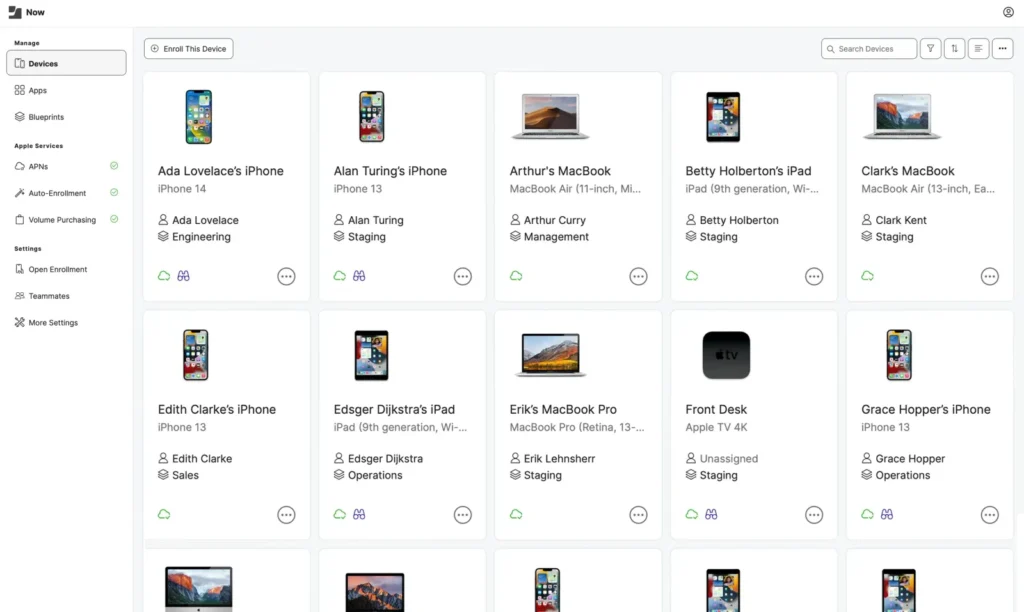
Jamf has spent over 20 years focused exclusively on the Apple ecosystem, and that depth shows. Its technical precision on macOS and iOS is the result of building one thing very well for a long time. Beyond the standard MDM requirements (enrollment, policies, encryption, updates, app deployment, identity management), Jamf offers a level of control over the native Apple layer that few other platforms come close to: Kernel Extension management, integration with XProtect and the Endpoint Security Framework, and same-day support for every new macOS and iOS release.
Factorial IT covers the same core MDM requirements (enrollment, security policies, encryption with FileVault and BitLocker, OS updates, app deployment, remote lock and wipe) for macOS, Windows, and Linux from a single console. And beyond MDM, it bundles hardware procurement, SaaS management, and endpoint security in a single contract connected to your HR system. For most SMBs, this removes the need to separately manage and bill for an MDM, an EDR, a SaaS management platform, and a logistics module.
In short: Jamf goes deeper inside the Apple ecosystem. Factorial IT goes further outside it, covering more stages of the IT lifecycle from one platform.
2. Multi-OS vs. Apple-First Approach
Factorial IT manages macOS, Windows, and Linux from a single console. Jamf manages Apple devices only.
This matters a great deal in practice. Most companies do not operate with a 100% homogeneous fleet. Windows continues to dominate in office environments, while macOS is typically concentrated in design, product, or leadership teams. If even 20% of your fleet runs Windows, Jamf effectively forces you to add Intune or a similar tool, maintain two separate MDM consoles, and manage two sets of policies without a unified view.
In that scenario, Jamf can work very well as the Apple solution, but it forces you to complete the stack with another tool for Windows. Factorial IT allows you to work with a more unified view of the entire fleet instead.
3. HR-Driven Automation vs. IT-Driven Administration
One of the most important differences lies in where the automation starts.
In Factorial IT, the employee lifecycle drives the device lifecycle. When HR registers a new hire, the platform can purchase the laptop, configure it with zero-touch, provision accounts in Slack, Google Workspace, or Notion, and apply the corresponding security policies. When someone leaves, it locks the device and revokes all access within minutes.
Jamf has no native connection to HR systems. The practical result: when someone leaves, IT has to coordinate manually with HR to revoke access. That time gap is exactly where most security incidents involving non-revoked accounts occur.
For companies that want to connect HR and IT in their onboarding and offboarding processes, this difference carries significant weight. It is not just a matter of convenience — it also reduces idle time, manual tasks, and risk from access remaining active longer than it should.
4. Operational Simplicity vs. Technical Specialization
Jamf is a very powerful platform, but also a more technical one. It is especially suited to IT teams with experience administering Apple environments and who need a high degree of control. It has its own certifications (Jamf Certified Tech, Jamf Certified Admin) because configuring it properly requires knowledge of Apple MDM profiles, Bash or Python scripting, and the internal mechanics of Apple Business Manager. Where Jamf really pulls ahead is not only its Apple focus, but the depth it offers in tasks like configuration profiles, advanced update management, scripting-based automation, and a more mature compliance and security layer within the Apple ecosystem.
Factorial IT is designed to be up and running in 30 minutes and fully deployed within 14 days, with no certification or specialist training required. During implementation, a dedicated specialist accompanies the setup to make the go-live faster and easier. The value proposition here is not competing with Jamf on extreme Apple specialization, but offering a simpler experience to deploy and operate for small and mid-size teams.
5. Unified Platform vs. Modular Stack
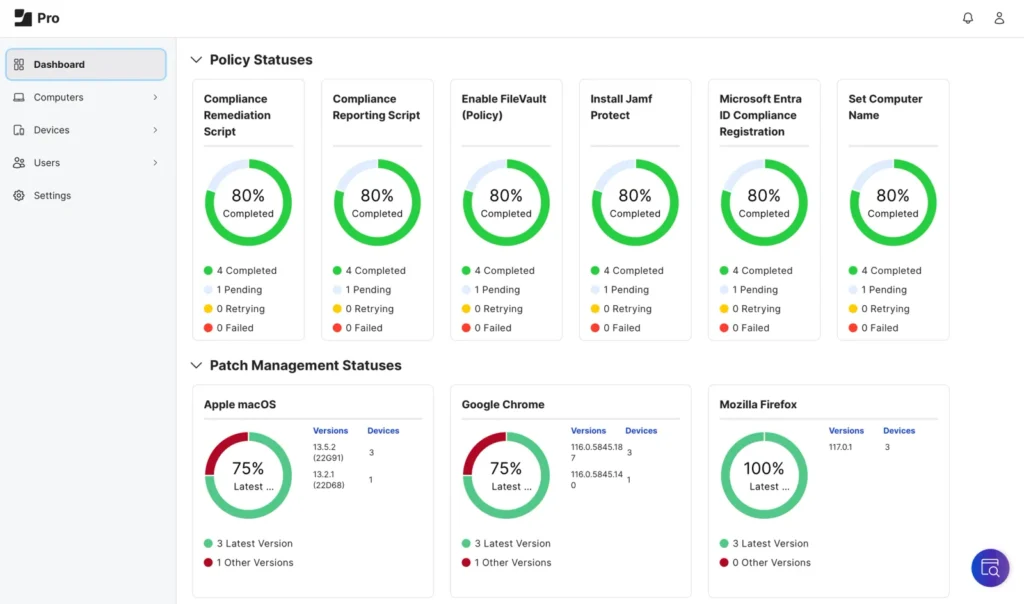
With Jamf, many companies end up building a layered stack: Jamf Pro for MDM, Jamf Protect for endpoint security, Jamf Connect for identity management, each with its own contract and renewal cycle. Audit logs are a fourth element that also comes at an additional cost.
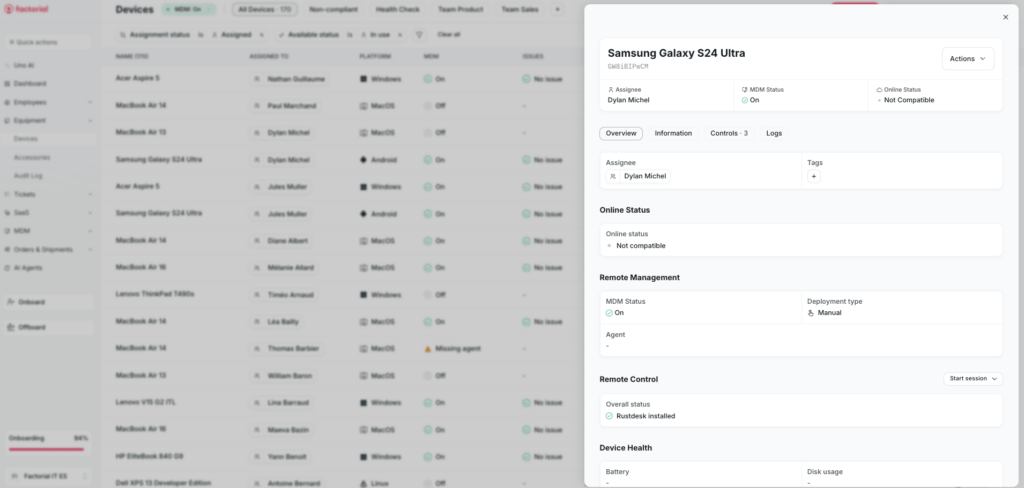
Factorial IT bundles MDM, SaaS management, EDR, and HR integration in a single platform with one monthly price. For many companies, the real comparison is not Jamf vs. Factorial IT as isolated MDMs, but a more unified platform vs. a more modular stack. And that is exactly where more cost, more vendors, and more operational overhead tend to appear.
Functional Comparison: Devices, Security, SaaS, and Operations
Device Management (MDM)
Jamf Pro is the reference standard for Apple fleets. It supports zero-touch deployment via Apple Business Manager, advanced configuration profiles, Bash scripting with access to all system preferences, granular patch management by version, and is the first to support every new macOS and iOS release on launch day. If you need to manage Kernel Extensions, configure system-level proxies, or enforce Screen Time policies on corporate iOS devices, Jamf covers it with a level of detail no other platform matches.
Factorial IT manages macOS, Windows, and Linux from a single console with an enterprise-grade MDM engine. Day-to-day capabilities include device enrollment, remote lock and wipe, disk encryption (FileVault on Mac, BitLocker on Windows), app deployment, OS update management, and real-time device querying. For advanced needs, administrators have full access to scripting and SQL-style queries over the fleet.
| Feature | Factorial IT | Jamf Pro |
|---|---|---|
| macOS | Yes | Yes |
| Windows | Yes | No |
| Linux | Yes | No |
| iOS / iPadOS | Yes | Yes |
| Zero-touch deployment (Apple Business Manager) | Yes | Yes |
| FileVault encryption (Mac) | Yes | Yes |
| BitLocker encryption (Windows) | Yes | No |
| App deployment | Yes | Yes |
| OS update management | Yes | Yes |
| Remote lock and wipe | Yes | Yes |
| Advanced configuration profiles (Apple) | Yes | Yes (more granular) |
| Custom scripting | Yes | Yes |
| Real-time fleet queries | Yes (SQL-style) | No |
| DDM (Declarative Device Management) support | Yes | Yes (cloud plan only) |
| SIEM integration | Yes | Yes |
| Full API | Yes | Partial |
| Built-in vulnerability detection | Yes | No (requires Jamf Protect) |
Hardware Procurement and Logistics
The difference here is very clear.
Jamf does not include hardware procurement. You buy and ship devices through your own suppliers. It is a device management platform, not an operational layer for procurement and logistics.
Factorial IT includes an integrated purchase module with over 40 laptop models (Apple, Dell, Lenovo, and others) and shipping to employees in more than 60 countries. Devices arrive pre-configured and ready to use from day one. When someone leaves the company, a return label is automatically generated: the device is collected, securely wiped, and prepared for reassignment.
For companies with remote employees, offices in multiple countries, or ad-hoc hiring across EU markets, this removes an operational burden that in many SMBs typically falls on HR or office managers with no dedicated logistics infrastructure.
SaaS and Access Management
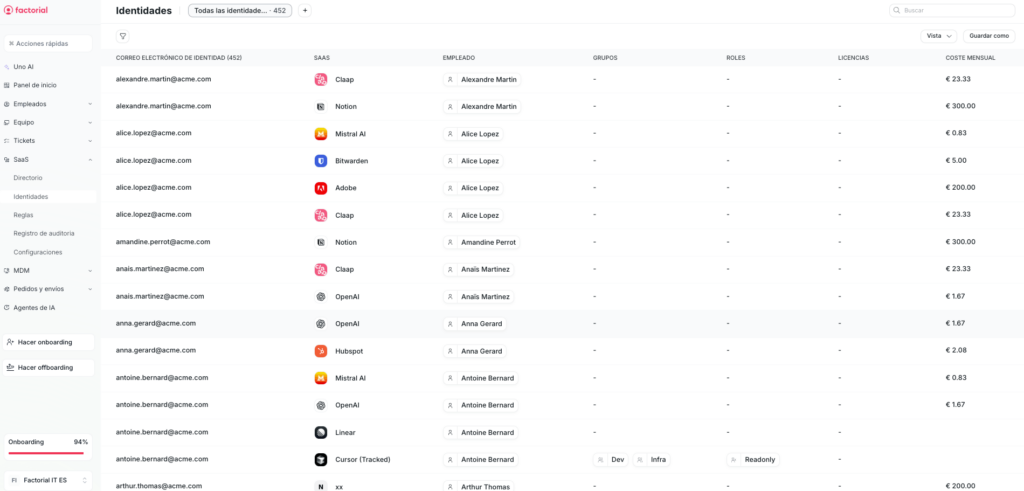
Jamf manages devices, not software. It has no SaaS management module. Its focus is the device and the security of the Apple environment.
Factorial IT centralizes all applications in use across the company, including shadow IT — tools employees use without IT’s knowledge, detected via a Chrome extension and Google Workspace integration. From there, it manages account provisioning and deprovisioning, roles and permissions per application, and license usage tracking.
The most critical use case is offboarding: when someone leaves the company, all their access is automatically revoked. In companies with 50 or more SaaS applications — standard for any tech company with more than 100 people — this module can justify the entire platform cost on its own.
For many companies, this is a more important difference than it appears. A large portion of operational risk no longer lives only in the laptop, but in active accounts across tools like Google Workspace, Slack, Notion, and internal applications.
Endpoint Security (EDR)
Jamf Protect uses Apple’s native Endpoint Security Framework for threat detection on macOS: it monitors anomalous behavior, blocks known malware, and generates telemetry for SIEM systems. It is a solid product, but sold separately from Jamf Pro (approximately $6/device/month extra), covers Apple devices only, and is not integrated in the same dashboard as the MDM.
Factorial IT takes a more open approach to endpoint security, integrating two EDR providers that deploy automatically at device enrollment with no additional configuration:
ThreatDown (by Malwarebytes): behavioral detection, automated threat response, endpoint isolation in the event of an incident.
SentinelOne: AI-based prevention, autonomous remediation, and one-click system rollback to a clean state in the event of ransomware. The MDR option includes an analyst team monitoring your fleet 24/7.
The pattern holds: Jamf goes deeper on Apple; Factorial IT aims to cover a more mixed and operationally complex environment.
Implementation and Onboarding
Jamf typically requires a more technical implementation. Its full potential is best realized when the IT team already has solid familiarity with the Apple ecosystem and is comfortable working with advanced configurations, automations, and specialized administration.
Factorial IT places more emphasis on a simple startup. The goal is not just fewer steps, but enabling smaller teams to start operating sooner with less dependency on very specific technical expertise. This matters especially in companies where IT does not want to spend weeks assembling pieces, testing workflows, and coordinating multiple tools before reaching a stable operational state.
The Regulatory Context: Why This Comparison Is No Longer Just About MDM
NIS2 applies to companies with more than 50 employees or €10 million in revenue in critical sectors (energy, banking, healthcare, transport, digital infrastructure, among others), with fines of up to €10 million and personal liability for executives.
What NIS2 demands in practice: auditable asset inventory, documented encryption, immediate and traceable access revocation at offboarding, and CSIRT notification within 24 hours of any significant incident. Furthermore, NIS2 will create a cascade effect on thousands of SMBs that supply regulated entities — if you are a technology vendor to a financial, healthcare, or energy company, your client will already be asking for compliance evidence even if you are not directly obligated.
For companies in markets with additional local compliance frameworks (ENS in Spain, the NIS2 implementation via D.Lgs. 138/2024 in Italy, Decree-Law 125/2025 in Portugal, the revised BSIG in Germany), the requirements around documented security measures, access governance, and audit trails make the choice of IT management platform a compliance decision, not just a technical one.
What Each Platform Offers
Factorial IT automatically generates the reports required by NIS2 Article 21 (asset inventory, encryption evidence, access control and traceable offboarding, audit logs) and integrates with Vanta and Drata to automate up to 90% of SOC 2 and ISO 27001 reporting. All included in the standard price.
Jamf offers compliance monitoring for Apple devices and SIEM integration. Audit logs cost over $20,000 in additional modules. There are no specific workflows for NIS2 or local security frameworks, and no integration with audit tools like Vanta or Drata.
For many companies, the choice no longer depends only on which tool configures a Mac better, but on which one helps document inventory, encryption, access, offboarding, and internal controls with less operational effort. Factorial IT is more aligned with companies that want to connect IT, HR, and compliance in one workflow. Jamf fits better when the absolute priority remains excellence in Apple administration.
Pricing
Both platforms use per-device or per-user monthly pricing models, but their structure is very different.
Factorial IT bundles MDM, SaaS management, EDR, and HR integration in a single platform with one monthly price, no minimum term and no implementation costs. MDM and SaaS management from €10 per employee per month, EDR from €3.50 per device.
Jamf bills each module separately (MDM, security, identity, auditing), with total costs rising significantly as you add functionality.
For a 200-person tech company with a mixed fleet (150 Macs, 50 Windows devices, 50 mobile devices), the difference between full management with Factorial IT and an equivalent Jamf stack can exceed €20,000 per year, not counting the additional tool you would need for Windows devices.
Which Solution Fits Your Company Best?
Choose Factorial IT if…
- You have between 50 and 5,000 employees with a mixed Mac + Windows fleet (and/or Linux)
- IT is managed by a small team, an office manager, or someone from operations
- You want automated onboarding and offboarding triggered from your HR system
- You need to comply with NIS2, ISO 27001, or similar audit requirements and want auditable evidence without a parallel project
- You hire across multiple European countries and need device logistics already solved
- You prefer one platform and one invoice over coordinating five different vendors
Choose Jamf if…
- Your fleet is 100% Apple, or very close to it
- You have dedicated IT administrators with Apple ecosystem experience
- You need granular control over macOS: advanced configuration profiles, scripting, kernel-level policies
- You already have solutions in place for Windows (Intune), identity (Okta), and SaaS, and do not need to consolidate them
- Your company size justifies the combined cost of Pro + Protect + Connect plus premium onboarding
If any of this sounds familiar, it’s worth seeing it in action with your own use case. Request a demo.
And if you’re still weighing your options before deciding, you can also check out our guide on the best Jamf alternatives.

