Almost every company has an information security policy. The trouble starts when you have to prove someone actually read it, that it gets reviewed on a schedule, and that what the document says matches what’s actually configured on your employees’ laptops. It’s the first document an auditor asks for, and it’s also the one that gets copied the most and adapted the least.
In this article we’ll cover what an information security policy actually is, which frameworks require one, what sections it needs, how to build one step by step, and the mistakes that show up most often.
What is an information security policy?
An information security policy is the document, approved by leadership, where an organization states its commitment to protecting information and sets the principles that govern how that protection works. It defines the scope, assigns responsibilities, and sets the frame for every technical and organizational decision that comes after.
It’s a high-level document. It doesn’t explain how to configure a firewall or how often passwords expire. It covers the what and the why, and leaves the how to the standards and procedures that sit underneath it. That’s why a well-written policy rarely runs more than four or five pages.
It covers all of your organization’s information regardless of format. Data in internal systems, paper records, information shared with vendors, and anything that moves through conversations or removable media all fall under the same umbrella.
Information security policy vs. issue-specific policies
This is where most people get tripped up, so it’s worth clearing up early. The information security policy is the master document, the one leadership signs and the one everything else hangs off of. Issue-specific policies are the ones that spell out individual areas, and they’re what your team actually follows day to day.
Documentation usually breaks into three levels.
- Master policy: the framework document approved by leadership, short and stable over time.
- Issue-specific policies: access control, device use, remote work, backups, information classification, incident response, secure development, and so on.
- Procedures and records: the operational detail behind each policy and the proof it was followed.
Why does your company need an information security policy?
Its main job is to give direction. When something comes up that nobody planned for, the policy is the standard you fall back on to make the call. Without one, every department figures it out on its own and security decisions end up depending on whoever happens to be around that day.
Beyond that, it does four concrete things.
- Makes leadership’s commitment visible: security stops being an IT problem and becomes something backed from the top.
- Distributes responsibility: every role knows what falls to them and who to escalate to.
- Makes the rules enforceable internally: without a policy that’s been communicated and acknowledged, it’s hard to hold anyone accountable for breaking it.
- Holds up everything else: issue-specific policies, procedures, and technical controls all rest on it and point back to it.
There’s also a growing external use for it. Enterprise customers and government agencies ask for your security policy during vendor reviews, and most cyber insurance carriers want to see it before issuing coverage.
How your information security policy affects ISO 27001 certification
ISO 27001 is the international standard for certifying information security management systems, and your policy shapes that certification from day one. Not having one is disqualifying, because Clause 5.2 sits in the body of the standard rather than Annex A, which means you can’t exclude it in your Statement of Applicability. No policy approved by top management, no certificate.
Its quality sets the tone for the rest of the audit. Control A.5.1 requires the policy to be approved, published, communicated, acknowledged by the people it applies to, and reviewed at planned intervals. Since your issue-specific policies and procedures all rest on it, a weakness here pulls nonconformities along with it. Scope matters just as much, because whatever isn’t in the document isn’t in the system, and the system is what the certificate covers.
ISO 27001 isn’t the only framework that asks for one. SOC 2 treats documented, approved policies as the foundation of the control environment, and they’re usually the first thing a firm requests during readiness. The HIPAA Security Rule requires covered entities and business associates to implement written policies and procedures. PCI DSS devotes Requirement 12 to organizational policy and expects one that’s published, distributed, and reviewed at least annually. And if you’re going after federal work, FedRAMP and CMMC build on NIST SP 800-53 and NIST SP 800-171, which start from documented policy at the top of nearly every control family.
What to include in an information security policy
There’s no required table of contents. There is, though, a set of sections that shows up in almost every policy that clears an audit.
1. Purpose and scope
Purpose explains why the document exists and should line up with your business objectives. Scope is the part that gets the least attention and causes the most problems later. It has to spell out exactly which processes, locations, systems, assets, and people are covered.
Getting scope wrong cuts both ways. Too broad and you’re committing to protect things you don’t control. Too narrow and the certificate loses value with customers who assumed it covered your whole operation.
2. Principles and leadership commitment
This is where you put the principles that guide security across the organization. The usual ones are risk-based decision making, secure by default, least privilege, defense in depth, and continuous improvement.
Leadership commitment has to be explicit and verifiable. That means allocating resources, formally approving the document, and taking part in management review. A generic statement of intent with no budget behind it and no identifiable signature doesn’t count for much.
3. Roles and responsibilities
The policy defines who does what. At minimum that’s your security lead, the security committee if you have one, the owners of each asset or process, and the general obligations that apply to everyone.
Each role needs concrete duties. It’s worth spelling out how security interacts with privacy, with legal, and with HR, because hires and terminations kick off security tasks that tend to end up without an owner.
4. Supporting issue-specific policies
The master policy lists the specific policies that build on it and points to where they live. The most common ones cover access control, acceptable use, mobile devices and BYOD, remote work, information classification and handling, backups, encryption, incident response, vendor management, and secure development.
You don’t need to describe them. Just list them, name an owner for each, and give a clear document reference.
5. Exceptions and consequences
Sooner or later, every policy runs into a case where a control can’t be applied. The document should say who can approve an exception, on what grounds, for how long, and where it gets recorded.
Consequences for violations need to be spelled out, and they should be reviewed with HR and legal so they line up with your employee handbook and applicable employment law. Without this section, you have no real recourse when something serious happens.
6. Version control and approval
A policy without version control is a policy you can’t audit. The cover page or footer should carry the version number, approval date, approving authority, author, next review date, and a change history.
This section looks like housekeeping and it’s one of the first things an auditor checks. It tells them in about thirty seconds whether the system is alive or whether the document hasn’t been touched in four years.
How to write an information security policy
Writing the document is the short part. What gives it substance is what happens before and after.
1. Inventory your assets and assess risk
The policy protects specific assets, so step one is knowing what they are. Your inventory needs to cover laptops and desktops, servers, applications and cloud services, data, storage media, and the people with access to each. In a fleet split between the office and remote work, that snapshot only stays current if it’s collected automatically.
With the inventory in hand, you identify threats and vulnerabilities, rate likelihood and impact, and decide which risks to accept, mitigate, transfer, or avoid. NIST SP 800-30 is the most common reference for this step in the US, with ISO 27005 alongside it. The principles that end up in your policy come out of here, and that’s what separates a real document from a downloaded template.
2. Draft it and get it approved
The writing has to be readable for everyone, including people with no technical background. Short sentences, a glossary at the end, and no term you can’t explain in one line.
Approval belongs to leadership, with a date and an identifiable signature. In organizations with a security committee, the usual practice is for the committee to propose the text and leadership to approve it formally on the record.
3. Communicate it and record acknowledgment
Dropping the policy in a shared drive isn’t communicating it. The standard requires the people it applies to acknowledge it, so you need proof that each person received and accepted it, with a date.
The cleanest way to handle this is through onboarding. New hires get the document when they start, accept it digitally, and that record lands in their employee file. When the policy changes versions, you collect acknowledgment again from everyone. That history is exactly what an auditor will ask for.
4. Review and update it
Reviews happen at planned intervals, typically once a year as part of management review. They also get triggered by significant changes like a merger, an infrastructure shift, entering a new regulatory environment, or a serious security incident.
Every review leaves a trail, even when nothing changes. Recording that the document was reviewed on a specific date and confirmed as-is counts as evidence too.
Information security policy example
Plenty of organizations publish their policy openly, which gives you a good read on the actual tone and length. Two patterns stand out. The document rarely runs past five pages, and almost all of them include a version control table on the first or last page.
A typical information security policy outline looks something like this.
- Purpose and applicability
- Regulatory and framework references
- Information security principles
- Leadership commitment
- Security organization, roles, and responsibilities
- Risk management
- Supporting standards and policies
- Training and awareness
- Incident response
- Compliance, exceptions, and disciplinary action
- Review and version control
That outline is a starting point. The content of each section only means anything if it comes out of your own risk assessment.
Common mistakes when writing an information security policy
Policies that fail an audit tend to repeat the same mistakes.
- Copying a template without adjusting the scope: you end up with locations that don’t exist, departments the company never had, or systems that never got deployed. An auditor catches it on the first read and looks at everything else with more skepticism from there.
- Letting IT approve it instead of leadership: the standard requires top management to establish it. A policy signed only by your technical lead doesn’t meet the requirement, and it signals that security isn’t backed from the top.
- Confusing policy with procedure: if the document sets minimum password length or backup frequency, every operational tweak sends it back to leadership for re-approval. The policy stops getting updated and drifts from reality within months.
- Leaving out vendors and contractors: plenty of policies cover employees only and skip contractors, subcontractors, and vendors with system access. That’s one of the most common ways in, and one of the things auditors look at hardest.
- Not being able to prove people have read it: the document exists, it’s approved, it’s published, and nobody can say who’s actually read it. Without acknowledgment records, you fail the communication requirement outright.
- A gap between what’s written and what’s configured: the policy says every machine has disk encryption, automatic screen lock, and strong passwords, and a look at the fleet shows a chunk of devices meet none of the three. This is the costliest mistake, because it turns a minor nonconformity into a major one.
Put your information security policy into practice with Factorial IT
A policy only matters if what it says is actually applied on your devices and you can prove it. The more manual the process, the further the document drifts from reality.
Factorial IT enrolls your company devices and applies your encryption, screen lock, and password rules across Mac, Windows, and Linux, without touching each machine individually. The policy gets delivered and accepted during onboarding, and that acceptance is time-stamped in each person’s employee file.
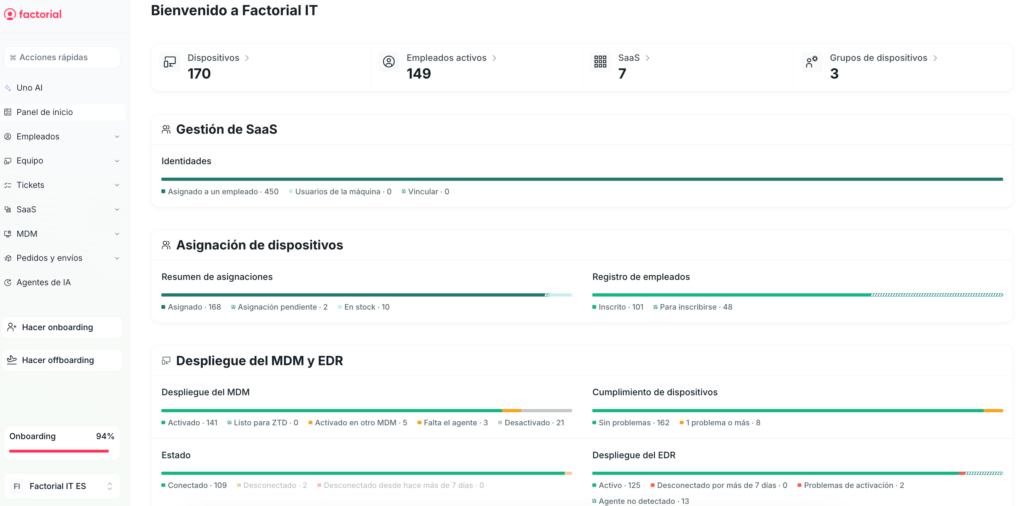
The result is a policy with a status report behind it, showing which devices meet each requirement and who’s acknowledged the document.