An employee leaves the company, and three months later their account is still active—with access to the CRM and financial documents. This is exactly the kind of scenario ISO 27001 aims to prevent through access control, and it’s also one of the most common findings in certification audits. Because controlling access means deciding who gets into each system, what they can do once they’re in, and how long they keep that permission. The standard devotes several controls to putting that whole process in order.
In this article, we’ll cover what access control means under ISO 27001, what the 2022 version requires, the principles it rests on, the types that exist, what the policy needs to include, and how to put it into practice.
What is access control in ISO 27001?
Access control is the set of rules and mechanisms that determine who can access an organization’s information and systems, and what they can do with them. The goal is to make sure only authorized people reach the information they need to do their jobs, while preventing any unauthorized access.
The standard covers two planes that need to follow the same principles:
- Logical access: permissions for applications, databases, networks, files, and cloud services.
- Physical access: entry to facilities, server rooms, and the media where information is stored or processed.
The underlying idea is need-to-know. In other words, each person accesses only the information they truly need to carry out their role—no more, no less. Access control done right isn’t a one-time barrier; it’s an ongoing process that gets defined, applied, monitored, and reviewed.
What does ISO 27001 say about access control?
Access control is one of the heaviest-weighted sections of Annex A in ISO 27001, and also one that changed the most between the 2013 and 2022 versions. Understanding that shift clears up a good chunk of the usual confusion.
In ISO 27001:2013, all of access control lived in the A.9 domain, with fourteen controls split across four blocks: business requirements, user access management, user responsibilities, and access control for systems and applications.
ISO 27001:2022 reorganized Annex A and spread those requirements across several new controls. Access control as such is now 5.15, but the operational detail is distributed among others.
How is access control split up in the 2022 version?
These are the ISO 27001:2022 controls that, together, cover what used to be A.9:
- 5.15 Access control: sets the rules for physical and logical access based on business and security requirements (formerly 9.1.1 and 9.1.2).
- 5.16 Identity management: the identity lifecycle, from creating a user account to deactivating it.
- 5.17 Authentication information: managing passwords and other access credentials.
- 5.18 Access rights: granting, reviewing, and revoking permissions.
- 8.2 Privileged access rights: tighter control over administrative accounts.
- 8.3 Information access restriction: what each user can read, write, or delete.
- 8.5 Secure authentication: login procedures, including multi-factor authentication.
If your documentation still refers to A.9, that’s not a dealbreaker—but it’s worth updating the references to the 2022 version before a certification or transition audit.
The principles of access control
Beyond the specific controls, the standard rests on a handful of principles that should guide any decision about permissions. They’re the foundation the policy is built on.
1. Least privilege and need-to-know
These are the principles that should drive every decision about who gets access and how far it goes:
- Least privilege: each user gets exactly the permissions they need to do their job, and only for as long as they need them.
- Need-to-know: access is granted based on the information a person needs to know, not on their title or seniority.
- Need-to-use: the same criterion applied to infrastructure and tools, not just data.
- Deny by default: everything is blocked except what’s explicitly allowed—not the other way around.
- Separation of duties: splitting up incompatible tasks so no single person controls a critical process from start to finish.
2. Identification, authentication, and authorization
Every solid access setup rests on three consecutive steps that are easy to mix up:
- Identification: the user states who they are through a unique identifier (an ID or a named account).
- Authentication: the system verifies they are who they claim to be, based on something they know (a password), something they have (a token, a card), or something they are (fingerprint, face). Combining two of these factors is the basis of multi-factor authentication.
- Authorization: once the identity is verified, the system determines what actions they can perform on each resource.
Types of access control: DAC, MAC, RBAC, and ABAC
ISO 27001 doesn’t impose a specific model, but it does expect the organization to pick one that fits its risk level. Here are the four most common:
- DAC (discretionary access control): the owner of each resource decides who can access it. Flexible, but hard to audit and to keep consistent at scale.
- MAC (mandatory access control): a central authority defines access based on labels and classification levels. It’s the strictest option and shows up in high-security environments.
- RBAC (role-based access control): permissions are assigned to roles, and people inherit the permissions of their role. It’s the most widely used model in companies because it simplifies management and reviews.
- ABAC (attribute-based access control): access depends on attributes like location, device, time of day, or data type. It allows very precise rules, at the cost of greater complexity.
For most organizations, a well-designed RBAC model covers the bulk of what’s needed and fits naturally with assigning permissions by job function.
What should the access control policy include?
The access control policy is a mandatory document. The standard requires you to establish it, document it, and review it periodically. It works as a statement of what the organization allows and doesn’t allow, rather than a technical manual on how to do things. The people who define it are the asset owners, in line with the security policy and the risk assessment.
A complete policy usually pulls together the following elements.
- Scope and responsibilities: which systems and information it applies to, and who approves, grants, and reviews access.
- Granting rules: criteria for creating, modifying, and revoking permissions, grounded in least privilege.
- Identity management: using named accounts, banning shared accounts, and the identifier’s lifecycle.
- Privileged access: tighter conditions for administrative accounts and their oversight.
- Authentication: password requirements, use of MFA, and credential protection.
- Network access and remote work: allowed connections, VPN, and access from outside the organization.
- Review and traceability: how often permissions are reviewed, plus logging of access and changes.
How to implement access control step by step
With the principles and policy already defined, you can tackle the rollout in ordered phases, each one building on the last.
Phase 1: Classify your information
The starting point is knowing what information you handle and how much its loss or leak would expose you. Telling critical, sensitive, and public data apart lets you match each permission to its real level of risk, instead of protecting everything the same way.
Phase 2: Define roles and access rules
With your information classified, the next step is to translate job functions into roles with concrete permissions. This is where least privilege kicks in: each role gets only what its function needs, and people inherit the permissions of their role.
Phase 3: Manage onboarding, offboarding, and privileged access
The access lifecycle is where the most audit findings show up. These are the critical points worth having buttoned down:
- Onboarding with individual identification: each person with their own account and formally approved permissions.
- Immediate offboarding: when an employee leaves, their access needs to be revoked right away—not dependent on someone remembering to do it.
- Orphaned access: accounts belonging to people who are gone or to closed-out projects that stay active are a frequent way in.
- Privileged accounts: limited to those who need them, with stronger authentication and logging of their use.
Phase 4: Strengthen authentication
Defining who gets access means nothing if the identity isn’t verified properly. It’s worth requiring strong passwords and turning on multi-factor authentication (MFA) for sensitive access and, above all, for privileged accounts.
Phase 5: Review and monitor access
Access control isn’t something you set up once and forget. The standard expects periodic reviews that confirm each permission is still justified, especially after role changes, promotions, or departures. A quarterly review, with managers validating their team’s access, keeps the system aligned with reality and heads off audit findings. On top of that, continuous monitoring leaves a trail of who accessed what and helps flag unusual behavior.
How Factorial IT helps with access control
Managing access by hand becomes unworkable once you’ve got staff turnover, remote devices, and dozens of SaaS apps. Factorial IT centralizes that management and ties it to HR, so permissions follow the employee lifecycle.
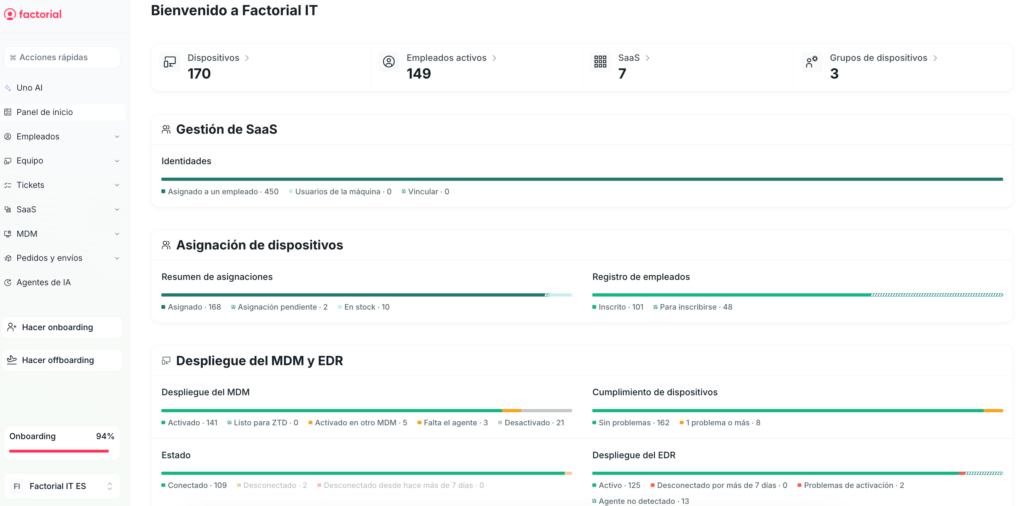
- Automatic provisioning and deprovisioning: access to SaaS tools is granted at onboarding and pulled at offboarding, with no manual steps.
- Instant revocation at offboarding: when an employee leaves, their access is revoked right away and logged, which closes the door on orphaned accounts.
- Real-time visibility: an up-to-date map of who has access to what, ready whenever you need it.
- Device and password policies: encryption, remote lock, and profile-based security policies across Mac, Windows, and Linux machines.
- Audit-ready evidence: exportable logs and reports that document onboarding, offboarding, and permission changes—handy when you’re prepping for a SOC 2 or ISO 27001 audit.