ISO 27001 is the international reference standard for managing information security, and within its management system, the Statement of Applicability (SoA) is one of the core documents. It’s the first thing an auditor opens when certification time comes around, and it’s where everything your organization has decided to do to protect its information comes together.
In this article, we’ll walk through what the SoA is, what it’s for, what it needs to include, and how to build one step by step, with a sample table so you can see how it looks. If your team already runs SOC 2, this is the piece that anchors an ISO 27001 program alongside it.
What is the ISO 27001 Statement of Applicability (SoA)?
The Statement of Applicability, better known by its acronym SoA, is the document that pulls together every security control from Annex A of ISO 27001. For each one, it states whether your organization applies it or not, along with the justification and the implementation status.
Put another way, it’s the full picture of which controls your organization has chosen to put in place, which ones it’s left out, and why. In the current version of the standard, ISO 27001:2022, Annex A groups 93 controls into 4 themes, so the SoA runs through all 93 of them one by one.
It’s worth keeping the SoA separate from your risk assessment. The risk assessment identifies the threats your organization is exposed to, while the SoA captures the decision about which controls you’ll apply to treat those risks. They’re two different documents that work together, and further down you’ll see how they connect.
What is it for, and why is it required?
The SoA plays several roles inside the ISMS. Three of them explain why it matters so much.
- It’s a required document for certification: the standard spells it out. Clause 6.1.3 d) of ISO 27001:2022 requires a Statement of Applicability that lists the necessary controls, the justification for including them, whether they’re implemented, and the reason for excluding any control. No SoA, no certification.
- It connects the risk assessment to the controls: the SoA is the bridge between the risks you’ve identified and the measures you’ve put in place to treat them. It gives you traceability between what the standard asks for and what your organization actually does.
- It’s the auditor’s main roadmap: when the audit starts, the auditor opens the SoA before anything else, because it hands them a complete map of the ISMS. From there, they check that the controls you say you apply are really in place and that your exclusions hold up. A weak SoA, with no justifications or unfounded exclusions, is one of the fastest routes to a nonconformity.
What does the SoA need to include?
The standard doesn’t lock you into a specific format, so you can use whatever fits your team best as long as it captures the information you need. For each Annex A control, the SoA should reflect four things.
- The control and its description: the reference and name of the control exactly as it appears in Annex A, for example A.5.1 Policies for information security.
- Whether it applies or not: the decision to include or exclude that control in your ISMS.
- The justification: the reason behind that decision, whether the control is applied or dropped. This part is key, because justifying exclusions is exactly what the auditor digs into most.
- The implementation status and evidence: whether the control is in place, in progress, or pending, along with a reference to the policy, procedure, or evidence that backs it up.
A lot of organizations add extra columns, like the control owner or the risk it treats, to strengthen traceability. It’s not required, but it helps keep the document under control.
Sample SoA table
Here’s what a Statement of Applicability usually looks like in table form. This is a simplified example with just a few controls so you can see the structure.
| Control | Description | Applies? | Justification | Status | Evidence |
|---|---|---|---|---|---|
| A.5.1 | Policies for information security | Yes | Risk identified in the risk assessment | Implemented | InfoSec Policy v1.2 |
| A.5.7 | Threat intelligence | Yes | Need to stay ahead of external threats | In progress | Threat intelligence procedure |
| A.6.7 | Remote working | Yes | Part of the workforce works outside the office | Implemented | Remote work policy v2.0 |
| A.7.4 | Physical security monitoring | No | The organization doesn’t have its own facilities | Not applicable | Documented justification |
| A.8.23 | Web filtering | Yes | Risk of access to malicious sites | Implemented | Corporate proxy configuration |
How to build a Statement of Applicability step by step
Building the SoA isn’t a standalone task. It falls out naturally from the risk management work you’ve already done. Here are the usual steps to put it together.
1. Start with your risk assessment and risk treatment
The SoA isn’t your starting point. It comes out of the work you’ve done on risk. Before you touch it, you need your information assets identified, the risks they’re exposed to assessed, and the treatment options decided for each one. That’s the moment when it becomes clear which controls you need to bring each risk down.
If you try to fill in the SoA without that groundwork, you’ll end up checking controls blindly, and the auditor will catch it right away, because there’s no traceability between the risks you identified and the controls you chose.
2. Select the applicable controls from Annex A
With your risks on the table, you go through the 93 controls in the 2022 Annex A and decide which ones apply to your organization and which don’t. The standard doesn’t require you to implement all of them, only the ones your risk level justifies, so a control can stay out if it doesn’t make sense in your context.
Keep in mind you can also add controls that aren’t in Annex A if your risk assessment calls for it, since Annex A is a reference and not a closed list.
3. Document the justification, status, and evidence
For each control, you note whether it applies and the reason behind that decision. For the ones that apply, you add the implementation status, whether it’s in place, in progress, or pending, plus a reference to the policy, procedure, or evidence that backs it up.
Don’t skip the justification for exclusions, because that’s exactly what the auditor reviews most. Excluding a control is perfectly valid as long as you explain why it doesn’t apply to your organization. A well-written reason is worth more than a list of checked controls with no explanation.
4. Review and approve the document
Finally, the SoA needs to be reviewed and approved by your organization’s top security authority before it’s considered valid. That formal sign-off is what turns the draft into the ISMS reference document.
From there, it’s ready for the audit. Just remember it’s not a final version set in stone. It’s the first of many, because the SoA keeps getting updated over time.
How to maintain and manage the SoA
The SoA isn’t something you write once and file away. It’s a living document you have to review and update whenever something relevant changes in the organization, like a new risk showing up, a new asset or technology coming online, a shift in the regulatory landscape, or a change to a treatment decision. That’s why it helps to keep version control that logs every change and who approved it.
This is where a lot of organizations get stuck. Keeping the SoA in a spreadsheet gets unmanageable the moment you have dozens of active controls, with their owners, their evidence, and their deadlines all changing at once. It’s easy for the document to fall out of date and for you to walk into the audit with expired evidence or controls that have no owner assigned.
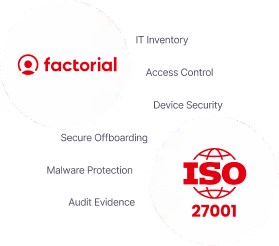
This is where an IT management and compliance tool like Factorial IT makes the difference, because it covers and documents a good chunk of the technical Annex A controls that show up in your SoA.
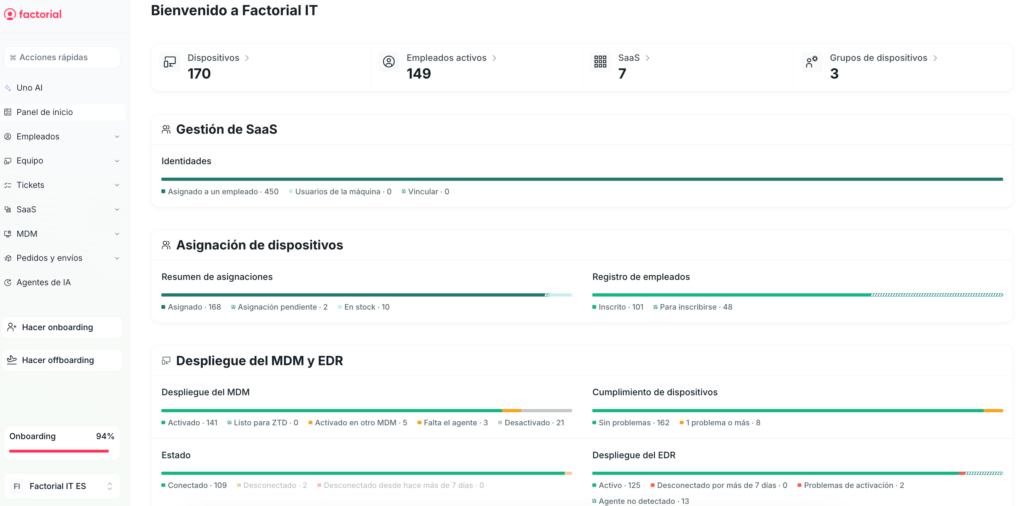
- Automatic IT asset inventory: always up to date and exportable for the audit.
- Device management (MDM): encryption, antivirus, and patches across Mac, Windows, and Linux.
- Access management: grants and revokes permissions based on each employee’s role.
- Secure offboarding: shuts down every access point the moment a departure is logged in HR.
- Automatic audit evidence: ready to export the moment the auditor asks for it.
With your controls in place and evidence collected on an ongoing basis, keeping the SoA current stops being a last-minute scramble before the audit.