Business process management software might sound technical, but the idea is simple. It is a tool that helps you organize the way work gets done in your business, step by step, so nothing falls through the cracks. Instead of relying on memory, email threads, or scattered spreadsheets, you use one system to define, run, and improve your everyday workflows. For small business owners, this means fewer mistakes, faster approvals, and a much clearer view of what is happening across the company.
What is business process management software?
Business process management software, often called BPM software, is a type of tool that helps you map, organize, and improve the way work gets done in your company. Instead of handling tasks with scattered emails, chats, and spreadsheets, BPM software lets you create clear workflows that everyone can follow.
In simple terms, it is a digital system that shows who does what, in what order, and with which information. You can think of it as a shared playbook that turns adhoc routines into clear, repeatable steps. The software then helps you follow that playbook, track progress, and make changes when you see a better way to work.
For small businesses, this matters because even simple processes like hiring, onboarding, approvals, or customer follow ups can waste time when they are not organized. BPM software makes these processes easier to run and improve.
What is a “business process” in practice?
A business process is any set of steps that you and your team repeat to reach a clear goal. These steps may involve different people, tools, and data, and they often cross several departments or roles.
Some simple examples of business processes in a small business are:
- Approving a new hire and sending their contract for approval
- Handling a customer order from quote to payment
- Managing time off requests and approvals
- Approving expenses, invoices, or refunds
- Onboarding a new supplier
When these steps are clear, your business runs smoothly. When they are not clear, you get delays, errors, and frustrated employees or customers. Business process management software helps you write down and manage these steps so they are easy to follow and update.
What does business process management software do?
Business process management software helps you move from “work just happens” to “work follows a clear path that we can see and improve.” It does this by giving you one place to design, run, and track the key steps in your everyday operations. Instead of each person having their own way of doing things, you create shared workflows that everyone can follow. The software then guides tasks through these workflows, so you spend less time chasing updates and more time actually getting things done.
Even if your company is small, BPM software can act like a control center for repeatable work. You do not need to be technical to use it. Most tools let you build simple flows with forms and drag and drop steps. Over time, this structure helps you cut down on errors, delays, and confusion, because every task has a clear owner, next step, and deadline.
1. Map and document workflows
One of the first things BPM software does is help you draw out how your processes really work. You turn what is in people’s heads into a simple map of steps: who starts the process, what information they provide, who approves it, and how it ends. This can be as basic as an employee submitting a vacation request followed by a manager approving or rejecting the request and HR updating the company calendar.
When you mark this in the software, everyone can see the same process. New employees no longer have to guess or ask several people how something works. You can also spot missing steps, repeated work, or unclear responsibilities.
2. Automate routine tasks and handoffs
After your workflows are mapped, BPM software lets you automate the parts that do not need a human decision every time. For example, when a form is submitted, the system can automatically:
- Create a task for the right manager
- Send a confirmation email to the person who made the request
- Move the request to the next stage when a button is clicked
- Trigger a reminder if nothing happens after a certain number of days
These simple automations add up to a big time saving. Your team no longer has to remember who to email next or when to follow up. The system takes care of handoffs in the background and keeps things moving. This reduces delays and makes your business feel more responsive to both employees and customers.
3. Coordinate people, tools, and data
Most processes in a business involve several people and often several tools. For example, hiring a new employee might involve your HR system, your email provider, your document storage, and your payroll tool. Without a central place to coordinate this, information gets copied by hand, and mistakes can slip in unnoticed.
BPM software acts like a bridge between people and systems. It keeps the key steps and data in one view, and many tools can connect to the other software you already use. This means when a process reaches a certain step, the BPM system can update records in another tool or send needed data automatically. Your team spends less time copying information and more time checking that everything looks right.
4. Track progress and give visibility
Another important job of BPM software is to show you where things stand at any moment. Instead of asking “Did that get approved?” or “Where is that request now?”, you can open the workflow and see each task, its status, and who is responsible. This is helpful for managers and owners who want a quick sense of how smoothly work is flowing.
You can see which processes are running well and which ones always seem to get stuck at the same step. If one manager is overloaded with approvals, you will spot that pattern and can adjust. This kind of visibility is hard to get from email and spreadsheets alone, but BPM tools make it part of your daily view.
5. Measure and improve over time
Finally, BPM software lets you turn everyday work into data that you can use to improve. You can see how long processes take from start to finish, how many requests you handle per month, or which steps are often sent back for rework. Even basic reports are enough to highlight where you are losing time or where errors are common.
With this information, you can test small changes. For example, you might change who approves certain requests, or you might simplify a form that people often fill in incorrectly. Then you can check the numbers again and see if things improved. Over time, this cycle of measure and adjust helps you build smoother, more reliable processes without guessing.
Here is a longer version of the section “Key benefits of business process management software for small businesses”, in the same simple, benefit focused style.
Benefits of business process management software for small businesses
Even if you have a small team, the way you handle everyday work has a big impact on time, stress, and the satisfaction of your customers. Business process management software helps you move from “we are just getting by” to “we have clear, reliable ways of working.” It does this by turning repeated tasks into well defined workflows that are easy to follow and improve.
Instead of relying on memory or hoping people remember each step, you use one shared system that guides requests, approvals, and handoffs. Over time, this reduces mistakes, speeds up response times, and gives you better control over how your business runs. Here are some of the main benefits you can expect.
Save time by reducing manual work
In many small businesses, a lot of time is lost on simple admin tasks. People forward emails, chase approvals, copy information into spreadsheets, and send reminders by hand. None of this work is very valuable, but it still takes up hours every week.
Business process management software cuts down this manual effort. Once you define a workflow, the system can automatically route tasks to the right person, send notifications when something is ready, and move requests to the next step with a click. You spend less time asking “Did you see this?” and more time actually solving customer and employee needs.
Even small changes can have a big effect. For example, if your expense approval or time off process moves from email to a simple digital workflow, you might save several back and forth messages per request. Multiply that by the number of requests you handle each month, and the time savings quickly add up.
Make work more consistent and reduce errors
When each person has their own way of handling a process, results are inconsistent. One manager might approve something over chat, another might need a form, and a third might forget to reply at all. This creates confusion and can lead to mistakes, especially in areas that affect money, pay, or legal obligations.
With BPM software, you set one clear process that everyone follows. Each request goes through the same steps, with the same checks and the same information collected. This does not mean you lose flexibility. It just means the basics are always covered. You can still add comments or special handling when needed, but the core path stays the same.
This consistency protects your business. It reduces the chance that you miss an important step, forget a required approval, or store information in the wrong place. New employees also benefit because they do not have to guess how things should be done. They can see the process and follow it from day one.
Improve visibility and control for owners and managers
As a small business owner, you often have many responsibilities competing for your attention. It is hard to know exactly where things stand when work is buried in private inboxes and chat threads. You might only hear about problems when something goes wrong or a deadline is missed.
Business process management software gives you a clear view of your workflows. You can see how many requests are open, which stage they are in, and who is responsible next. If something is stuck, you can spot it early and take action instead of waiting for a complaint.
This visibility also helps with planning. If you see that certain processes always slow down at the same time each month, you can adjust staffing or simplify steps. If one person is overloaded with approvals, you can share the work in a more balanced way. You move from reacting to issues to managing them proactively.
Support compliance, documentation, and audits
Even small companies need to follow rules related to HR, finance, data protection, and customer contracts. When processes are informal and scattered, it is hard to show what happened, who approved what, and which version of a document was used. This can cause stress if you are audited or if a dispute comes up.
BPM software keeps a record of your workflows. Each request, approval, and change can be tracked inside the system, along with who did it and when. This creates a simple trail you can refer to later. If you ever need to prove that a process was followed or check when something was approved, you can find that information quickly.
For HR and people processes, this is especially helpful. You can keep a clear record of things like time off approvals, policy acknowledgements, and performance review steps. This reduces risk and helps you show that you handle processes in a fair and consistent way.
Make it easier to scale and onboard new team members
When your business grows, the informal ways you used to work often start to break. What used to be a quick chat becomes a long email chain. What used to be one person’s job now touches several roles. Without a structure, growth creates friction.
Business process management software helps you scale more smoothly. Once your core processes are defined in the system, adding new people is easier. They can see how things work, follow existing workflows, and contribute without slowing everything down. You do not have to reinvent processes each time you hire someone or open a new location.
This structure also makes your business less dependent on any single person. If someone is sick or leaves the company, their work does not disappear in their inbox. The workflows they used are still there, and others can step in and keep things moving.
Common Types of Processes You Can Manage with BPM Software
You can start small and grow over time. Here are some typical processes small businesses handle with BPM tools:
- HR and people operations: hiring, onboarding, offboarding, time off approvals, policy sign off
- Finance and admin: purchase approvals, invoice approvals, expense reimbursements
- Sales and customer operations: quote approval, contract review, customer onboarding
- IT and access: device requests, account creation and removal, permission changes
Many companies begin with one or two high impact processes, learn how the software works, and then expand to more areas.
Business Process Management Software vs Project Management Tools
It is easy to confuse BPM tools with project management software. They both help organize work, but they serve different purposes.
- Project management tools focus on one time projects with a start and an end, like a website redesign.
- BPM tools focus on processes you run again and again, like onboarding every new employee or approving every invoice.
In some cases, you might use both. The key is to see BPM software as the backbone for your repeatable workflows, while project tools handle unique, one off initiatives.
Where Factorial fits as business process management software
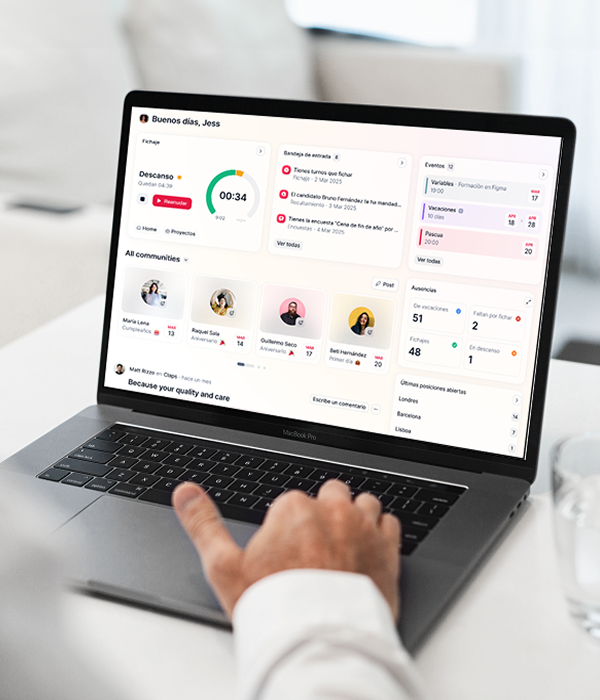
Factorial is best known as an all in one HR platform, but it also works as business process management software for HR and people related workflows. It helps you define and manage repeatable HR processes in a simple, structured way.
With Factorial, you can:
- Set up hiring workflows from job request to signed contract
- Manage onboarding checklists so every new hire goes through the same steps
- Automate time off requests and approvals
- Standardize performance review cycles and reminders
This turns your HR routines into clear processes, reduces back and forth, and gives you a better view of what is happening with your team. For small businesses that want to get their people processes under control before they grow, Factorial is a practical, easy to learn option.
How to decide if you are ready for BPM software
You might be ready for business process management software if:
- You lose track of tasks because they are buried in email or chats
- You repeat the same steps often but still get delays or errors
- You cannot easily see where work is stuck
- You want to standardize how your company works before you grow further
In that case, starting with a simple, people focused area like HR processes can be a low risk way to get value fast. Tools like Factorial help you turn complicated routines into workflows that you can then expand to other parts of your business over time. Book a demo of Factorial to see how it can help you automate your processes.

FAQs about business process management
What are the top 10 business process management software?
The best BPM software depends on your industry, the size of your company, and what process you want to automate. Top options include Factorial, Monday.com, Zoho Creator, Wrike, Appian, Kissflow, Nintex, Process Street, Pipefy, and Camunda.
Is BPM outdated?
Some say that “old BPM is dying” because AI allows you to automate your processes without software. However, most business process management platforms nowadays integrate AI into the platforms themselves. Factorial, for example, has an AI agent called One that you can ask questions from and assign tasks to to help you manage your business processes.
Who uses BPM?
In a company, all sorts of people can make good use of business process management tools, including finance teams, HR professionals, and marketers. Finance departments use BPM for processing invoices, approving budgets, and reporting on finance. HR teams use it to for hiring and onboarding employees and automating performance reviews, as well as collecting and storing documents and extracting information from those documents automatically. Marketing teams can also use BPM for managing campaigns and during lead nurturing processes.