The asset inventory is one of the first controls an ISO 27001 auditor checks, and it’s also one that surfaces the most inconsistencies. Plenty of organizations show up to the audit with a spreadsheet that no longer reflects reality: devices that were never logged, offboardings that were never processed, and owners who left the company months ago. Without a reliable list of what needs protecting, the rest of your management system is running on guesswork.
In this article, we’ll cover what ISO 27001 means by an asset inventory, what the standard requires, which assets and which data to capture, and how to build and maintain it without relying on manual work.
What is an asset inventory under ISO 27001?
An asset inventory is the complete, up-to-date record of everything that holds value for an organization’s information security, with an owner assigned to each item. The standard isn’t just talking about computers or servers. An asset is anything the company needs to protect because losing it, having it stolen, or seeing it misused would compromise the confidentiality, integrity, or availability of its information.
ISO 27001 draws a distinction between two broad types:
- Information assets: the data itself, regardless of where it lives. Customer databases, contracts, source code, technical documentation, intellectual property.
- Associated assets: everything that supports, processes, stores, or transmits that information. Laptops, phones, servers, applications, software licenses, cloud services, and even the people with access.
Why is the inventory the foundation of your ISMS?
You can’t protect what you don’t know exists. A device that isn’t in the inventory doesn’t get patched, doesn’t get encrypted, and doesn’t get revoked when its user leaves the company. It’s exactly the kind of asset a breach walks right through.
The inventory directly shapes the rest of your information security management system (ISMS):
- Risk assessment: assessing risk means first knowing what you’re assessing it against. Without an inventory, the assessment is incomplete by definition.
- Information classification: you can’t decide what to protect more rigorously until it’s been identified and cataloged.
- Access control: knowing who should access what assumes you already know which assets exist and who owns them.
- Incident management: when something goes wrong, the inventory lets you scope the blast radius and see which assets are involved.
What does ISO 27001 require for the asset inventory?
The requirement lives in Control 5.9 of Annex A in ISO/IEC 27001:2022, “Inventory of information and other associated assets” (the equivalent of the old A.8.1.1 from the 2013 version). The standard asks you to build and maintain an inventory of information assets and associated assets, including their owners.
That control doesn’t travel alone. It comes paired with two others that round out the asset lifecycle:
- Control 5.10 (acceptable use): define rules for using and handling information and associated assets.
- Control 5.11 (return of assets): make sure that, when the working or contractual relationship ends, the person hands back the assets they were assigned.
Three conditions fall out of these requirements, and the auditor will check every one. The inventory has to be complete, with no relevant assets left out. Every asset needs an identified owner. And everything has to be current and consistent with what’s actually in use. Miss any one of the three, and you’re usually looking at a nonconformity.
Worth keeping in mind: this requirement isn’t unique to ISO 27001. Asset management shows up across the frameworks U.S. companies deal with every day—it maps to the inventory expectations in SOC 2, and it underpins how you demonstrate control over regulated data under HIPAA and privacy laws like the CCPA. Build the inventory well once, and you cover several frameworks at the same time.
Which assets belong in the inventory?
The most common mistake is limiting the inventory to hardware. ISO 27001 covers a much wider range, because information rests on very different categories of assets:
- Hardware: laptops, desktops, phones, tablets, servers, network equipment, and storage devices.
- Software: operating systems, desktop applications, internal tools, and licenses.
- Information and data: databases, files, documentation, backups, and logs, wherever they happen to live.
- Cloud services and SaaS: email platforms, CRM, storage, collaboration tools, and any subscribed service that handles company information.
- Intangible assets: intellectual property, reputation, know-how, and data with no single physical form.
- People: employees, contractors, and vendors with access to information or other assets, to the extent that access has to be controlled.
SaaS and cloud services deserve special attention. They’re the usual source of shadow IT: apps a team signs up for without going through IT, that never make it into the inventory and stay outside any kind of control.
What data should each asset in the inventory include?
Logging just the asset’s name isn’t enough to pass an audit or to actually manage security. Every entry in the inventory needs to capture the data that lets you identify it, locate it, and know who answers for it:
- Unique identifier: a code or reference that tells the asset apart with no ambiguity.
- Description and type: what it is and which category it belongs to (hardware, software, service, data).
- Owner: the person or role responsible for the asset and for decisions about protecting it.
- Location: where it sits physically or, for logical assets, which environment it lives in.
- Status: whether it’s active, in repair, in stock, or decommissioned.
- Classification: the sensitivity level of the information it holds or handles.
- Date added and last reviewed: how long it’s been on the books and when it was last verified.
How do you build an asset inventory step by step?
Building the inventory from scratch is a lot more manageable when you tackle it in phases instead of trying to catalog everything at once. These six steps put the work in order and keep it from stalling halfway through:
1. Define the scope
Before you list a single thing, spell out which areas, processes, and locations fall inside the ISMS. From there the rule is simple: inside the scope, everything; outside it, nothing.
Trouble starts when the scope is poorly written. Too narrow, and you leave assets unlogged. Too broad, and you end up maintaining information that adds nothing and only creates work. Put it in writing and use it as a filter every time you’re unsure whether something belongs.
2. Identify and discover the assets
This is where the inventory is won or lost. Walk through every category—hardware, software, data, services, and people—and surface everything that exists within the scope.
Shadow IT and the laptop forgotten in a drawer won’t raise their hands, so don’t leave it all to each manager’s memory. Automatic discovery is your best ally here.
3. Assign an owner to every asset
No item should be left without someone responsible for it. The owner decides how the asset is protected and answers for it.
When it isn’t clear who to assign something to, that uncertainty is exactly what you need to resolve—not park for later. An inventory with blank owner fields is a nonconformity waiting for the auditor.
4. Classify every asset
Give each asset the sensitivity level it warrants based on the information it handles. That calls for a scale of your own, and if one doesn’t exist yet, defining it is the step that comes first—because without it, everyone classifies their own way and consistency goes out the window.
With the scale in hand, classifying is quick, and it tells you where to tighten things up and where you don’t need to bother.
5. Document it in a central tool
All of the above has to live in one place you can pull evidence from. A standalone spreadsheet goes stale within weeks because it depends on someone updating it by hand. A platform connected to the real sources feeds itself. That difference doesn’t show day to day, but it sure does on audit day, when they ask for the current state and not a snapshot from six months ago.
6. Review and maintain the inventory
And that brings us to the step almost everyone lets slide. A flawless inventory on the day it’s created loses its value fast if no one keeps it alive.
You need a set review cadence and, above all, a process that carries over additions, departures, and ownership changes the moment they happen. The most reliable way to pull that off is to tie the inventory to employee onboarding and offboarding, so every change in headcount shows up in the catalog without anyone having to remember.
How do you build and maintain the inventory with Factorial IT?
Factorial IT solves the inventory problem at its root: the gap between what’s documented and what’s actually in use. Instead of keeping a spreadsheet by hand, the platform automatically discovers and catalogs the organization’s devices and software, and keeps a real-time inventory of every asset.
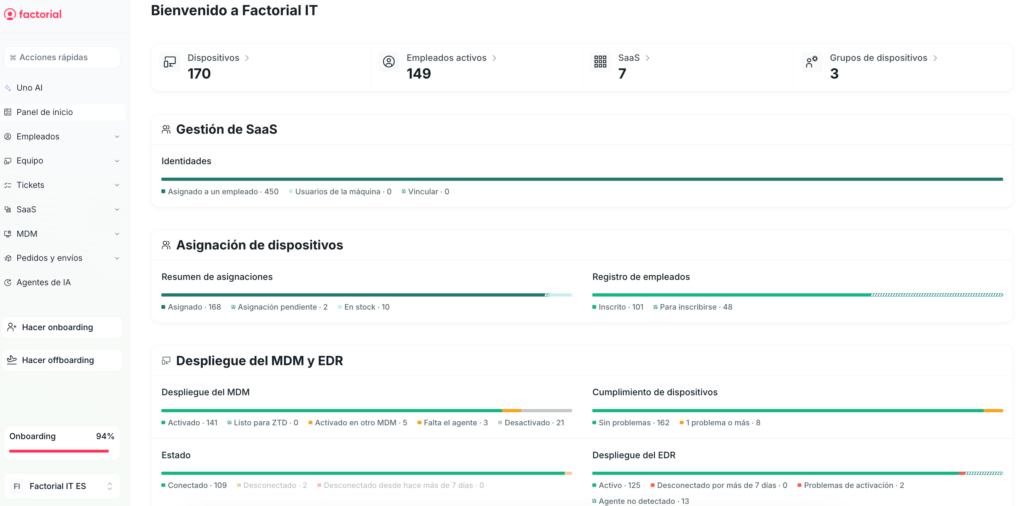
Every item in the catalog includes the information ISO 27001 asks for and the auditor checks:
- Owner, status, and cost: who answers for each device, what state it’s in, and what it costs—available in seconds.
- Onboarding and offboarding traceability: every change is logged, so the history reflects how your fleet actually evolved.
- Full lifecycle: from the moment a device is assigned to its controlled retirement, with no out-of-support assets slipping off the radar.
- Exportable evidence: reports and records that generate themselves and work directly as proof of compliance.
The real difference comes down to the connection with HR. Tie the inventory to onboarding and offboarding, and a new hire gets their equipment logged from day one, while someone leaving has their asset flagged for return with no manual steps. That link is what keeps the inventory from drifting out of sync—which is exactly why most inventories fall apart on audit day.