You don’t get ISO 27001 certified with a tool. You get certified with an information security management system, and that system rests on management decisions, a risk assessment, documented procedures, and the real state of your devices and access. No platform covers all four.
What a tool does solve is the part that depends on data. Which devices you have, what state they’re in, who has access to what, and since when. In Annex A, those are the controls that eat up the most time, because almost no organization has the data on hand and they’re the only ones you can’t handle by writing a document.
In this article, you’ll see which Annex A controls Factorial IT covers, with what concrete evidence, and how to handle the part that falls outside it, starting with the management system itself.
No Tool Certifies ISO 27001
ISO 27001 certification is issued by an accredited body after it audits your management system, not your software. Any vendor that shows you a table with all 93 Annex A controls in green is just checking boxes, because more than half of those controls don’t depend on any tool.
The standard has two layers, and it’s worth separating them from the start.
- The first layer is the management system, what the standard calls the ISMS. These are clauses 4 through 10, and that’s where the scope, leadership from management, the risk assessment, the statement of applicability, internal audits, and the management review live. None of that is software. A document nobody signs off on doesn’t count as evidence, and no platform can sign off on it for you.
- The second layer is the Annex A controls, the specific measures your risk assessment decides to apply. Some of those controls are demonstrated with documentation and process. Others are demonstrated with the real state of your device fleet, and that’s the part that eats up time and that the auditor checks line by line.
Factorial IT works on that second layer. It doesn’t manage your ISMS, doesn’t run your risk assessment, and doesn’t certify you. What it does is make the technical Annex A controls that depend on your devices and access generate their own evidence, with a date, so they reach the audit already closed out.
Why Doesn't an Excel Inventory Hold Up in an Audit?
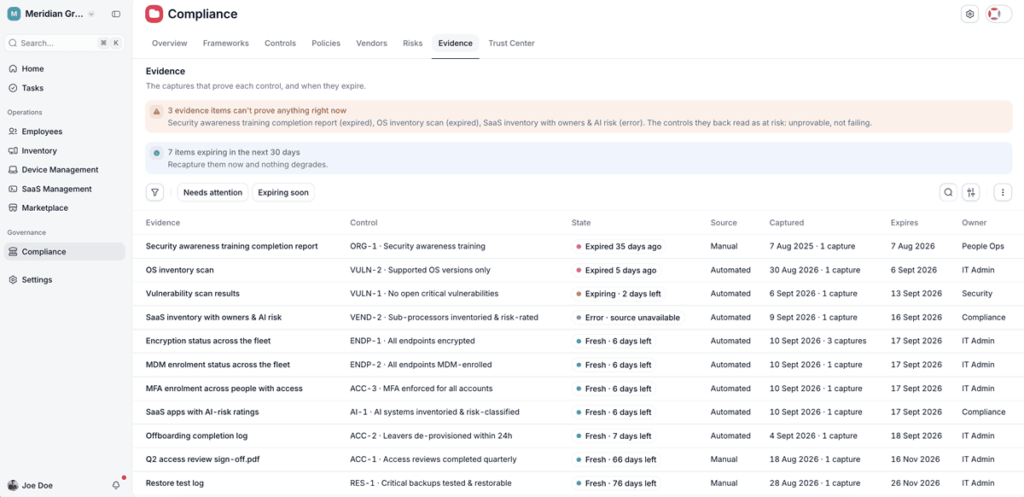
The problem isn’t that Excel doesn’t work. The problem is that it starts going stale the day you export your device fleet data. The certification auditor doesn’t ask whether you have an encryption policy, they ask what percentage of the fleet has encryption active and as of what date it was checked. A static document doesn’t answer that question, and in ISO that detail matters more than in any other standard, because the auditor comes back. After the initial certification, there’s a surveillance audit every year and a recertification every three years.
| What the Auditor Looks At | Excel Inventory | Factorial IT |
|---|---|---|
| Data freshness | Manual, whenever someone remembers | Real time, no intervention |
| Date on the evidence | The day it was exported | The moment it’s pulled |
| Fleet coverage | Only the devices someone remembered to add | Every device that reports its status |
| Noncompliant devices | Have to be cross-checked by hand | Named list with detection date |
| Employee offboarding | Reconstructed after the fact | Logged automatically |
| Annual surveillance audit | The work is redone every time | The data is already there |
Which Part of the Problem Does Factorial IT Solve?
Annex A of the 2022 version of ISO 27001 has 93 controls split across four groups, namely organizational, people, physical, and technological. Most are demonstrated with documentation and process, an approved policy, a written procedure, a set of meeting minutes. Around twenty aren’t demonstrated that way. They’re demonstrated with the real state of your fleet and access, and they’re the ones the auditor checks line by line.
That’s where Factorial IT comes in. It doesn’t manage your ISMS, doesn’t run your risk assessment, and doesn’t certify you, and it doesn’t replace the consultant who writes the policies or the auditor who issues the certificate either. What it does is make those technical controls generate their own evidence, with a date, so they reach the audit already closed out.
They break down into six groups. All six cover what eats up the most time and the one part of the file you can’t handle by writing a document.
The Annex A Controls Factorial IT Covers
These are the six groups where Factorial IT generates evidence. Each one lays out what the standard asks for, where the evidence usually falls short, and what Factorial IT adds.
| Control (Annex A) | What It Requires | The Evidence You Need | How Factorial Produces It |
|---|---|---|---|
| Asset Inventory (A.5.9, A.5.10, A.5.11) | An asset inventory with an identified owner for each one | A dated inventory with an owner assigned to each device | A real-time inventory of a mixed macOS, Windows, Linux, iOS, and Android fleet, with each device tied to a person, a team, and a department |
| Access Control and Identity Management (A.5.15, A.5.16, A.5.18, A.6.5, A.8.2) | Identity lifecycle, least privilege, and removal of access at offboarding | A dated log of provisioning, changes, and removals, with the time between the exit and the cutoff of the last access | Onboarding and offboarding triggered by the HR event, with access removal, device lock, and license release at the same moment |
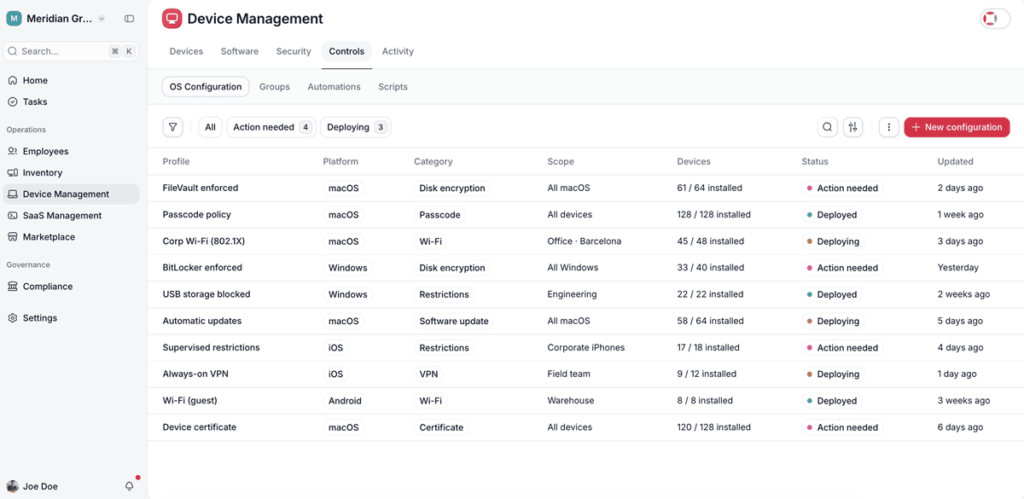
| Encryption and Secure Configuration (A.8.24, A.8.9, A.8.1) | Use of cryptography and secure configuration of user devices, applied and verified | The percentage of the fleet with encryption active as of a specific date and a named list of noncompliant devices | Enforcement and verification of FileVault and BitLocker plus configuration policies by role, with automatic detection and correction of drift |
| Vulnerability and Update Management (A.8.8) | Detection, assessment, and remediation of known technical vulnerabilities | Patch level per device, average time to apply, and a list of end-of-life systems | Version tracking, update policies, and detection of known vulnerabilities and end-of-life software |
| Protection Against Malware (A.8.7) | Malware protection deployed and active on every device | Real agent coverage, device by device, with a date | Verification of the agent status on each device, with integration to SentinelOne and ThreatDown, and flagging of the ones that don’t have it |
| Event Logging and Incident Response (A.8.15, A.5.26) | Logging of security events and incident response following a defined process | The scope of the incident and the trail of the response, with timestamps | The console instantly returns the user on the affected device, their access, their apps, and the action history, with remote lock and wipe |
1. Asset Inventory
What does the standard require? An inventory of information assets and associated assets, with an identified owner for each one (A.5.9), acceptable-use rules (A.5.10), and the return of assets when someone leaves the organization (A.5.11).
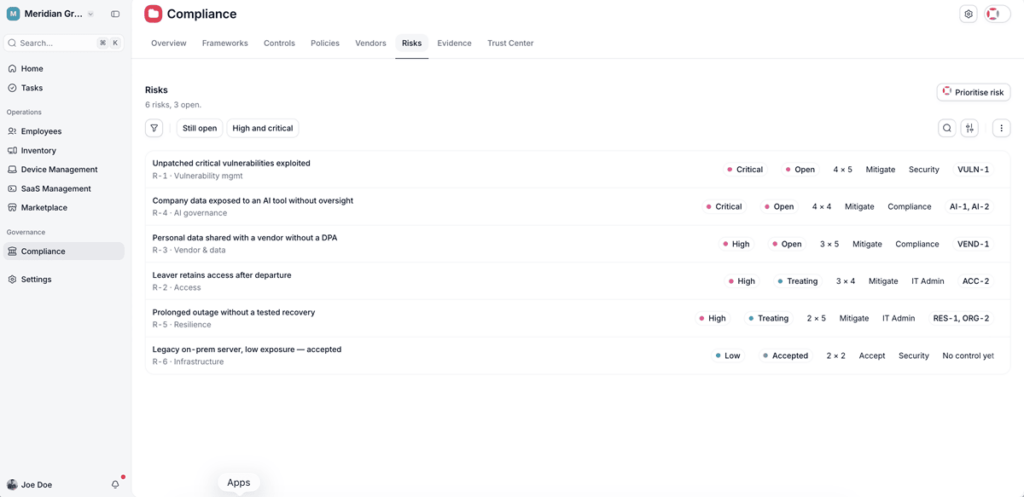
Where does it usually break down? Almost everyone has a list of devices. Almost no one has it tied to people, and without that link you can’t demonstrate access removal or the scope of an incident. There’s a second, ISO-specific problem, which is that the asset inventory is the input for the risk assessment and the statement of applicability. If it’s incomplete, it carries the error through the entire management system.
What does Factorial IT do? A real-time inventory of a mixed macOS, Windows, Linux, iOS, and Android fleet from a single console, with hardware, installed software, and versions. Each device is tied to a person, a team, and a department through the connection with your HR software. The inventory also captures the SaaS apps actually in use, including the ones purchased outside of IT.
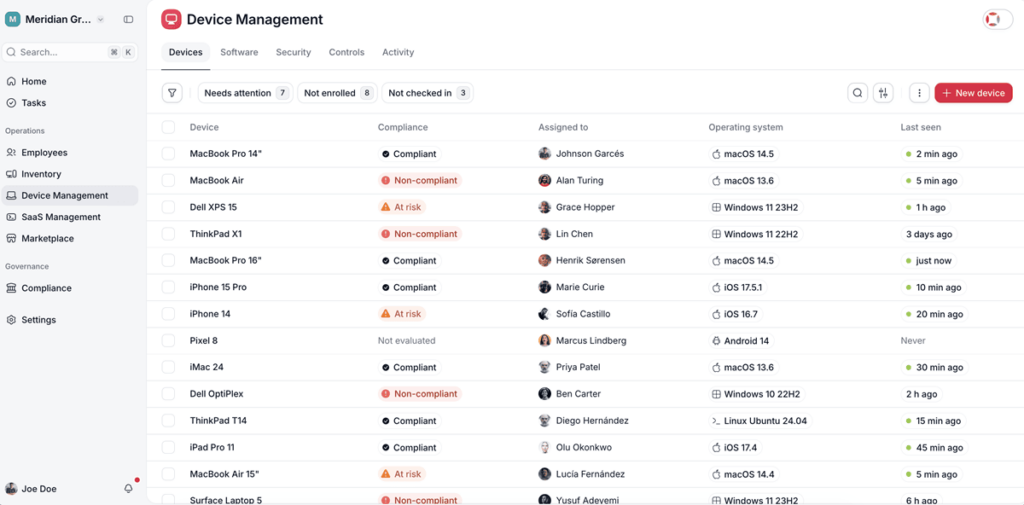
The evidence Factorial IT generates. A downloadable, dated inventory with an owner per asset and the reporting coverage percentage.
2. Access Control and Identity Management
What does the standard require? A defined access control (A.5.15), management of the identity lifecycle (A.5.16), the provisioning, review, and removal of access rights (A.5.18), the responsibilities when someone changes roles or leaves (A.6.5), and specific control of privileged access (A.8.2).
Where does it usually break down? The offboarding procedure is written down. What doesn’t exist is proof that it was carried out. Almost no company can tell you how many hours passed, across the last twelve departures, between an employee’s last day and the cutoff of their last access. That’s exactly what the auditor reviews, and it’s the most common source of a nonconformity.
What does Factorial IT do? Onboarding and offboarding are triggered by the event in your HR software. When someone joins, accounts and access are provisioned based on their role. When they leave, access is removed, the device is locked, and licenses are freed up.
The evidence Factorial IT generates. A log with the dates of provisioning, changes, and removals, along with the time elapsed between the exit in the HR software and the cutoff of the last access.
3. Encryption and Secure Configuration
What does the standard require? The use of cryptography under a defined policy (A.8.24), management of system configuration (A.8.9), and protection of end-user devices (A.8.1).
Where does it usually break down? The policy that mandates encryption exists, but not the data on what percentage of the fleet actually has it active today, or the named list of devices that don’t. The auditor asks for that percentage and that list, not the policy.
What does Factorial IT do? Enforcement and verification of FileVault and BitLocker across the whole fleet. Configuration policies by role, operating system, or security posture, with firewall, session lock, password policy, and peripheral restrictions. Drift is detected and corrected automatically.
The evidence Factorial IT generates. The compliance percentage per rule as of a specific date, the noncompliant devices, and a trail of the remediations.
4. Vulnerability and Update Management
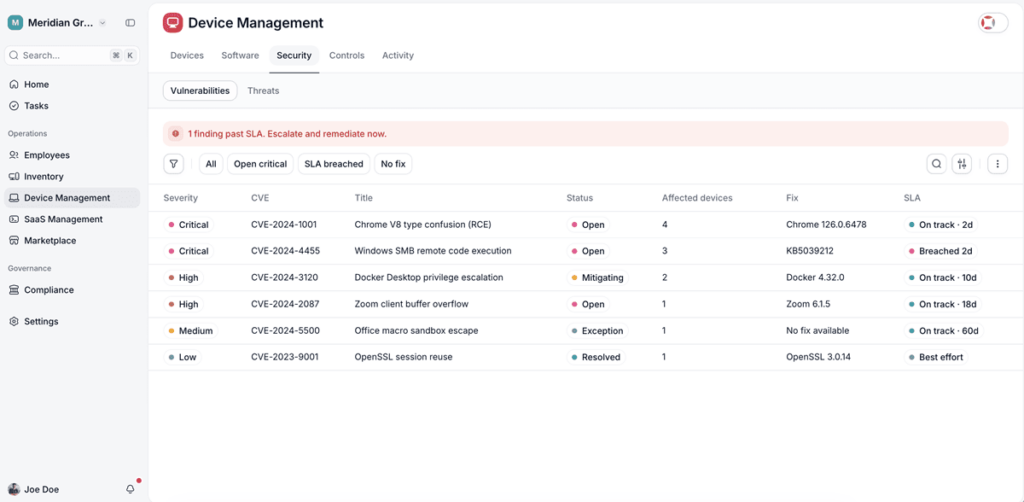
What does the standard require? Management of known technical vulnerabilities, which includes detecting them, assessing them, and applying the appropriate measures (A.8.8).
Where does it usually break down? Patching happens, but you can’t document the average time to apply or identify the systems that are already end-of-life. The auditor is looking for the process and the specific data point.
What does Factorial IT do? Version tracking for operating systems and applications, update policies, detection of known vulnerabilities per device with their remediation status, and detection of end-of-life software.
The evidence Factorial IT generates. Patch level per device, average time to apply, and a list of unsupported systems.
5. Protection Against Malware
What does the standard require? Malware protection deployed and active on every device (A.8.7).
Where does it usually break down? People show the antivirus invoice, but what actually gets verified is the real deployment, and there’s almost always between 3% and 8% of devices with no agent or with the agent stopped.
What does Factorial IT do? Here it’s worth being precise. Factorial IT isn’t the antivirus. It’s the layer that proves it’s there and that it’s working. Integration with SentinelOne and ThreatDown, with verification of the agent status on each device and flagging of the ones that don’t have it.
The evidence Factorial IT generates. Effective antimalware coverage, device by device, with a date.
6. Event Logging and Incident Response
What does the standard require? The logging of relevant security events (A.8.15) and a response to information security incidents that follows a defined process (A.5.26).
Where does it usually break down? Not in detecting, but in scoping it and leaving a trail. The question that stalls the response is which data, which access, and which systems were within reach of the compromised device, and then what was done and at what time.
What does Factorial IT do? When an incident hits a device, the console instantly returns the user, their access, their apps, and the action history on that device. It includes remote lock and wipe, with a trail for every action.
The evidence Factorial IT generates. The scope of the incident and the trail of the response, with timestamps.
Where Factorial IT Does the Hard Part
On top of the six groups above, there are three controls where Factorial IT solves the data-dependent part but not the whole control. They don’t fall entirely outside, like the ones in the next section, and they aren’t covered in full, like the six in the previous table. In these three, the tool contributes one specific piece, and the other piece comes from an external vendor or an internal process.
| Control (Annex A) | What It Requires | The Part Factorial Covers | The Part It Doesn’t |
|---|---|---|---|
| Secure Authentication (A.8.5) | MFA and secure authentication where the risk calls for it, with proof of which accounts have it active | Visibility into which accounts have MFA active, pulled from the identity provider | MFA itself, which comes from Google Workspace, Microsoft Entra ID, or another provider |
| Review of Access Rights (A.5.18) | Checking periodically that each person keeps only the permissions they need | The inventory of access per person and the execution of the removal | The formal recertification workflow, with a manager who reviews and signs off |
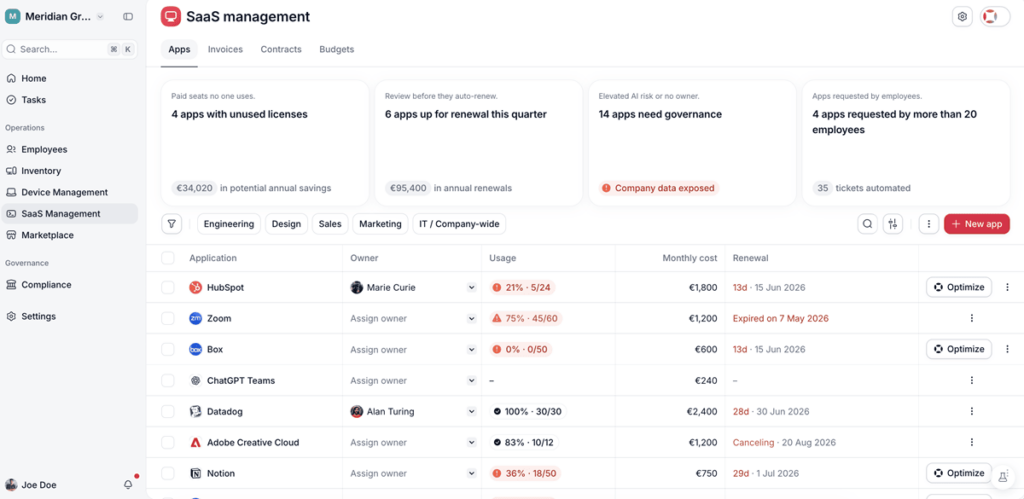
| Cloud Services and Vendors (A.5.23, A.5.19) | Knowing and assessing the risk of the vendors and cloud services in use | The real inventory of the services in use, including shadow IT | The assessment and contracting of each vendor, which is a business process |
1. Secure Authentication (A.8.5)
Multifactor authentication comes from your identity provider, which is where your employees log in. Factorial IT doesn’t replace that provider and doesn’t turn MFA on by itself.
Where it helps is on the control side. The standard doesn’t just require having MFA active, it requires being able to prove which accounts have it, and that picture is usually scattered across several tools. The integration with the identity provider brings that information into one place, which is exactly what the auditor wants to see.
2. Review of Access Rights (A.5.18)
This control has two sides. One is having the list of who accesses what, and that side is already handled by the access control group, with the per-person inventory always up to date and removal carried out from the HR event. The other side is the formal recertification process, where a manager periodically reviews their team’s access and leaves a signed record that they approve it.
That second side is the one Factorial IT doesn’t provide, because it isn’t data but an approval workflow where people validate. What it does shorten is the prep work, since that manager comes to the review with the per-person access list already built instead of reconstructing it by hand.
3. Cloud Services and Vendors (A.5.23, A.5.19)
Controlling the risk that comes in through your vendors has two parts, knowing which services you actually use and assessing those vendors with the right safeguards.
The first part rests on data Factorial IT already has, the inventory of SaaS apps actually in use, including the shadow IT purchased outside of IT. That inventory is the starting point for the control, because you can’t gauge the risk of a vendor you didn’t even know you were using. The second part, the assessment and contracting of each vendor with their clauses and safeguards, is a business process and falls outside the tool.
What Factorial IT Doesn't Cover, and How to Tackle It
These four areas fall outside Factorial IT, because no tool in this category covers all 93 controls in the standard. Even so, knowing how to tackle them and in what order is what separates a six-week project from a six-month one.
| Area | Why It Isn’t Software | What Factorial IT Saves You |
|---|---|---|
| The ISMS, the risk assessment, and the Statement of Applicability | These are management decisions and documents someone has to approve and sign | The asset inventory that the risk assessment starts from, and the technical evidence that fills in the implementation part of the SoA |
| Training and awareness (A.6.3) | Requires a training platform with tracking per employee | The list of employees by department that feeds that platform |
| Physical and environmental security (A.7) | These are controls over facilities, physical access, and building equipment, a different layer from the workstation | The device inventory with its owner and the remote wipe that documents the secure disposal of the device |
| Backups, continuity, and network security | These are servers, network, and facilities, plus a plan that gets written and tested, not the workstation | The inventory of systems you use to decide what’s critical |
1. The ISMS, the Risk Assessment, and the Statement of Applicability
This isn’t software because these are management decisions and documents someone has to approve. The security policy, the risk assessment, the treatment plan, the internal audit, and the management review are the heart of the management system, and no tool can sign them for you.
The way to tackle it is with a consulting firm. For a company with fewer than 300 people, it’s a four-to-six-week project, and it should hand you concrete deliverables.
- The scope of the management system.
- The security policy and the assignment of roles to specific names.
- The risk assessment for the critical assets and its treatment plan.
- The Statement of Applicability, which justifies control by control what applies and why.
- The management approval minutes and the first internal audit.
2. Training and Awareness (A.6.3)
The standard asks that employees receive security training suited to their role and that you can prove it. That falls outside Factorial IT, because delivering it takes a dedicated platform that records who completed each course.
It’s the cheapest control of them all and, at the same time, the one that tends to get pushed back the most. A phishing simulation and microlearning platform costs little per employee per year, and the only thing that gets audited is that the record of who took the training exists. You set it up once and it barely needs any follow-up. Its only real upkeep is keeping the list of employees that feeds it up to date and sorted by department, which is exactly the list Factorial IT already maintains instead of tracking it by hand in a separate spreadsheet.
3. Physical and Environmental Security (A.7)
The entire A.7 group is about protecting the place where the systems sit, with secure areas, control of physical access to the facilities, protection of equipment, and secure disposal of materials. It’s a building-and-facilities layer, not a workstation one, and that’s why it falls outside the tool.
Most of these controls are handled with low-cost organizational and physical measures when you have an office, and if you work remotely the scope shrinks and you justify that reduction in the statement of applicability. Where Factorial IT adds something is at the end that touches the device. Each device is tied to an owner and its location, and the remote wipe documents the secure disposal when a device is retired or lost, which is one of the controls in this group.
4. Backups, Continuity, and Network Security
This heading covers a few different things, backup and recovery, the continuity plan, network security, and its monitoring. None of that is Factorial IT’s territory, but it’s worth separating out so you don’t buy it all as one bundle.
The backup tool is a purchase and gets handled with your usual integrator. The continuity plan isn’t something you buy, it gets written and tested, and that does take internal time, because it means defining which services are critical, how long you can go without them, and who does what in the meantime. Security and continuous network monitoring are another infrastructure layer, and round-the-clock monitoring is a SOC, which came up earlier in the incidents group.
Here the inventory is once again the starting point, because you can’t decide which services are critical on systems that aren’t even identified. Start with the few the company grinds to a halt without, not with the full list.
How to Get ISO 27001 Certified from Start to Finish
Throughout this article, the 93 Annex A controls have been split into three groups. The ones Factorial IT covers with data, the ones it covers halfway, and the ones that fall outside because they’re decisions, documents, or external vendors. And above the controls sits the management system, which is what actually gets certified. The problem with splitting it up this way is that someone has to put all the pieces together afterward.
The answer is that you don’t have to put them together yourself. Factorial IT handles the technical layer, the one demonstrated with the real state of your devices and access, and a specialized consulting firm builds the ISMS, meaning the scope, the risk assessment, the statement of applicability, and the internal audits. And it doesn’t do that on its own, but by leaning on the data Factorial IT already generates, so the evidence from the tool is the same evidence that backs the complete file. Once that file is ready, an independent accredited body runs the certification audit and is the one that issues the certificate. What would be a project with several disconnected points of contact becomes one path from start to finish.
This isn’t a decision worth putting off, even though the driver here isn’t a penalty. More and more customers, RFPs, and enterprise accounts require the ISO 27001 certificate as a condition for working with you, and the deadline isn’t set by a law, it’s set by a contract renewal or a deal you don’t want to let slip. Starting with the part that gets solved with data, and leaning on a partner for the management system, is the most predictable way to get there on time.