Compliance requirements keep getting stricter, and the bar keeps rising for mid-sized companies. SOC 2, ISO 27001, HIPAA, state-level privacy laws — they all demand the same thing: endpoint traceability, documented access controls, incident response protocols, and the ability to prove it all with auditable evidence. The cost of falling short isn’t just fines. It’s lost deals, failed audits, and eroded trust with customers and partners.
Meanwhile, Apple keeps gaining ground in enterprise fleets: MacBooks across product teams, iPhones in sales, iPads in field operations. Managing those devices with generic tools or spreadsheets is no longer an option. You need an MDM built for the specifics of macOS, iOS, and iPadOS — one that helps you stay compliant without tripling the workload on your IT team.
In this article, we break down the 6 best MDM software for Apple devices in 2026: what they offer, what sets them apart, and the limitations worth knowing before you commit.
Comparison table: the best Apple MDM software
| Software | Best for | Apple platforms | Zero-touch | BYOD | HRIS | Data |
|---|---|---|---|---|---|---|
| Factorial IT | Mixed fleets with IT-HR automation | macOS, iOS, iPadOS + Windows, Linux, Android | ✅ Yes | ✅ Yes | ✅ Native | EU |
| Iru (formerly Kandji) | Apple-first with advanced automation | macOS, iOS, iPadOS, tvOS + Windows, Android | ✅ Yes | ✅ Yes | ⚠️ Limited | Primarily US |
| Jamf Pro | All-Apple environments with granular control | macOS, iOS, iPadOS, tvOS | ✅ Yes | ✅ Yes | ⚠️ Limited | EU region available |
| Mosyle | Apple-first on a budget | macOS, iOS, iPadOS, tvOS, watchOS | ✅ Yes | ✅ Yes | ❌ No | Primarily US |
| NinjaOne | IT teams adding Apple to their RMM | macOS, iOS + Windows, Linux, Android | ✅ Yes | ✅ Yes | ❌ No | EU region available |
| Hexnode UEM | Fast deployments with pre-built templates | macOS, iOS, iPadOS, tvOS + Windows, Android, Linux, ChromeOS | ✅ Yes | ✅ Yes | ⚠️ Limited | EU region available |
1. Factorial IT
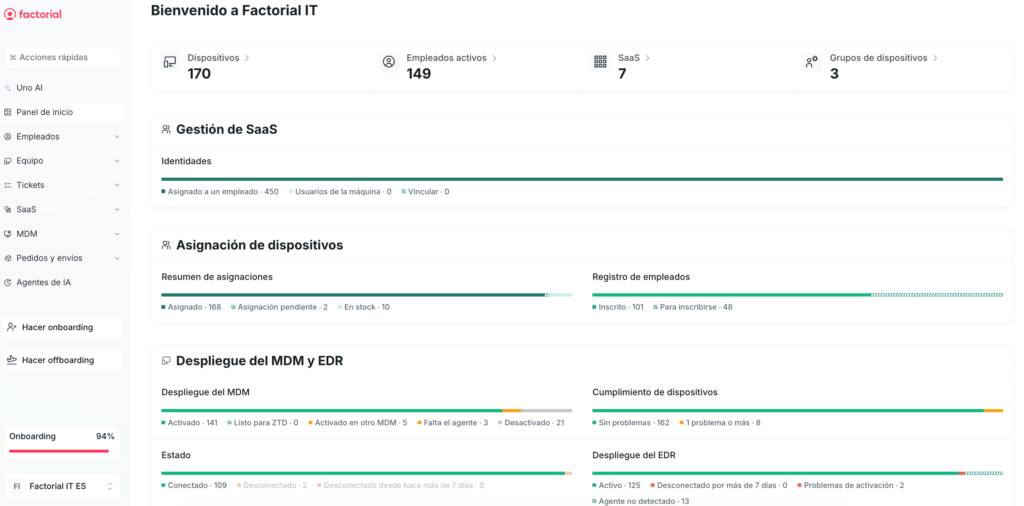
Best for: growing companies managing Apple devices alongside Windows and Linux, where the device lifecycle needs to be driven by HR — not manual IT tickets.
Factorial IT doesn’t just manage Apple endpoints in isolation. It takes a different approach: tying each device to the employee record in the HRIS, so that a new hire, a department change, or an offboarding automatically triggers the right configuration, apps, permissions — and, when needed, a full device wipe.
For Apple fleets, that means the new hire’s MacBook arrives fully configured at first boot, and the departing sales rep’s iPhone gets locked down without IT having to open a console.
Key features
- Zero-touch deployment via ABM: Macs, iPhones, and iPads are linked to Apple Business Manager and configure themselves automatically on first boot, with security profiles, apps, and corporate credentials already applied.
- App distribution via Apple VPP: publish and assign App Store applications to Apple devices from the console, segmented by team, role, or location.
- FileVault with centralized key escrow: mandatory disk encryption on macOS with secure storage of recovery keys, accessible to IT without risk of data loss.
- Unified security policies: passwords, system restrictions, certificates, Wi-Fi, and VPN configurations managed from a single panel and aligned with major compliance frameworks.
- Real-time fleet inventory: instant visibility into installed software, versions, hardware specs for each device, and whether it meets active policies.
- Automatic vulnerability detection (CVE): cross-referencing software on Apple devices against public vulnerability databases to flag exposed endpoints.
- OS update management: forced macOS and iOS updates with customizable maintenance windows and patch status monitoring.
- Remote commands: lock, wipe, locate, restart, and run scripts from the console on any Apple device in the fleet.
- IT-HR lifecycle automation: when HR registers a new hire or an exit, the Apple device, SaaS licenses, and corporate access are provisioned or revoked automatically.
- Integrated SaaS license management: centralized tracking of who’s using what tool and how many licenses are active, from the same platform that manages devices.
- Data and infrastructure operated from the EU, with European-hours support included.
What sets it apart
In most MDM solutions, the Apple device and the employee using it are separate entities connected by manual processes. Factorial IT removes that gap: the device is an attribute of the employee profile, just like their email address or job title.
When HR updates that profile, the device automatically inherits the new policies, apps, and access. For an IT team that was previously juggling onboarding and offboarding across four different consoles, this is a fundamentally different way to work.
Limitations
- No tvOS support. If you manage corporate Apple TVs, you’ll need to supplement with another tool.
- The catalog of connectors with SIEM, ticketing, and third-party tools is still growing, though it doesn’t yet match the breadth of more established solutions.
- You get the most value when Factorial IT works alongside the Factorial HRIS. As a standalone MDM it gets the job done, but you miss out on what truly sets it apart: lifecycle automation tied to HR.
2. Iru (formerly Kandji)
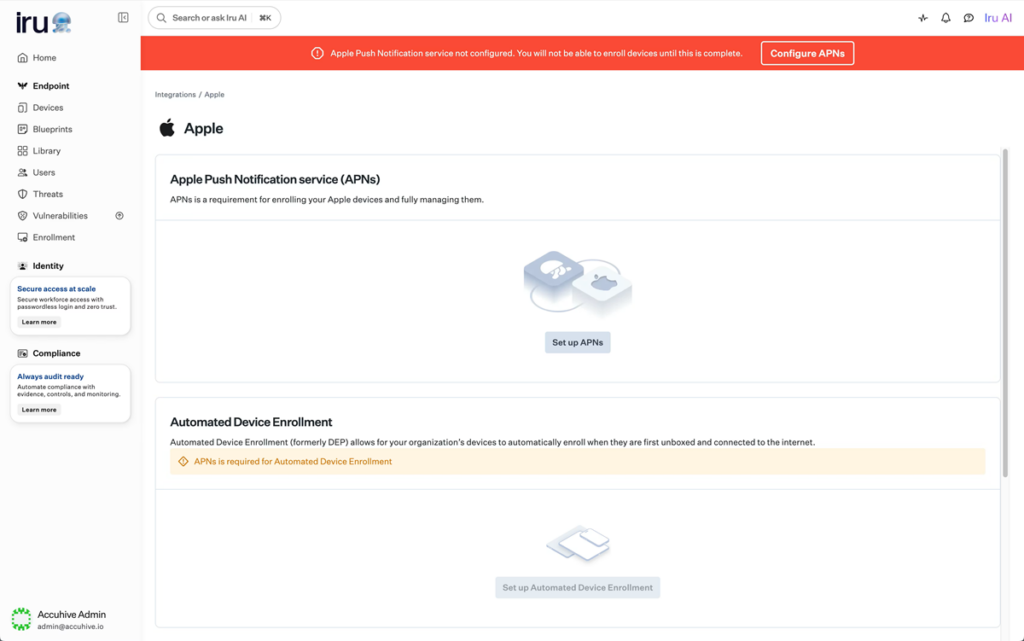
Best for: Apple-first organizations looking for advanced management with native automation, and starting to bring Windows or Android devices into the fleet.
Iru launched as Kandji in 2019, focused exclusively on Apple. In October 2025, it rebranded, expanded coverage to Windows and Android, and evolved into a unified platform that goes beyond pure MDM. Despite that expansion, its Apple management engine remains one of the most polished on the market.
Key features
- Zero-touch provisioning with Apple Business Manager: Apple devices are configured right out of the box with apps, security settings, and corporate policies applied — no IT hands-on required.
- Blueprints with visual configuration mapping: a proprietary system that organizes policies, apps, and settings in a visual flow, catching conflicts between configurations before deployment.
- Auto Apps library with 300+ applications: a curated catalog of business apps for macOS and Windows with automatic installation and patching — no manual packaging needed.
- 120+ one-click security controls: compliance settings for macOS and iOS that on other platforms would require scripts or manual configuration profiles.
- Full Declarative Device Management (DDM) support: native adoption of Apple’s protocol that delegates management to the device itself, speeding up policy enforcement.
- Built-in EDR: threat detection and response with autonomous containment, without needing a separate security vendor.
- Vulnerability management with autonomous patching: visibility into CVE-exposed software with AI-driven automatic remediation.
- Workforce Identity with passwordless SSO: hardware-backed passkey authentication, eliminating dependency on external identity providers for Mac login.
What sets it apart
What separates Iru from other Apple MDMs is the depth of its automation combined with an accessible interface. While other solutions offer a comparable level of customization, they demand advanced technical expertise.
Configurations that on other platforms require scripts and XML profiles are handled here with one-click controls. And by integrating EDR, identity, and compliance under a single agent, Iru reduces the number of tools an IT team needs to run in parallel.
Limitations
- Pricing is quote-based, with no public rate card.
- Cross-platform capabilities (Windows and Android) are relatively new. While functional, they haven’t yet reached the maturity of the Apple management side, which has years of development behind it.
- US-based infrastructure. For companies with strict data residency requirements, this may be a plus — but it’s worth confirming specifics before committing.
3. Jamf Pro
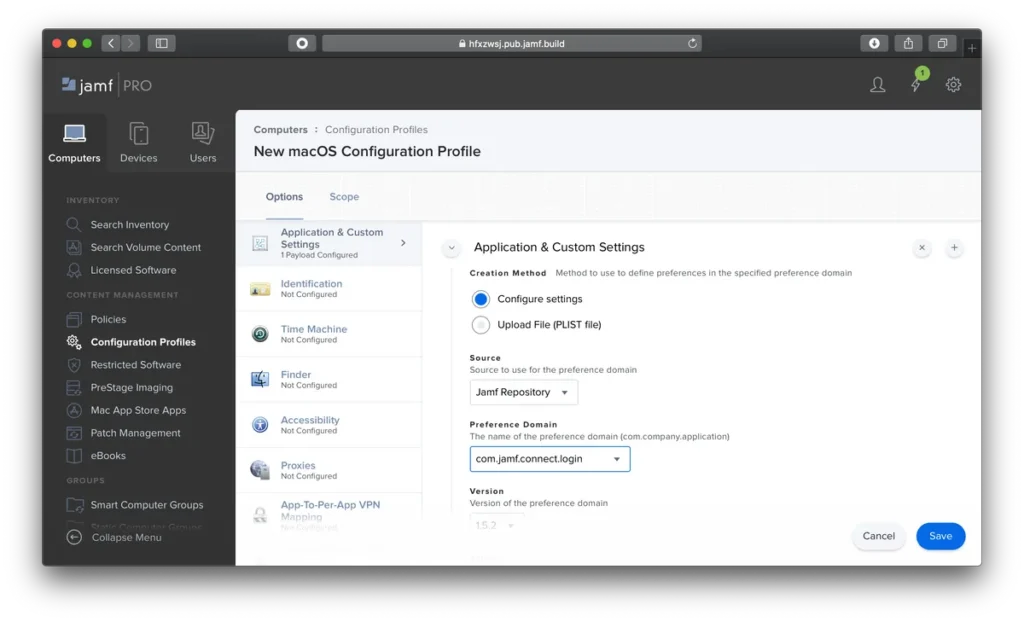
Best for: companies with an all-Apple fleet that need the deepest level of control and customization over macOS, iOS, iPadOS, and tvOS.
Jamf has been building for the Apple ecosystem for over two decades, and that experience shows. It offers one of the broadest configuration catalogs for macOS, a tight integration with Apple Business Manager, and an active community (Jamf Nation) where admins share scripts and solutions to common problems.
If your fleet is exclusively Apple and you need granular control covering everything from kernel extensions to FileVault policies with institutional escrow, Jamf is the benchmark everyone else measures against.
Key features
- PreStage Enrollments with Apple Business Manager: automated setup from first boot, with profiles, restrictions, and corporate apps applied seamlessly.
- Dynamic Smart Groups: automatic fleet segmentation based on inventory criteria that trigger policies without admin intervention.
- Corporate Self Service: a self-service portal where employees install IT-approved apps without filing tickets or depending on the tech team.
- High-granularity configuration profiles: control over virtually any native macOS and iOS parameter, including system extensions and advanced network settings.
- Third-party Patch Management: automated version tracking and update deployment for common applications without manual intervention.
- FileVault management with institutional escrow: enforced disk encryption on macOS with secure recovery key storage from the console.
- Jamf Protect (add-on): endpoint threat detection built specifically for macOS, with behavioral analysis and continuous compliance.
- Jamf Connect (add-on): corporate identity and password management integrated with cloud providers like Okta, Azure AD, and Google Cloud Identity.
What sets it apart
Its level of control over the specifics of macOS and iOS is hard to match. Complex provisioning workflows that on other solutions require custom scripts and creative workarounds often come down to a single checkbox in Jamf.
Limitations
- Apple only. No Windows, Linux, or Android management. Organizations with mixed fleets need a second MDM, which means double the consoles, licenses, and operational complexity.
- Total cost is significant, especially for companies with fewer than 200 devices.
- Running Jamf Pro requires specialized technical knowledge, which can be a challenge for small IT teams or those with high turnover.
4. Mosyle
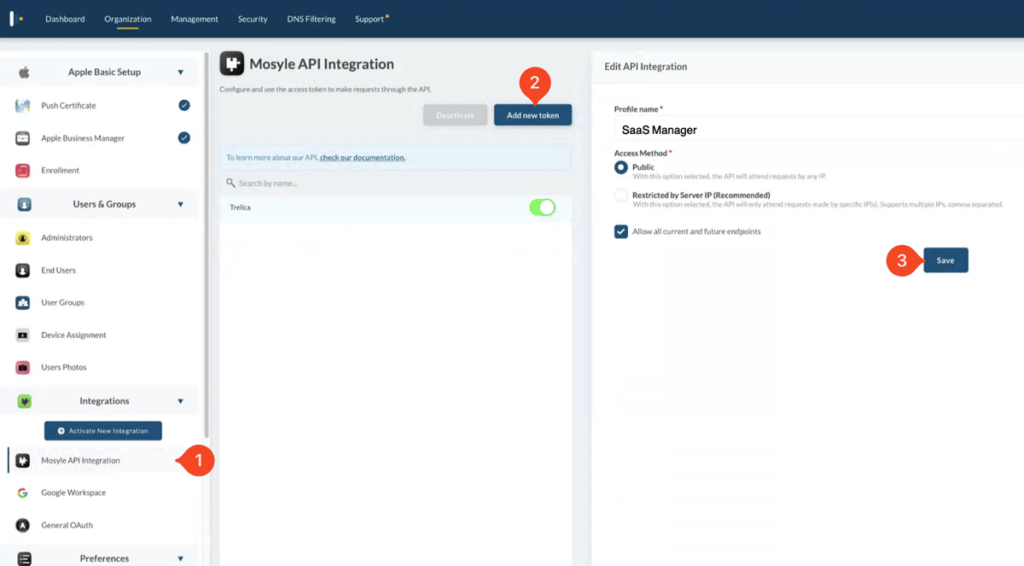
Best for: Apple-first companies and educational institutions looking for a powerful MDM with built-in security and native automation.
Mosyle started in the education space and scaled into the enterprise segment without losing its core DNA: tools built exclusively for Apple, native automation, and a pricing model that undercuts the rest of the market. It has become one of the most popular alternatives for anyone looking for a full-featured Apple MDM at a competitive price point.
Key features
- Full zero-touch deployment with ABM: Apple devices are enrolled, configured, and loaded with apps automatically on first boot — no IT intervention needed.
- Next-gen antivirus for macOS: Mac-specific protection with machine learning-based detection, built natively into the platform without third-party agents.
- AI-driven automated Zero Trust: continuous verification of device and user posture before granting access to corporate resources, with automatic remediation when deviations are detected.
- Mosyle Auth 2 for macOS SSO: control over the Mac login window with authentication tied to the corporate identity provider (Google Workspace, Microsoft 365, Okta, and more).
- Extensive macOS app catalog: automated distribution and installation of App Store apps via Apple VPP, plus a proprietary catalog for PKG and DMG packages with automatic patching.
- AlScript (generative AI scripting): lets admins describe what they need in plain language and receive ready-to-run macOS scripts.
- Privilege management with Admin On-Demand: temporary admin rights elevation on macOS when the user needs it, with full session logging for audit purposes.
- Automated hardening and compliance: pre-built templates aligned with major security benchmarks (CIS, NIST) that are applied and verified continuously.
What sets it apart
It’s the value for money that truly positions Mosyle. The platform delivers a set of Apple capabilities covering MDM, security, identity, and compliance in a single solution — without being a watered-down version of anything.
It’s a different approach: automation and native integration with Apple’s frameworks replace the manual configuration that other solutions demand. And the fact that it includes antivirus, Zero Trust, and privilege management without paid add-ons simplifies both the architecture and the invoice.
Limitations
- Apple only. No Windows, Linux, or Android management, which means companies with mixed fleets need to maintain a second management tool.
- The user community and public documentation are fairly limited.
- Infrastructure and data hosted primarily in the US. This is a non-issue for domestic companies, but worth noting for those with international operations and data residency requirements.
- While the interface is functional, some users report that certain advanced options aren’t as intuitive as you might expect.
5. NinjaOne
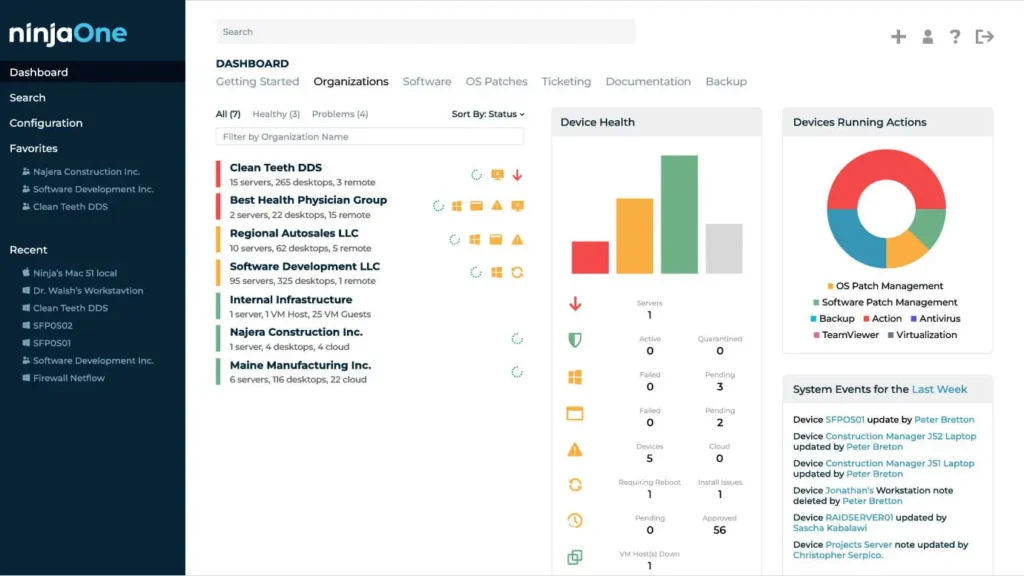
Best for: IT teams already using NinjaOne as their RMM who want to add Apple device management without introducing another console into their daily workflow.
NinjaOne started as a remote management platform (RMM) for Windows servers and endpoints, and over time has been expanding its capabilities toward macOS, iOS, and MDM territory. For teams that already use it, adding Apple device management to the same console is a natural extension that avoids stacking yet another tool on the pile.
Key features
- Automated macOS patching: OS and app updates with configurable policies by device group and defined maintenance windows.
- Mac software deployment: PKG package distribution and custom scripts with installation verification and automatic retries on failure.
- Advanced scripting inherited from the RMM module: Bash and Shell script execution across the entire macOS fleet, with recurring task scheduling.
- Real-time Apple device monitoring: configurable alerts on hardware status, storage levels, macOS version, and security posture.
- Built-in remote access (NinjaOne Remote): direct connection to any Mac in the fleet for tech support without installing external tools.
- MDM management for iOS devices: enrollment, configuration profiles, restrictions, and remote commands for corporate iPhones and iPads from the same platform.
- Automatic hardware and software inventory: full visibility into installed apps, versions, and configuration of each Apple device, with a change history.
- Unified multi-OS console: Apple, Windows, and Linux management from a single interface — ideal for teams administering mixed fleets.
What sets it apart
For IT teams bouncing between patching a Windows server, troubleshooting a VPN issue on a MacBook, and setting up a new sales rep’s iPhone, having everything in one console meaningfully reduces operational friction.
NinjaOne doesn’t try to compete with specialized solutions on Apple management depth, but its RMM heritage gives it clear advantages in scripting, patch automation, and proactive monitoring that many pure-play MDMs don’t offer. It’s the option that makes the most sense when Apple management is part of the problem, not the whole problem.
Limitations
- Apple-specific MDM features are less deep than those offered by specialized solutions.
- No HRIS integration.
- Support for tvOS and iPadOS in dedicated scenarios (kiosks, shared devices) is more limited than what Apple-first platforms offer.
6. Hexnode UEM
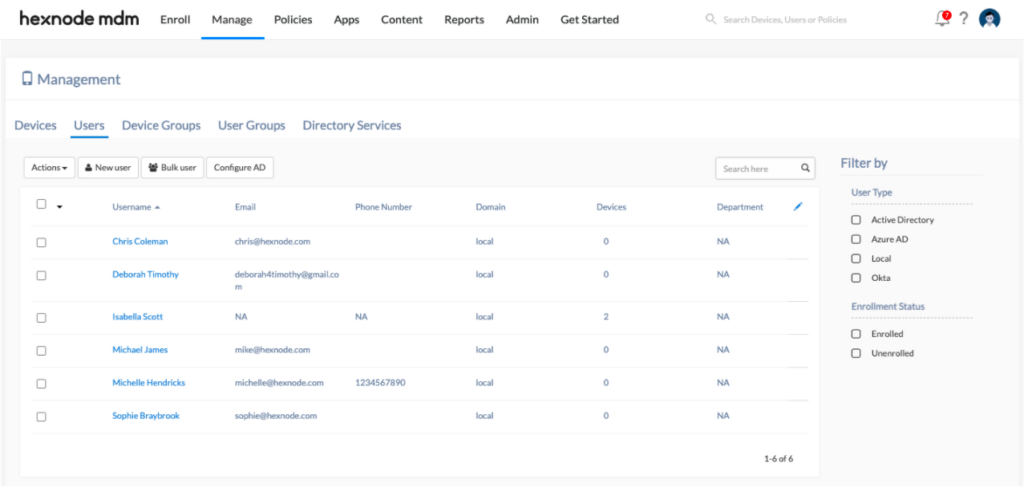
Best for: IT teams managing Apple fleets alongside other operating systems who want an affordable, fast-to-configure MDM with pre-built templates for hassle-free deployments.
Hexnode covers macOS, iOS, iPadOS, tvOS, as well as Windows, Android, Linux, and ChromeOS. But what sets it apart isn’t so much that breadth as its practical approach: a library of ready-to-use policy templates that lets you get a functional Apple configuration up and running in minutes, even with a small IT team.
Key features
- Automated Device Enrollment with Apple Business Manager: direct ABM integration so Macs, iPhones, and iPads configure themselves automatically on first boot with profiles, apps, and restrictions already in place.
- App distribution via Apple VPP: license assignment and silent deployment of App Store apps to devices or user groups, including private B2B apps.
- Pre-built Apple policy templates: ready-made configurations for common scenarios like iPhone BYOD, iPad kiosk mode, or corporate Mac, cutting deployment time and configuration errors.
- Kiosk Lockdown for iOS, iPadOS, and tvOS: single-app or multi-app lockdown with filtered browsing and control over hardware features like camera, AirDrop, and physical buttons.
- Enforced disk encryption with FileVault management: mandatory encryption on macOS with recovery key escrow from the console.
- Geofencing and location-based policies: automatic application of configurations and restrictions on Apple devices based on their physical location — useful for fleets with mobile workers.
- Built-in remote assistance (Remote View and Remote Control): incident resolution directly from the console without third-party tools.
- Five pricing tiers starting at $1/device/month: a tiered structure that lets you match spending to actual needs without sacrificing essential features.
What sets it apart
Its library of pre-built Apple templates makes a real difference in day-to-day operations. Setting up a work profile for an iPhone or a kiosk mode on an iPad takes minutes, not hours. For IT teams where nobody is dedicated full-time to endpoint management, that speed is what separates a deployment that ships today from one that sits in the backlog until next month.
Limitations
- Advanced security features (certificate management, per-app VPN, granular app control) are only available on the Enterprise and Ultra plans.
- HRIS and ITSM tool integration is limited.
- On the lower-tier plans, support response times can be slower, particularly outside US business hours.