Running a restaurant means managing staff, payroll, and daily performance. Problems often come up when a server calls out at the last minute, time-off requests build up, or you do not have enough staff during a busy shift. The best restaurant scheduling software turns this stress into a clear, repeatable process. Managers can create schedules in minutes with saved shift templates, employees get fairer hours and faster answers, and managers can spot staffing gaps before service starts.
If you are looking for the best restaurant scheduling software in 2026, this guide is for busy restaurant managers and owners. It will help you choose a tool that fits your team size, daily needs, and plans for growth.
Key Facts
- The best restaurant scheduling software replaces error-prone spreadsheets with automated shift-building, real-time coverage checks, and mobile-first communication – cutting schedule-build time from hours to minutes.
- According to the National Restaurant Association’s 2026 State of the Restaurant Industry report, restaurant and foodservice sales are projected to reach $1.55 trillion in 2026, with operators forecast to add more than 100,000 jobs – making reliable workforce scheduling more critical than ever.
- Labor costs are the single largest controllable expense in food service: the National Restaurant Association’s 2025 Restaurant Operations Data found that salaries and wages (including benefits) represented a median of 36.5% of sales at full-service restaurants in 2024, well above historical averages.
- Operators using scheduling software aligned to sales data report labor cost reductions of 1 to 3 percentage points of revenue compared to those relying on manual scheduling.
Below, we explain what restaurant scheduling software is, what real-world challenges it solves, and what to look for when choosing the best one for your business. Read on for a side-by-side comparison of the top 6 platforms, a short review of each platform, and a checklist on what to consider so you can easily choose the best employee scheduling software for restaurants like yours.
Table of Contents
- What Is Restaurant Scheduling Software – and Why Does It Matter?
- Which Restaurant Scheduling Software Is Right for Your Operation? (Comparison Chart)
- Best 6 Restaurant Scheduling Systems: Platform-by-Platform Reviews
- How Do You Choose the Best Restaurant Scheduling Software for Your Business?
- FAQs
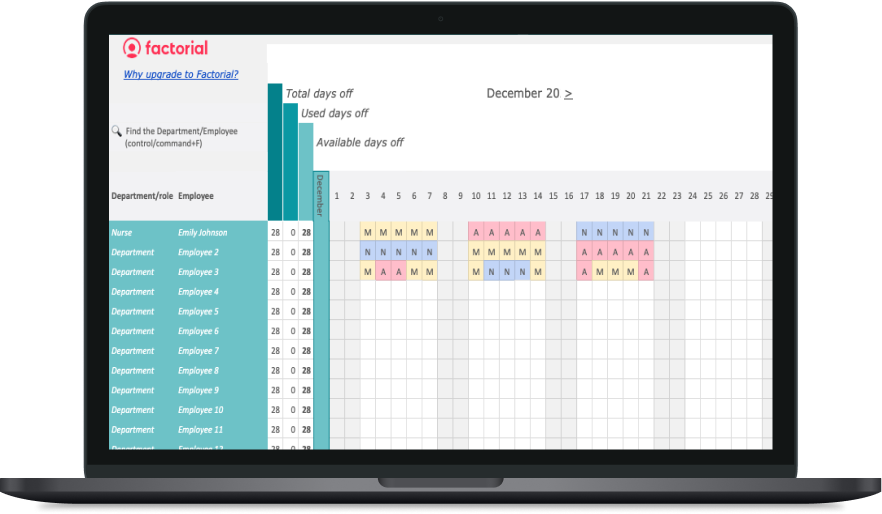
What Is Restaurant Scheduling Software and Why Does It Matter?
Restaurant scheduling software is like a control panel for your week. Instead of moving names around in a spreadsheet and hoping nothing changes, you can build schedules with smart tools.
It keeps all key scheduling details in one place, including:
- Employee availability and approved time off
- Saved shifts, repeat rotations, and coverage rules
- Employee skills and roles, such as FOH and BOH
- Staff members who are close to their weekly hour limits
This helps managers create schedules that fit the needs of each service. It also helps prevent mistakes, such as scheduling someone who is unavailable or not qualified for a role.
Think of it as a live schedule instead of a static file. As you assign shifts, the software can:
- Flag stations that may not have enough coverage
- Warn you about overtime or missed rest periods
- Show which employees can fill a shift without breaking your scheduling rules
When plans change, you do not need to rebuild the whole schedule. An employee may call in sick, a large group may book late, or prep may take longer than expected. Staff can request shift swaps in the app, managers can approve them quickly, and everyone gets an updated schedule with notifications and read receipts.
Time tracking can also connect to the schedule. Clock-ins and breaks go into clear timesheets, so payroll shows both the hours employees were scheduled to work and the hours they actually worked. Saved templates and repeat shifts make it easier to publish next week’s schedule with a few small changes.
In short, the best restaurant scheduling software turns daily chaos into a clear routine. It supports fair rotations, stronger coverage, fewer compliance issues, and a team that always knows when and where they need to work. According to the National Restaurant Association’s 2026 State of the Restaurant Industry report, more than 9 in 10 operators say labor is a major cost challenge, and many use scheduling technology to help manage it.
What Are the Most Common Restaurant Scheduling Challenges?
Restaurant scheduling problems often follow the same pattern. You copy last week’s schedule, spend time changing it to cover absences, and publish it. Then more time-off requests come in, someone calls out sick, or several employees are about to work overtime. This can cause coverage problems, higher labor costs, and compliance risks. Suddenly, you are trying to fix the schedule at the last minute.
The staffing challenge is also serious. According to the 2026 State of Restaurants Report, 80% of restaurants were short at least one role in 2025. On average, each restaurant was missing five employees, up from 3.8 in 2024. Restaurant turnover is often higher than 75% each year, and in quick-service restaurants it can rise above 100%, based on U.S. Bureau of Labor Statistics Job Openings and Labor Turnover Survey (JOLTS) data. These numbers show why a clear, repeatable scheduling process is necessary.
A better approach is to create restaurant shift schedules with reusable tools. The right scheduling software can help you:
- Save common shifts and rotate less popular shifts fairly.
- Check that every station has enough staff before service starts.
- See approved time off in the calendar and avoid scheduling unavailable employees.
- Follow break laws and overtime rules without extra calculations.
With the right scheduling software, same-day changes do not have to cause chaos. Employees can request shift swaps in the app, and managers can approve them quickly. The software can also track scheduled hours and actual hours worked, making payroll easier and helping your restaurant stay compliant.
The bottom line: restaurant shift scheduling software can save time and reduce stress. Reusable shift templates, coverage checks, rest-day rules, and simple shift swaps make shift management easier for managers and clearer for employees.
Which Restaurant Scheduling Software Is Right for Your Operation? (Comparison Chart)
Before the deep dive, here’s a quick snapshot of where each platform shines. Use it to narrow your shortlist, then skim the detailed notes below.
Feature comparison
| Platform | Scheduling | Labor Cost Management | Time Tracking | Mobile App | POS Integration | Multi-location Support | Best For |
| Factorial | Advanced | Yes | Yes | iOS/Android | Yes | Yes | Restaurants wanting all-in-one HR + payroll + scheduling |
| 7shifts | Advanced | Yes | Yes | iOS/Android | Major POS | Yes | Easy scheduling & labor compliance |
| HotSchedules | Advanced | Yes | Yes | iOS/Android | Major POS | Yes | High-volume, multi-location restaurants |
| Restaurant365 | Advanced | Yes | Yes | Web & Mobile | Major POS | Yes | Chains needing scheduling + accounting + inventory |
| Sling by Toast | Advanced | Limited | Yes | iOS/Android | Toast POS | Limited | Toast users prioritizing communication |
| When I Work | Basic | Limited | Yes | iOS/Android | Limited | Limited | SMBs wanting simple scheduling & team messaging |
Best 6 Restaurant Scheduling Systems: Platform-by-Platform Reviews
Here are six of the best restaurant scheduling systems for 2026. We review each platform’s key features, pricing, and best use cases to help you find the right tool for your restaurant.
1. Factorial
Key features:
- Drag-and-drop scheduling with saved & rotating shifts
- Coverage rules by role/station with gap and overtime alerts
- Built-in availability, PTO, and leave management in the schedule
- Shift swaps and open shifts with manager approvals and guardrails
- Automatic rest days, break/OT/minors compliance, and overnight-shift support
- Time clock with geofencing and clean timesheets (planned vs. actual)
- Mobile apps (iOS/Android) for managers and staff
- Multi-location templates, role-based permissions, and payroll/HR/POS integrations
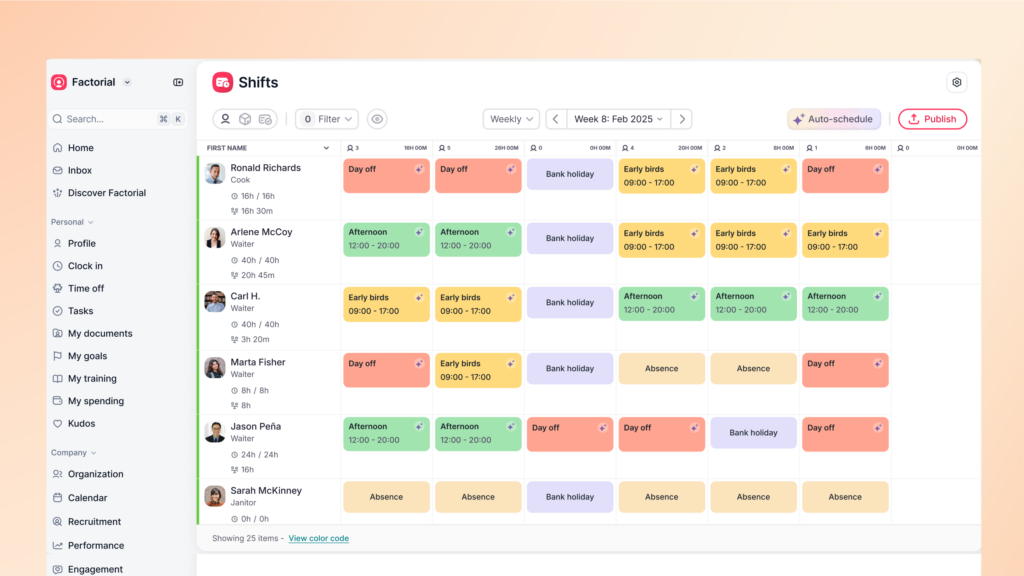
Factorial is an all-in-one business management platform that combines shift scheduling, time tracking, time off management, and other core HR processes. It is designed to grow with your business, which is particularly useful for restaurants, as it automates your shift management and uses built-in AI to generate schedules based on your coverage rules, saved shifts, and staff availability.
Managers can build shift rosters and use templates for efficiency, see coverage by role while scheduling, and get warnings via notifications before adding overtime or missing rest windows. Availability and approved time off live in the same place as the schedule, so you don’t accidentally assign someone who shouldn’t be there.
Staff request shift swaps in the mobile app, and you approve in a simple tap. The bank of hours keeps track of hours, so planned vs. actual hours and breaks populate clean timesheets, and payroll exports also speed up the work for finance. For growing teams, multi-location templates, role-based permissions, and reporting on labor costs and overtime make it easier to keep teams happy across sites. Consult our team for assistance and information on POS integrations.
👉 Interested in Factorial? Get your free demo today!
Why scheduling software pays for itself: Operators using scheduling tools aligned to sales data report labor cost reductions of 1 to 3 percentage points of revenue compared to those relying on manual scheduling, according to case studies published by the National Restaurant Association Solutions group. For a restaurant generating $1 million in annual revenue, a 2-percentage-point labor reduction equals $20,000 in recovered margin per year.
2. 7shifts
Key features:
- Drag-and-drop scheduling with templates
- POS-connected labor forecasting and budgeting
- Mobile apps (iOS/Android) for managers and staff
- Shift swaps and open shifts with approvals
- Time clock and compliance alerts
- Team messaging and announcements
- Integrations with major POS providers (e.g., Toast, Square, Lightspeed)
- Multi-location tools and reporting
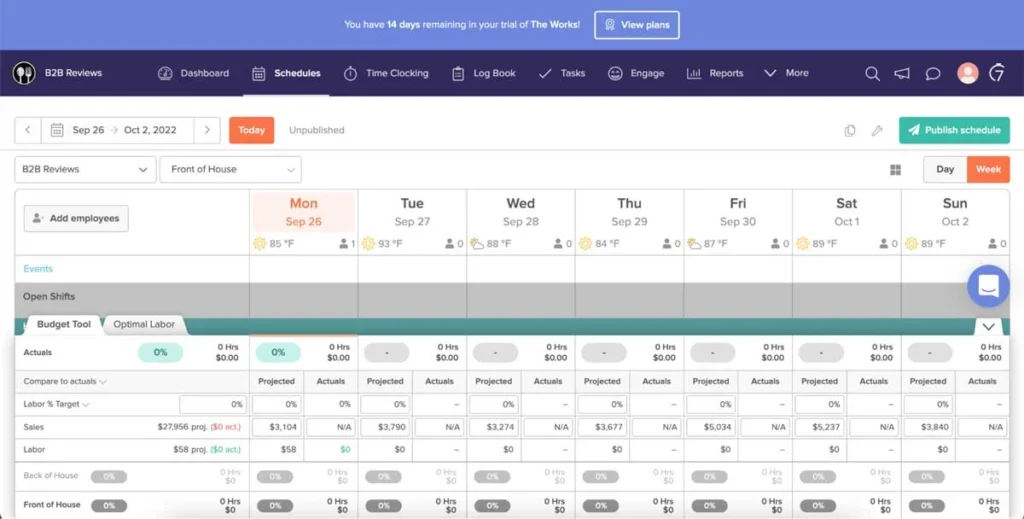
7shifts is an app built specifically for restaurants. Managers can drag and drop shifts to build a schedule, see availability and time off in one place, and publish to their staff via a mobile app. 7shifts integrates with popular POS systems, so you can connect your sales data with scheduling to make your restaurant operations much easier.
The mobile app is useful for staff who want to request swaps or pick up open shifts, which managers can approve in seconds. Notifications sent via the app ensure that everyone is kept in the loop.
Pricing: 7shifts offers a free Comp plan for up to 30 employees at one location. Paid plans start at $39.99/location/month (Essentials, up to 30 employees), $79.99/location/month (Pro, up to 60 employees), and $134.99/location/month (Premium). A payroll add-on is available at $6 per employee.
3. HotSchedules
Key features:
- Drag-and-drop scheduling with templates and labor generation
- AI-assisted forecasting tied to demand/sales
- Mobile apps (iOS/Android) for staff and managers
- Shift swaps, drops, and pickups with manager approvals
- Time & attendance with GPS-enabled clock-ins
- Compliance tools for breaks, minors, and Fair Workweek rules
- Team messaging and announcements
- Multi-location controls and standardized templates
- Reporting and analytics for labor and coverage
- Integrations with major POS and the broader Fourth platform
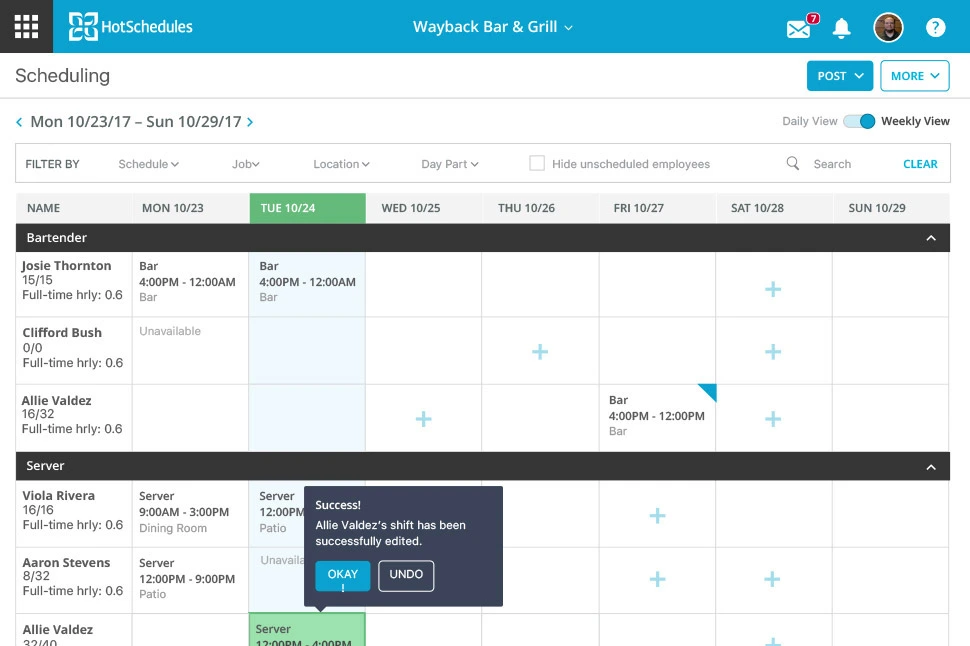
HotSchedules is a restaurant scheduler built to allow managers to create and publish rosters and publish schedules to the mobile app. Staff can swap shifts, drop or pick up shifts, request time off, sync their calendar, and message their team. Managers can review and approve changes for more control. Notifications make sure that everyone on the team is aligned.
AI-assisted forecasting and labor reporting help you with coverage and planning to keep overtime and overstaffing to a minimum. Compliance is also made easier with rules and alerts to block when a shift would violate your policies. Tools can be customized to help accuracy across multiple locations.
Pricing: HotSchedules (now part of the Fourth platform) uses quote-based pricing. Contact Fourth directly or visit for a current quote tailored to your location count and feature requirements.
4. Restaurant365
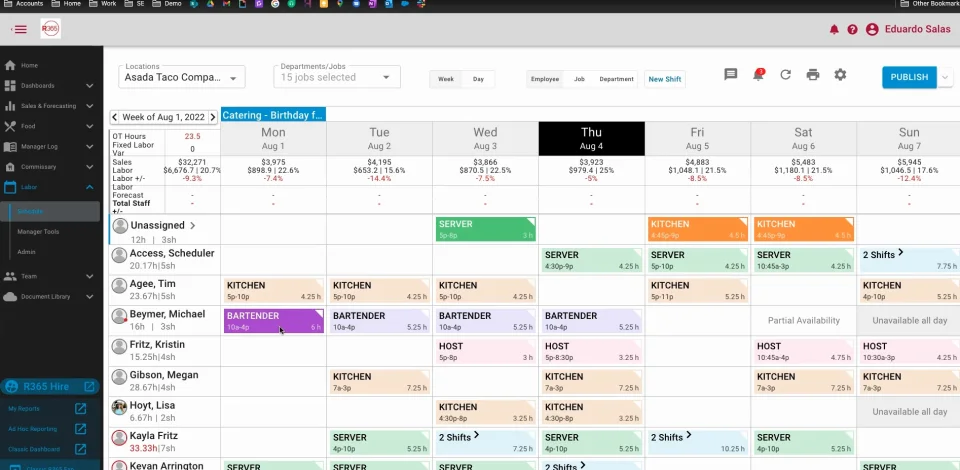
Key features:
- Data-driven scheduling with forecasts
- POS integration for schedule vs. sales alignment
- Time & attendance and mobile app for staff/managers
- Shift swaps, time-off requests, and approvals in one place
- Labor budgeting, overtime alerts, and compliance tools
- Multi-location management and standardized templates
- Payroll & HR suite for hire-to-retire workflows
- Reporting and workforce analytics
Restaurant365 combines scheduling with a larger back-office restaurant management suite, including accounting, inventory, payroll, and HR. Managers can reduce guesswork and build rosters using data on demand to cut down on overstaffing and overtime. The mobile app centralizes daily processes, allowing staff to consult schedules, handle time-off requests, request and approve swaps, and stay updated all from one place.
The software gives you visibility even for restaurants operating in multiple locations. You can standardize templates across several units, monitor labor budgets with warnings for overtime, and generate reports to gain insight into your workforce. All of these features are tied into Restaurant365’s payroll and HR to keep hours, pay, and compliance synchronized.
Pricing: Restaurant365 is priced on a quote basis depending on modules selected (scheduling, accounting, inventory, payroll). Contact Restaurant365 directly at for current pricing.
5. Sling by Toast
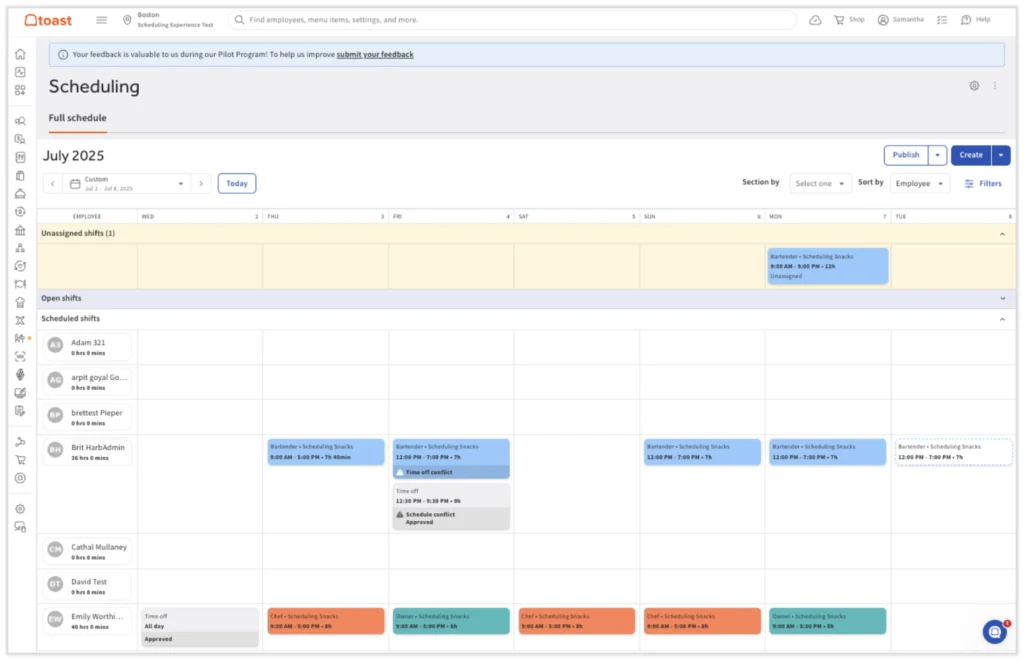
Key features:
- Drag-and-drop scheduling with templates
- Mobile apps (iOS/Android) for managers and staff
- Shift swaps, open shifts, time-off requests with approvals
- POS integration
- Schedule enforcement to prevent early clock-ins on POS
- Forecasting options (projected sales import with Toast integration)
- Team messaging and announcements
- Multi-location tools and reporting
Sling is a restaurant scheduling tool by Toast, the POS ecosystem. It allows you to plan shifts, communicate with your team, and stay on top of coverage. You can sync employee profiles from Toast with Sling, publish schedules to the app, and let your staff request shift swaps or pick up open shifts. Managers approve everything from one place, and notifications ensure you are all in step. Admin is made easy, especially when you already use Toast. You can compare POS sales data with labor costs and even export timesheets directly to Toast Payroll to cut down on time spent on payroll admin. For restaurants already using Toast, Sling is a cost-effective scheduling option, especially given its tight integration with Toast Payroll and POS data. Contact Sling at for current pricing, as plans vary by feature tier.
6. When I Work
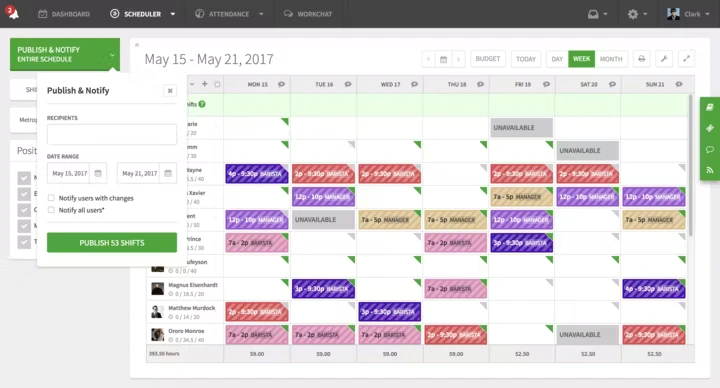
Key features:
- Drag-and-drop scheduling with templates
- Staff availability, time-off requests, and approvals
- Shift swaps and open shifts with manager approval
- Mobile apps (iOS/Android) for managers and staff
- Integrated time clock with pay rules, breaks, and overtime alerts
- Geofencing options to reduce early/invalid clock-ins
- Team messaging and announcements
- Labor reporting (planned vs. actual) and basic multi-location support
- Payroll integrations
When I Work is great for simple, fast scheduling for restaurants. Managers build and publish schedules with drag-and-drop tools, check availability and time off in the same view, and send updates to a mobile app that is easy for your team to use. Staff can confirm shifts, request swaps, or pick up open shifts without having to email back and forth. Overtime warnings and in-app communication helps keep a close watch over day-to-day changes and ensure proper shift coverage.
The built-in time clock tied to the schedule helps keep payroll clean, and geofencing prevents staff from clocking in early, further simplifying payroll. The combination of scheduling, time tracking, and payroll integration makes management much easier than when relying mostly on spreadsheets and email.
Pricing: When I Work pricing start from $2.50/user/month.
How Do You Choose the Best Restaurant Scheduling Software for Your Business?
Choosing the best shift management app for your restaurant as a manager starts with the problems that actually give you the biggest headaches. You need more than a nice calendar. You need an efficient schedule builder, helps compliance, and makes payroll easier. Availability, overtime warnings, PTO, and coverage – you need an overview of all of these to remove as much chaos from your day-to-day operations as possible.
Another important thing to keep in mind is planning for the future. What are your plans for growth? The software you choose is just as important as creating your SOP. You should take into account your current headcount, the number of locations you operate in, and what labor laws apply to you currently. You need an app that will support you and your business in its current form as well as support your growth plans. The best app doesn’t keep you confined with limitations and migration difficulties. The best app grows with you and helps you along the way.
A practical selection checklist:
- Labor compliance: Does the tool flag overtime, missed rest windows, and predictive scheduling law requirements (required in cities including San Francisco, Chicago, New York, and Seattle)?
- POS integration: Can it pull sales data to align staffing with forecasted demand?
- Mobile experience: Will your hourly staff actually use the app for shift swaps and availability updates?
- Multi-location support: If you operate or plan to operate more than one site, can the platform standardize templates and report across locations?
- Payroll connectivity: Does it export clean timesheets (planned vs. actual hours) to your payroll provider?
- Scalability: Will the pricing and feature set still work when your team doubles in size?
AI-assisted scheduling in 2026: The National Restaurant Association’s 2026 State of the Restaurant Industry report identifies advances in AI and data analytics as a key lever for managing costs and improving productivity. Scheduling and labor management now account for 12.5% of all AI applications deployed by restaurant operators, according to Restaurant365’s 2026 mid-year industry survey. If you are evaluating platforms in 2026, look for AI-assisted schedule generation – tools that draft a compliant, coverage-complete roster based on your demand forecast and staff availability – as a standard feature, not a premium add-on.
FAQ
What is the best scheduling software for restaurants?
The best software centralizes scheduling, time tracking, and compliance. Factorial is an all-in-one business management software that automates shift planning with coverage alerts and overtime warnings, making it an ideal solution for restaurants seeking to simplify operations and control labor costs.
What software do most restaurants use?
Restaurants typically use a combination of tools, including Point of Sale (POS) systems, inventory management software, and dedicated scheduling apps. Many also use separate systems for payroll, time tracking, and accounting to manage daily operations and their workforce effectively.
What are the top 10 restaurant management software?
Top restaurant management solutions often include features for scheduling, labor cost management, time tracking, and POS integration. An all-in-one business management software like Factorial combines these functions with payroll and HR, providing a centralized system to manage the entire operation efficiently.
What is the best scheduling software for shift work?
The best scheduling software for shift work simplifies roster creation and team communication. Factorial, an all-in-one business management software, offers drag-and-drop scheduling with templates, mobile shift swaps, and automated compliance alerts, making it easy for managers to build fair and efficient schedules.
The information presented on this page is based on publicly available sources, but not limited to wheniwork.com, getsling.com, 7shifts.com, app.hotschedules.com, restaurant365.com, Capterra public reviews, G2 public reviews, and Trustpilot public reviews. The comparisons between Factorial and other providers, are intended solely for the illustration of the respective software features, pricing and functionalities. All information regarding features, prices, and integrations may be subject to change without prior notice. Factorial assumes no liability for the accuracy, completeness, or timeliness of the information presented. We recommend contacting the respective providers directly to obtain the most accurate and up-to-date information. All legal regulations regarding spanish fair advertising and competition law are fully observed by us; if you have any concerns, please reach out to us. The comparisons presented do not constitute a final evaluation or recommendation for any provider, but serve solely as an informational source.