The risk assessment is where nearly every ISO 27001 project stalls out, and it’s also where you can tell whether the management system was actually built or just written up on paper. Plenty of companies spend weeks filling out a giant spreadsheet packed with dozens of theoretical threats and scores pulled out of thin air, then show up to the audit with a document nobody uses and that doesn’t explain why some controls were chosen and others left out.
In this article, we’ll walk through what a risk assessment is under ISO 27001, why it shapes the rest of the system, which method makes sense, and how to run one step by step.
What is a risk assessment in ISO 27001?
A risk assessment is the process a company uses to identify the risks threatening the security of its information and figure out how likely each one is and how much damage it would do. In other words, it’s about recognizing what can go wrong, how likely it is to happen, and what the fallout would be for the confidentiality, integrity, and availability of your information.
Clause 6.1.2 of ISO 27001 requires you to define a risk assessment process, apply it consistently, and keep documented information as evidence. The standard doesn’t treat it as a one-and-done task—it expects you to repeat it at planned intervals and any time something significant changes in your company or its environment.
It’s worth clearing up three terms that often get used interchangeably even though they aren’t the same thing. Risk analysis is the stage where you estimate the likelihood and impact of each risk. The risk assessment is the full process, which includes that analysis plus comparing the results against your acceptance criteria to decide which risks take priority. And risk treatment is the step after that, where you decide what to do about each one.
Why is the risk assessment the starting point of your ISMS?
ISO 27001 is a risk-based standard. That means the controls a company puts in place don’t come from a stock checklist or from copying the competition—they come from your own exposure. Two companies in the same industry can end up with very different sets of controls simply because their risks are different.
That logic puts the assessment at the foundation of your information security management system (ISMS). Its results determine which Annex A controls you’ll apply and which ones you’ll justify in writing for leaving out. Without a solid assessment, that decision has nothing to stand on, and an auditor will spot it right away.
There’s also an upstream dependency worth keeping in mind: you can’t assess risks to assets you don’t know you have.
Qualitative vs. quantitative: which one should you use?
ISO 27001 doesn’t lock you into a specific method. It requires that your method be consistent, repeatable, and capable of producing comparable results, but it leaves the how up to you. In practice, there are two broad approaches, and most companies blend elements of both.
- Qualitative approach: rates likelihood and impact on descriptive scales (say, 1 to 5, or low/medium/high) and plots them on a risk matrix. It’s fast to apply, easy to explain to leadership, and plenty for most SMBs.
- Quantitative approach: assigns numerical and dollar values to likelihood and impact, leaning on data and formulas. It’s more precise and helps justify spending, but it needs reliable historical data and a bigger time investment.
How to do an ISO 27001 risk assessment step by step
Even though the standard gives you methodological freedom, the assessments that actually work almost always follow the same sequence. These six steps organize the work and keep it from stalling halfway through.
1. Inventory your information assets
Start with what you need to protect. Go through every category—data, hardware, software, cloud services, and the people with access—and catalog it within your ISMS scope. This step builds directly on your asset inventory, so if you’ve already got one, a big chunk of the work is done. If you’re starting from scratch, define your scope clearly first, because that’s what tells you what belongs in the inventory and what stays out.
Every asset should be logged with a baseline of useful information for the analysis to come: what it is, who owns it, and how sensitive the information it handles is. That context is what later lets you estimate a risk’s impact with some judgment behind it instead of just eyeballing it.
The most common mistake here is sticking to hardware and leaving out the SaaS each team has signed up for on its own—which is exactly where the risk nobody’s watching tends to sneak in. That shadow IT doesn’t surface by itself, so it’s worth cross-checking your inventory against the tools people are actually using and against recurring expenses before you call it done.
2. Identify threats and vulnerabilities
For each asset, ask yourself what can go wrong and what weakness would make it possible. A threat is the event (theft, ransomware encryption, human error, a vendor outage), and the vulnerability is the door that lets that threat through (an unencrypted laptop, unpatched software, access that wasn’t revoked in time). It almost always takes both for a risk to materialize, so it helps to tie each threat to the specific vulnerability that enables it.
You don’t need to invent endless catalogs. Focus on the scenarios that are realistic for your type of company and the way you work, and lean on incidents you’ve already been through or that are common in your industry.
3. Analyze likelihood and impact
This is where the actual risk analysis kicks in. For each risk, score how likely it is to happen and the impact it would have if it did, using the scale you defined in your methodology. Keep in mind that impact isn’t only financial—it can also be reputational, legal, or a matter of business continuity.
Combining the two scores gives you the risk level. Apply the same yardstick to every risk so the results are comparable to one another, which is exactly what the standard expects from a consistent method.
4. Prioritize risks with the matrix
No team has unlimited resources, so you have to decide which risks get your time and money and which ones can wait. Plot likelihood against impact on a risk matrix and check the result against your acceptance criteria. That’s how you separate the risks that demand immediate action from the ones that fall within an acceptable level.
The matrix is also the clearest way to explain those priorities to leadership, because it turns the analysis into a visual map where the critical stuff jumps out at a glance. That buy-in is what later justifies spending on controls and helps keep decisions from resting on IT’s judgment alone.
5. Define how you’ll treat each risk
For every risk above your threshold, decide what you’re going to do about it (we’ll get into the specifics in the next section) and assign an owner responsible for that decision.
When you apply a control to bring a risk down, a residual risk remains—the level that’s still there once the measure is in place, and that also has to be assessed and formally accepted. All of these decisions then get captured in the Statement of Applicability, which ties each risk to the controls you’ve chosen to treat it.
6. Document and review at planned intervals
Everything above has to leave a paper trail. The auditor will want to see two documents: the risk assessment report, with the risks you identified and their scores, and the risk treatment plan, with the option you chose and the owner for each. You can start from a template so you’re not building from scratch, but adapt it to your reality instead of inheriting risks that aren’t yours.
And don’t treat it as a one-time deliverable. Set a review cadence and update the assessment whenever something significant changes: a new service, an incident, a reorg.
The four risk treatment options
Once your risks are prioritized, ISO 27001 lays out four ways to respond to each one. They’re not mutually exclusive—a single risk can be partly mitigated and accepted for whatever’s left over.
- Mitigate: apply security controls that lower the likelihood or the impact. It’s the most common option and the one that connects to Annex A.
- Accept: take on the risk knowingly and on the record when its level sits within your threshold or the cost of treating it outweighs the potential damage.
- Transfer: shift the risk to a third party, for example through insurance or by outsourcing the affected service.
- Avoid: eliminate the source of the risk by stopping the activity that creates it.
A practical example: an ISO 27001 risk register
Here’s what a simplified risk register would look like for a company with a small IT team and hybrid work. Scores run on a 1-to-3 scale (1 = low, 3 = high), and the risk level comes from combining likelihood and impact.
| Risk | Likelihood | Impact | Level | Treatment |
|---|---|---|---|---|
| An employee falls for a phishing attack and their credentials get stolen | 3 | 3 | High | Mitigate — MFA and awareness training |
| Unpatched software exploited by malware | 2 | 3 | High | Mitigate — centralized patching policy |
| Laptop lost or stolen with unencrypted data | 2 | 2 | Medium | Mitigate — disk encryption and MDM with remote wipe |
| An employee leaves without their access being revoked | 2 | 3 | High | Mitigate — offboarding tied to HR |
| A critical SaaS vendor goes down | 1 | 3 | Medium | Transfer — SLA and your own backup |
| Compromised social media account | 1 | 1 | Low | Accept — monitor, no additional controls |
In just about every assessment, the risks that end up at the top come down to people and devices, and a lot of them get mitigated with specific technical controls like encryption, patching, access management, or wiping a lost machine remotely. Keeping those centralized is what turns the risk register into a tool that actually reduces your exposure instead of just describing it.
How Factorial IT helps you manage risk across your ISMS
Having a risk written down in a register is one thing; actually bringing it down is another. Factorial IT works on that second part—the treatment—because it pulls together, in a single platform, the technical levers you use to mitigate the risks that almost always land at the top of the matrix.
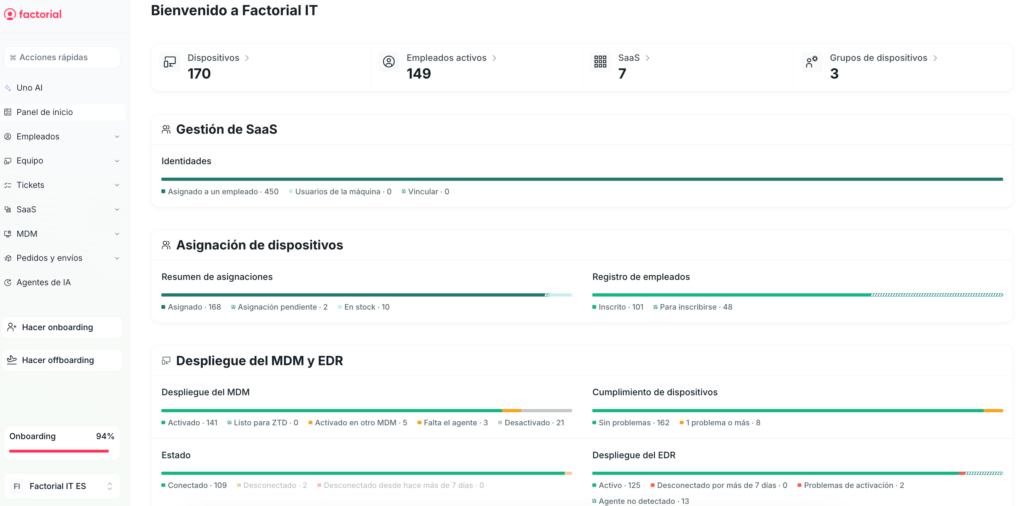
If you look back at the example in the table above, most of those risks get handled right here:
- Lost or stolen devices: the MDM enforces encryption centrally and lets you lock or wipe a device remotely, so a misplaced laptop stops being a data breach.
- Outdated software: managing your fleet lets you see which versions are running on each machine and keep patching current—the vulnerability behind a good share of malware incidents.
- Access that outlives a departure: access management lets you pull permissions when someone changes roles or leaves, closing the door on orphaned accounts.
- Risks you decide to accept or monitor: with the real status of every asset at your fingertips, reviewing an accepted risk and justifying that call to the auditor no longer depends on an out-of-date spreadsheet.