Ten years ago, managing devices in a company meant putting a passcode on the corporate phone and calling it a day. Today it means controlling laptops across three operating systems, protecting data on employees’ personal devices, keeping tabs on dozens of SaaS apps, and being able to remotely wipe a machine in a matter of minutes.
The problem is that not every solution on the market covers the same ground, even though the names sound alike. MDM, EMM, and UEM stand for three very different levels of control. Pick the wrong one and you’ll end up with a tool that falls short — or a platform you don’t actually need.
In this article, we break down what each approach covers, how they differ, and how to figure out which one fits your company’s reality.
What is MDM?
MDM stands for Mobile Device Management. It’s the most basic layer of control over a company’s devices — laptops, phones, tablets. The goal is to give IT teams the ability to see, configure, and secure every device in the fleet remotely.
MDM emerged when companies started handing out corporate smartphones and needed to make sure those devices met a minimum set of security requirements.
Key MDM features
- Remote device configuration: push Wi-Fi, VPN, and OS restriction settings without physically touching the device.
- Basic security policies: enforce disk encryption, strong passwords, screen lock, and operating system updates.
- Remote lock and wipe: respond to loss or theft by locking the device or erasing all its data remotely.
- Fleet inventory: know what devices are out there, what OS they’re running, whether they’re up to date, and whether they comply with your policies.
- Centralized app deployment: install and uninstall apps at scale so every device arrives pre-configured in the employee’s hands.
- Device geolocation: track devices in real time — especially useful for field teams or when a device goes missing.
- OS update management: schedule and enforce operating system updates to prevent devices from running vulnerable versions.
➡️ Discover the best MDM software in 2026.
What is EMM?
EMM stands for Enterprise Mobility Management. Where MDM focuses on the device, EMM takes it a step further by adding management layers for applications, content, and user identity.
EMM came about when BYOD (Bring Your Own Device) policies went mainstream. Suddenly, companies couldn’t just lock down the entire device — it belonged to the employee too. They needed a solution that could separate work from personal without overstepping.
Key EMM features
- Mobile Application Management (MAM): deploy, update, and control corporate apps independently of the device, deciding which apps get access to which data.
- Containerization: create an isolated corporate space inside a personal device. When an employee leaves, IT wipes only the company data without touching anything personal.
- Content Management (MCM): control how corporate documents are shared, stored, and accessed, with encryption and permissions by user or group.
- Identity and Access Management: tie access to corporate resources to user authentication, including single sign-on (SSO) and multi-factor authentication (MFA).
- BYOD policies: set specific rules for personal devices accessing company data without needing to control the entire device.
- Conditional access: allow or block access to corporate apps and data based on conditions like location, device status, or risk level.
- Data Loss Prevention (DLP): prevent sensitive information from leaving the corporate perimeter by restricting actions like copy-paste or sharing between personal and work apps.
What is UEM?
UEM stands for Unified Endpoint Management. It’s the natural evolution of EMM and the standard the market is moving toward. The key difference is that UEM isn’t limited to mobile devices. It manages every endpoint in the organization from a single console — laptops, smartphones, tablets, desktops, IoT devices, wearables, and even kiosks.
UEM appeared when companies realized that managing each device type with a different tool was creating more problems than it solved. Too many consoles, policies that didn’t talk to each other, and zero visibility across the board. The idea behind UEM is straightforward: one platform to manage everything.
Key UEM features
- Multi-OS management from a single console: manage devices running macOS, Windows, Linux, iOS, and Android without jumping between tools.
- Unified endpoint management: apply security policies and configurations to any device type — laptops, phones, tablets, desktops, wearables, and IoT.
- Threat detection and response: spot suspicious behavior or vulnerabilities on any endpoint and act automatically before things escalate.
- Automated remediation: push updates, isolate compromised devices, or apply security patches without manual intervention from the IT team.
- Zero Trust integration: continuously verify user identity and device status before granting access to corporate resources.
- Centralized analytics and reporting: get full visibility into fleet health from a single dashboard — policy compliance, at-risk devices, outdated software, and security trends.
- Device lifecycle management: cover the entire journey from initial enrollment to device retirement, including reassignments, updates, and decommissioning.
- Regulatory compliance: generate the evidence and reports needed to facilitate audits and certifications like ISO 27001, SOC 2, or NIS2.
Key differences between MDM, EMM, and UEM
MDM, EMM, and UEM aren’t three names for the same thing. Each one represents a different level of control, security, and coverage across your IT infrastructure.
| Criteria | MDM | EMM | UEM |
|---|---|---|---|
| Scope | Mobile devices | Mobile devices + apps + content | All endpoints |
| App management | Basic (install / uninstall) | Advanced (MAM, containerization) | Full (mobile + desktop + web) |
| Security | Device-level (encryption, passwords, remote wipe) | Device + apps + data (DLP, containers) | All endpoints + analytics + automated remediation |
| BYOD support | Limited | Yes (containerization) | Yes (containers + multi-endpoint policies) |
| Device types | Smartphones, tablets | Smartphones, tablets | Laptops, desktops, phones, IoT, wearables |
| Identity management | No | Yes (SSO, MFA) | Yes (integrated with IAM and Zero Trust) |
| Content management | No | Yes (MCM) | Yes (extended to all endpoints) |
| Threat detection | No | Limited | Yes (with automated remediation) |
| Implementation complexity | Low | Medium | Medium to high |
MDM vs. EMM vs. UEM: which one does your company need?
Now that the differences are clear, the real question is: which of the three do you actually need?
An MDM is enough if…
- Your fleet is made up entirely of company-owned mobile devices (tablets, smartphones).
- You need basic control: passwords, encryption, remote lock, and wipe.
- There’s no BYOD and no need for granular app or content management.
- Typical example: tablets for logistics teams or smartphones for sales reps.
An EMM makes more sense if…
- Your employees use their own devices for work (BYOD).
- You need to separate corporate data from personal data without being intrusive.
- You want to control which apps access which information and with what permissions.
- Typical example: companies with BYOD policies where personal and corporate devices coexist.
A UEM is the strongest bet if…
- You’re managing a mixed fleet: Windows laptops, Macs, phones, maybe IoT.
- You want a single console instead of three different tools.
- You need full visibility, consistent policies, and centralized reporting.
- Typical example: growing companies where the fleet is diversifying fast and separate tools no longer scale.
Where does Factorial IT fit in?
The market trend is clear: endpoint management is moving toward the UEM model. But most SMBs don’t need the complexity — or the price tag — of an enterprise-grade UEM.
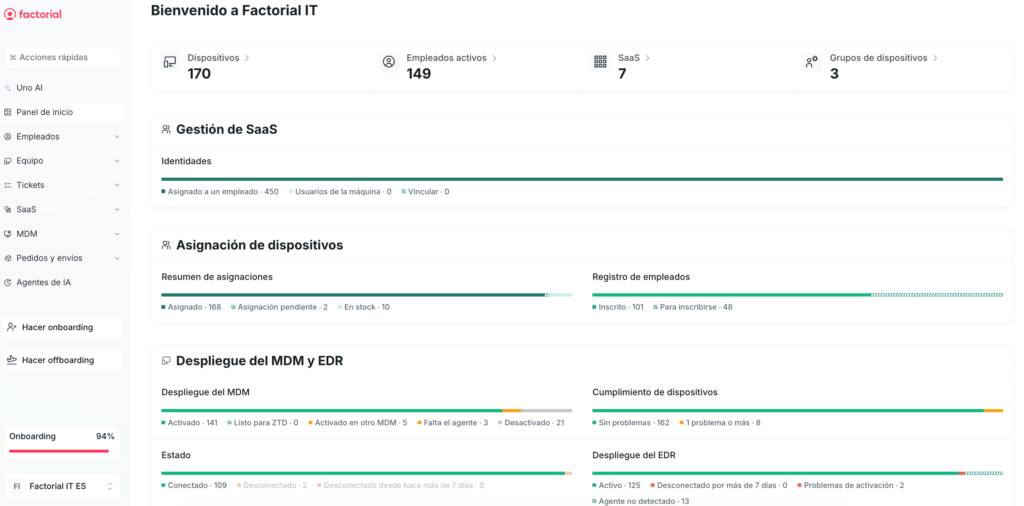
Factorial IT starts with a multi-OS MDM foundation (macOS, Windows, Linux, iOS) but goes well beyond device control. It connects fleet management to the employee lifecycle, automates onboarding and offboarding from the HRIS, manages SaaS licenses, and centralizes security with built-in EDR.
In practice, Factorial IT covers many of the needs that used to require combining an MDM, an EMM, and several additional tools — all from a single place, without the complexity of a traditional UEM.