Performance reviews are an important way to support employee growth and teamwork. They help people understand what they are doing well and where they can improve. But many managers say that writing reviews can feel mentally heavy. It takes effort to sort through notes, remember key moments, and explain feedback in a clear and helpful way. This is where AI performance reviews can be useful. They do not replace the manager’s role in the performance review process or write the review for you. Instead, they help you organize information and turn your ideas into a clearer message. You still provide the real examples and the final judgment and AI simply helps you shape the feedback so it is easier to understand.
Many managers use AI to
- turn rough notes into a simple outline
- improve the tone of a message
- avoid repeated phrases when writing several reviews
- make feedback more specific and actionable
- check if something important is missing
This guide explains what an AI performance review is, the benefits and risks of using AI, and how to use it in a responsible way. You will also learn how Factorial’s AI agent, One, supports managers by bringing the right information together, preparing summaries, and improving the flow of 1:1 conversations without taking away human decision-making.
What is an AI performance review?
An AI performance review is a review that is written or supported with the help of artificial intelligence. The manager or HR professional still provides the real information about the employee, such as achievements, challenges, goals, and examples of strong work. The AI helps organize these details, check the tone, and turn the manager’s ideas into clearer, more structured feedback.
AI tools for performance reviews come in two main forms:
1. AI tools built inside performance management software
These tools already have access to the information stored in the company’s system, such as goals, past reviews, 1:1 notes, and project updates. Because of this, they can help managers gather the right information faster and avoid missing important details. Factorial’s AI agent, One, is an example of this type of tool.
2. Stand-alone AI tools
These tools are not connected to a company’s system. Managers enter the information manually. The AI then helps by creating outlines, suggesting clearer wording, or rewriting drafts in the manager’s own voice. These tools do not have access to real company data, so the manager must provide all the facts.
It is important to remember that AI is a tool built to support you, not to replace you or to rely on without reviewing the output. An AI tool does not replace the manager’s judgment or responsibility. The manager still decides what to include, which examples matter, and what message they want the employee to walk away with. AI simply helps reduce the mental load of collecting and translating data into actionable items and makes the feedback clearer and more consistent.
Using AI for performance reviews
Managers and HR teams can use AI in many different ways during the performance review process. Some people use it to get started when they feel stuck. Others use it at the end to check for clarity or tone. AI can help with planning, organizing, and shaping the final message, but the manager is always the one providing the facts and examples.
Risks of using AI for writing performance reviews
AI can be a helpful tool, but it must be used carefully. Here are some risks to be aware of:
1. Generic or vague feedback
If a manager gives the AI very little information, the result can sound plain or unclear. Employees can tell when a review does not reflect their real work.
2. Missing important examples
AI cannot create true examples of what happened during the year. If the manager does not provide enough detail, the review may feel incomplete.
3. Losing the manager’s voice
If the AI draft is not reviewed or edited, the final message may sound different from the way the manager normally communicates. This can affect trust.
4. Possible bias
AI models can sometimes repeat biased patterns found in the data they were trained on. Managers must check the final review to make sure the language is fair and respectful.
5. Over-relying on the tool
AI should not replace thoughtful leadership. Managers still need to observe, coach, and make decisions. AI only assists with writing and structure.
Benefits of using AI for writing performance reviews
When used correctly, AI can support managers in meaningful ways. Here are the benefits that many leaders have shared:
1. Lower mental load
Managers often collect notes all year but struggle to shape them into a clear narrative. AI can help turn scattered ideas into an outline that is easier to work with.
2. More consistent communication
AI can help managers avoid repeating the same phrases or falling into patterns that make reviews sound identical. This supports fairness across a team.
3. Clearer and more actionable feedback
AI can suggest ways to make feedback easier for an employee to understand. It can help sharpen the message so the employee knows exactly what to do next.
4. Support for tone and wording
Sometimes the message is correct but the tone feels too harsh, too soft, or simply unclear. AI can help adjust the tone while keeping the manager’s meaning.
5. A better starting point
Instead of staring at a blank page, managers can begin with a structured outline, a summary of their notes, or a cleaned-up version of their own draft.
6. Stronger reviews for large teams
Managers with many direct reports often say that reviews start to sound the same. AI can help keep each review focused on the individual employee.
Legal considerations when using AI for employers
As AI becomes more common in performance management, employers need to understand the legal responsibilities that come with it. AI can help organize and clarify feedback, but it must be used in a way that is fair, transparent, and follows the law. Do research on using AI in the workplace to be ready for any questions your team may have.
1. Human oversight is required
In both the United States and the European Union, AI cannot make final employment decisions on its own. Managers must review and approve any feedback or ratings the AI creates. Human judgment is essential to ensure that the review is accurate and fair.
2. Avoid discrimination
Existing laws like Title VII of the Civil Rights Act and the Americans with Disabilities Act still apply when AI is used in performance reviews. If AI produces biased outcomes, employers are responsible. Managers should check that feedback is fair and inclusive and does not disadvantage any group.
3. Be transparent with employees
Many experts recommend letting employees know when AI is being used in the review process. This doesn’t mean sharing technical details, but explaining that AI supports the process while humans make all final decisions.
4. Protect data privacy
AI tools must handle employee data safely. This includes following GDPR in Europe, state privacy laws in the U.S., and internal company policies. Sensitive information should never be entered into unsafe or unapproved AI tools.
5. Know your vendor’s responsibilities
Companies should confirm how their AI provider handles data. For example, Factorial uses Microsoft Azure OpenAI, hosted in the EU, where customer data is never used to train models. Each interaction is private, and the AI cannot make decisions on its own.
6. Stay updated on best practices
AI laws and guidance are evolving quickly. Employers should follow credible resources to stay informed. A good place to start is our latest AI global report. It’s packed full of resources to help HR teams understand best practices and avoid risks.
Using AI responsibly ensures that performance reviews remain fair, clear, and effective. The key is to keep humans in control while using AI as a supportive partner.
How to use AI tools for performance reviews
Using AI for performance reviews works best when it supports your own thinking rather than replacing it. Here is a step-by-step guide for managers and HR teams to get the most out of AI tools while keeping reviews fair and meaningful.
1. Gather your information first
Before using any AI tool, collect the facts about your employee. This includes achievements, challenges, 1:1 notes, project results, and any feedback from peers or clients. The quality of the AI’s suggestions depends entirely on the information you provide.
2. Decide how you want to use the AI
There are several ways to involve AI in performance reviews:
- Outline creation: Ask the AI to organize your notes into a clear structure.
- Tone and wording checks: Have the AI suggest ways to make your feedback more clear and actionable.
- Draft refinement: You can write your review first and then ask the AI to suggest improvements.
The goal is to make your message stronger, not to let the AI write the review for you.
3. Write clear prompts
When asking the AI for help, be specific about your needs. For example, instead of saying “write a review for John,” you could say:
- “Create an outline for John’s performance review, including achievements in project management, communication, and leadership.”
- “Check this draft for tone and suggest ways to make feedback more actionable.”
Clear instructions help the AI provide useful suggestions that fit your style and goals.
4. Review and validate the output
Never submit a review without checking it yourself. Make sure:
- All examples are accurate and supported by facts.
- The tone matches how you would naturally communicate.
- There is no biased or unfair language.
Despite common AI myths, AI is a helper, not a replacement. You are responsible for the final content.
5. Integrate AI into your workflow
Some managers use AI while preparing for 1:1 meetings to highlight key discussion points, track progress on goals, or suggest focus areas for next steps. Others use it when summarizing notes from multiple employees to ensure consistency and clarity.
By using AI thoughtfully, you can make your performance review process smoother and more structured, while still keeping your own judgment central to every review.
AI tools for employee performance reviews
There are two main ways managers and HR teams can use AI tools for performance reviews: embedded AI agents within performance management software and stand-alone AI review generators. Both have their uses, but they work differently.
One – Factorial’s Embedded AI Agent
One, a new AI feature of Factorial’s all-in-one business management software, is an AI agent built directly into Factorial, giving it access to your company’s HR, finance, and operations data. It is designed to assist, not replace, human decision-making.
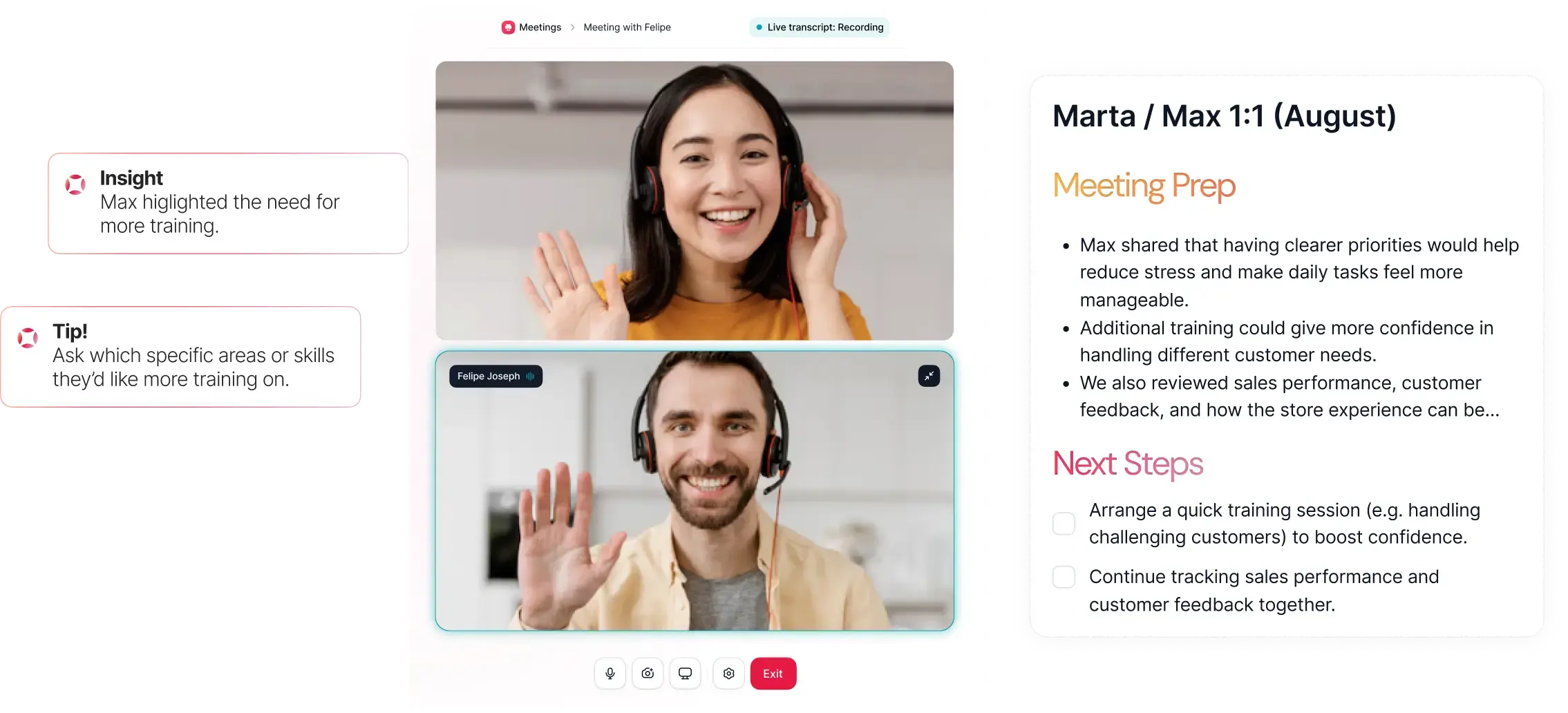
Key features of One for performance reviews:
- Summarizes employee data, goals, past reviews, and 1:1 notes into a clear outline.
- Suggests improvements for tone, clarity, and actionable feedback.
- Helps managers prepare for 1:1 meetings by highlighting discussion points and tracking follow-up actions.
- Supports multi-tasking, like translating, formatting, or simplifying content for clarity.
Because One is embedded, it understands your company context and automatically integrates existing employee information. This makes it more accurate and context-aware than stand-alone AI tools. Check out Factorial’s performance management tools to get ana idea of what you can do.
How One is different from a chatbot:
One is not a general chatbot. It knows your company data, retrieves accurate information, and assists with tasks like generating documents, reports, and insights. It cannot make final decisions and keeps sensitive employee data private and secure, fully compliant with GDPR and the EU AI Act.
Easy-peasy.AI – Stand-alone AI review generator
Easy-peasy.AI is a stand-alone tool that does not connect to company data. Managers input employee information manually, and the AI generates suggestions, outlines, or draft reviews.
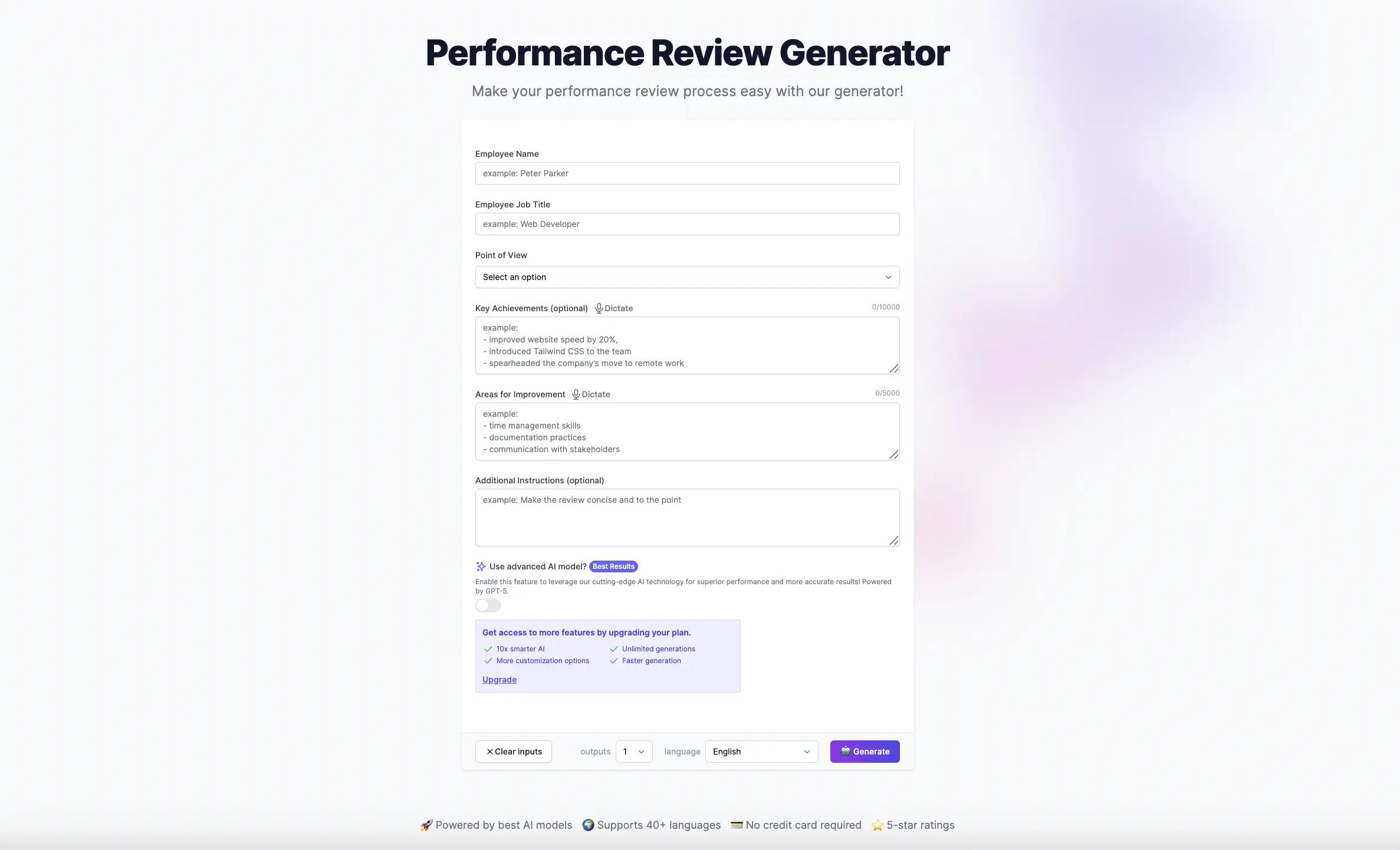
How Easy-peasy.AI works:
- Create a free account and select the Performance Review Generator template.
- Enter employee name, job title, achievements, areas for improvement, and any extra instructions.
- Choose the point of view (first, second, or third person).
- Click “Generate” to receive AI suggestions.
Stand-alone tools are useful when you want help creating outlines, checking tone, or generating ideas without sharing company data. However, they require more manual input, and they cannot access real-time employee data in the way embedded tools like One can.
Choosing between embedded and stand-alone AI
Embedded AI agents like One are ideal for companies already using performance management software because they integrate with your existing data and workflows.
Stand-alone tools are helpful for smaller teams or those who want to experiment with AI without committing to a full platform.
How to choose the best AI performance review tool
The right AI tool for performance reviews can make the process clearer and easier for managers and employees. Here’s a simple guide to help you choose:
1. Know what your company needs
Think about these important questions:
- How many employees you review.
- How often reviews or 1:1 meetings happen.
- If you already use HR software or need a stand-alone tool.
- How much help you want from AI versus keeping control yourself.
2. Look for key features
A good AI tool should offer:
- Data integration: Access to employee records, goals, and past reviews.
- Outline or draft support: Organize feedback clearly.
- Tone and clarity checks: Make feedback easy to understand and actionable.
- 1:1 meeting support: Track discussion points, goals, and follow-ups.
- Security and compliance: Keep employee data safe.
- Flexibility: Allow managers to edit AI suggestions in their own voice.
3. Keep human oversight
AI should help, and not replace, managers. Make sure the tool keeps you in control of the final decisions.
4. Check the vendor
Consider these factors:
- How the company protects data.
- How AI uses your information safely.
- Reviews or case studies from other customers.
- Available training or support.
5. Decide between embedded and stand-alone
Embedded AI like One works inside HR software and can access your company data.
Stand-alone tools like Easy-peasy.AI are easier to try but need you to enter data manually.
6. Try it out first
Many tools offer demos or free trials. Use them to:
- See if AI suggestions are helpful.
- Check that your voice is still in the review.
- Make sure it meets privacy and compliance needs.
By following these steps, you can choose an AI tool that supports managers, helps employees grow, and keeps humans in control of the process.
Streamlining employee performance reviews with Factorial
Factorial makes performance reviews easier and more structured by using its AI agent, One. One is not just a chatbot. One understands your company’s data and helps managers prepare meaningful, accurate, and actionable reviews.
1. How One supports 1:1 meetings
1:1 meetings are private conversations between a manager and an employee to discuss progress, priorities, and support needed. Factorial’s AI makes these meetings more productive:
- Preparation: One highlights key points to discuss and tracks goals.
- Meeting capture: It summarizes the discussion without losing context.
- Follow-up: One suggests focus areas for the next meeting and tracks actions.
Over 1.1 million meetings now use AI in some way, showing how much it can improve alignment and engagement.
2. Benefits of using One
- Clear feedback: Helps managers organize and communicate their thoughts.
- Consistency: Keeps reviews fair and balanced across employees.
- Customizable: Managers can write in their own voice while using AI to check tone, grammar, and clarity.
- Supports multiple tasks: One can summarize, format, or simplify documents quickly.
3. Tips for using One effectively
- Start simple: Ask One questions in plain language, like “Create a performance review template for managers.”
- Be specific: Include department, date range, or other details if needed.
- Combine tasks: Use One to check tone, summarize 1:1 notes, or format content for reports.
- Stay in control: AI gives suggestions, but you make the final decisions.
4. Security and compliance
Factorial’s One is fully GDPR compliant and aligned with the EU AI Act. Data is processed securely, and the AI does not make decisions like promotions or terminations. All critical actions are reviewed by humans.
Using Factorial and One helps managers spend less mental effort organizing reviews and meetings, while still keeping the focus on meaningful feedback and employee growth.
AI performance review FAQs
1. Can I use AI to write a performance review?
Yes, AI can help organize feedback, suggest improvements, and check tone, but managers must review and approve the final content.
2. Can ChatGPT write a performance review?
It can draft or outline reviews, but you need to provide accurate facts and ensure the feedback is fair and actionable.
3. How to use AI to write a performance review
Collect employee data, draft your review, then use AI to refine structure, clarity, and tone. Always verify accuracy.
4. What AI agents can assist with employee performance review tasks?
Embedded AI like Factorial’s One or stand-alone tools like Easy.peasy AI can help with drafting, outlines, and 1:1 meeting notes.
5. How does Factorial support performance reviews?
Factorial’s One summarizes data, suggests clear feedback, tracks goals, and assists with 1:1 meetings—all while keeping managers in control.
6. Is it legal to use AI for performance reviews in the US?
Yes, but federal anti-discrimination laws still apply. Managers must review AI suggestions to prevent bias and ensure fairness.
7. Will AI replace managers in the performance review process?
No. AI is a support tool. Managers remain responsible for final decisions, feedback, and employee development.
8. How can small businesses start using AI for performance reviews without a big budget?
Start with free stand-alone tools like Easy.peasy AI or trial embedded AI in HR software to help with outlines and feedback, then scale as needed.