Finding and hiring the right people is one of the most important decisions a business makes. However, many organizations still rely on instinct and assumptions when making hiring decisions. Recruitment analytics software helps change this by turning hiring data into clear and useful insights.
Recruitment analytics software takes some of the guesswork out of the hiring process. It collects and analyzes data from different stages of recruitment, including job postings, applications, interviews, offers, and onboarding. This gives HR teams a clearer view of what is working and where there may be room for improvement.
By using this information, organizations can make more informed hiring decisions, improve their recruitment processes, and create a better experience for candidates and hiring teams.
Key Facts: Recruitment Analytics Software at a Glance
- What it is: Recruitment analytics software collects, measures, and visualizes hiring data — from sourcing to onboarding — so teams can make faster, evidence-based decisions instead of relying on guesswork. It helps track talent acquisition metrics and feeds into your applicant tracking system.
- The scale of the challenge: According to SHRM’s 2026 Talent Trends Report, 68% of HR professionals report difficulty recruiting full-time employees, and 53% say hiring has become harder than the previous year.
- The cost of inaction: Benchmarking data shows the average cost-per-hire in the U.S. now stands at $4,700–$4,800 for non-executive roles, while median time-to-fill has reached 44 days. Both figures have risen over the past three years.
- The analytics advantage: Research finds that 94% of business leaders say people analytics improves the HR profession, and 71% of HR executives who use it call it essential to their organization’s HR strategy.
Table of Contents
- Key Facts: Recruitment Analytics Software at a Glance
- What Is Recruitment Analytics Software— and Why Does It Matter?
- Which KPIs Should You Track with Recruitment Analytics Software?
- Top 7 Recruitment Analytics Software for 2026
- Top Recruitment Analytics Software Comparison Chart
- What Are the Benefits of Implementing Recruitment Analytics Software?
- How to Choose the Best Recruitment Analytics Software for Your Business
- FAQs
What Is Recruitment Analytics Software, and Why Does It Matter?
In 2026, investment in top recruitment analytics software has accelerated across organizations of all sizes. According to SHRM’s 2026 Talent Trends Report, 68% of HR professionals report difficulty recruiting full-time employees, a persistent challenge that pushes teams toward data-driven tools. Artificial intelligence and automation now make it practical for businesses of any size to track and improve their hiring process.
Recruitment analytics software collects and analyzes data from every step of hiring, from job postings to offers. Instead of relying on guesswork or spreadsheets, it gives you clear insights into what works and what does not.
How Recruitment Analytics Software Works
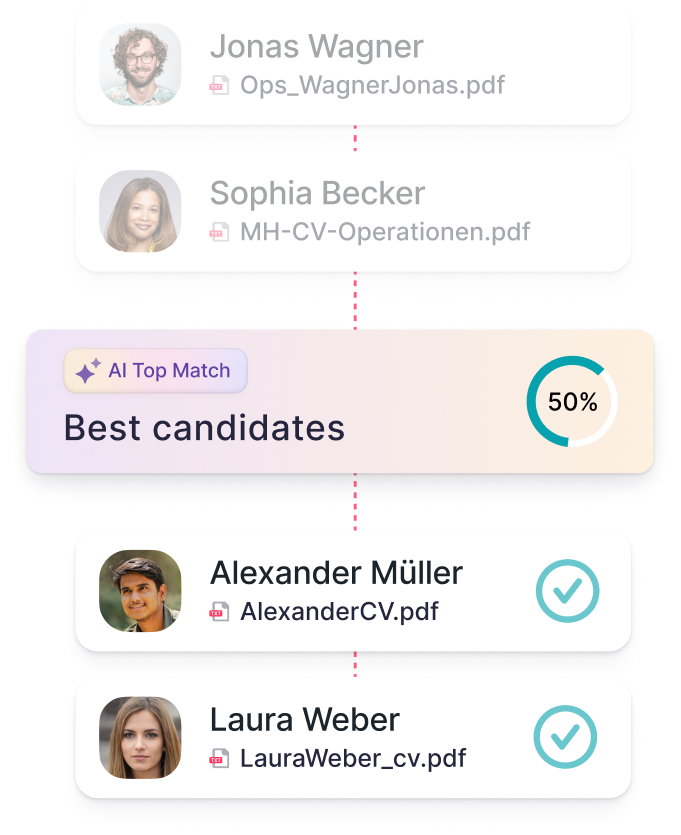
The software gathers information from your applicant tracking system (ATS), job boards, and HR tools, then turns it into reports and dashboards that show patterns like how long roles take to fill or which sources bring the best candidates. Some tools even use predictive analytics to forecast hiring needs.
All of this translates into faster, smarter decisions. You can see where delays happen, track costs, forecast future hiring, and show your ROI with real data.
In short, recruitment analytics software turns hiring from guesswork into a data-driven strategy.
The Four Types of Recruitment Analytics
Not all analytics are equal. Understanding the four levels helps you choose a platform that matches your team’s maturity:
| Analytics Type | What It Shows | Example |
|---|---|---|
| Descriptive | What happened | How many candidates applied last quarter |
| Diagnostic | Why it happened | Which stage caused the most drop-off |
| Predictive | What is likely to happen | Projected time-to-fill for an open role |
| Prescriptive | What to do next | Which sourcing channel to prioritize to hit a hiring target |
Most organizations start with descriptive reporting and work toward predictive and prescriptive capabilities as their data infrastructure matures. Organizations using people analytics to forecast hiring needs are better equipped to align talent strategy with business goals.
Deloitte’s 2026 Global Human Capital Trends report found that 95% of executives worry about the accuracy of candidate and workforce data, yet only 5% of organizations report significant progress in improving it, a gap that reinforces the case for reliable analytics infrastructure.
Which KPIs Should You Track with Recruitment Analytics Software?
To improve your hiring, you need to track the right numbers. These key performance indicators (KPIs) show how well your recruiting process works and where it can improve. They are essential talent acquisition metrics that fit naturally in a data-driven hiring strategy.
Time-to-Hire
How long it takes from when a candidate applies to when they accept an offer. Shorter time-to-hire means a smoother process and less risk of losing great candidates. This is a core hiring funnel analytics metric.
Time-to-Fill
The total time from when a job opens to when it’s filled. Time-to-fill helps teams plan and predict hiring needs more accurately.
Cost-per-Hire
The average amount you spend to hire one person, including ads, recruiter fees, and onboarding. Tracking cost-per-hire helps you manage your recruiting budget. SHRM benchmarking data puts the U.S.
Offer Acceptance Rate
The percentage of job offers that candidates accept. Low rates may be a sign of poor communication or uncompetitive offers.
Quality of Hire
How well new employees perform and stay over time. It shows if you’re hiring people who fit your company long-term.
Source of Hire
Tracks which platforms bring in the best candidates. It helps you focus on what works, including job boards and referrals.
Candidate Experience
How candidates feel about your hiring process. Positive experiences improve your reputation and attract better talent.
Early Turnover
The number of new hires who leave within their first year. High turnover can mean issues with hiring or onboarding.
Interview Analytics: The Underused KPI Category
Beyond pipeline metrics, leading teams in 2026 are also tracking interview analytics. This includes measuring interviewer consistency, question effectiveness, and candidate experience scores at the interview stage. This data helps identify which interview signals best predict 12-month performance. SHRM notes that data-driven recruiting helps teams refine strategies, allocate resources more effectively, and predict hiring needs with greater accuracy.
Tracking these KPIs regularly gives you a clear picture of how effective your recruitment process is and helps you make smarter hiring decisions.

Top 7 Recruitment Analytics Software for 2026
Below are seven of the top recruitment analytics software platforms in 2026. For each, you will find the ideal user profile, key features, strengths, drawbacks, and pricing guidance.
1. Factorial
Best for: Small to medium businesses looking for HR and recruiting analytics software in one platform.
Overview:
Factorial offers a unified HR solution that includes recruitment, people analytics, time tracking, payroll, and performance tools.
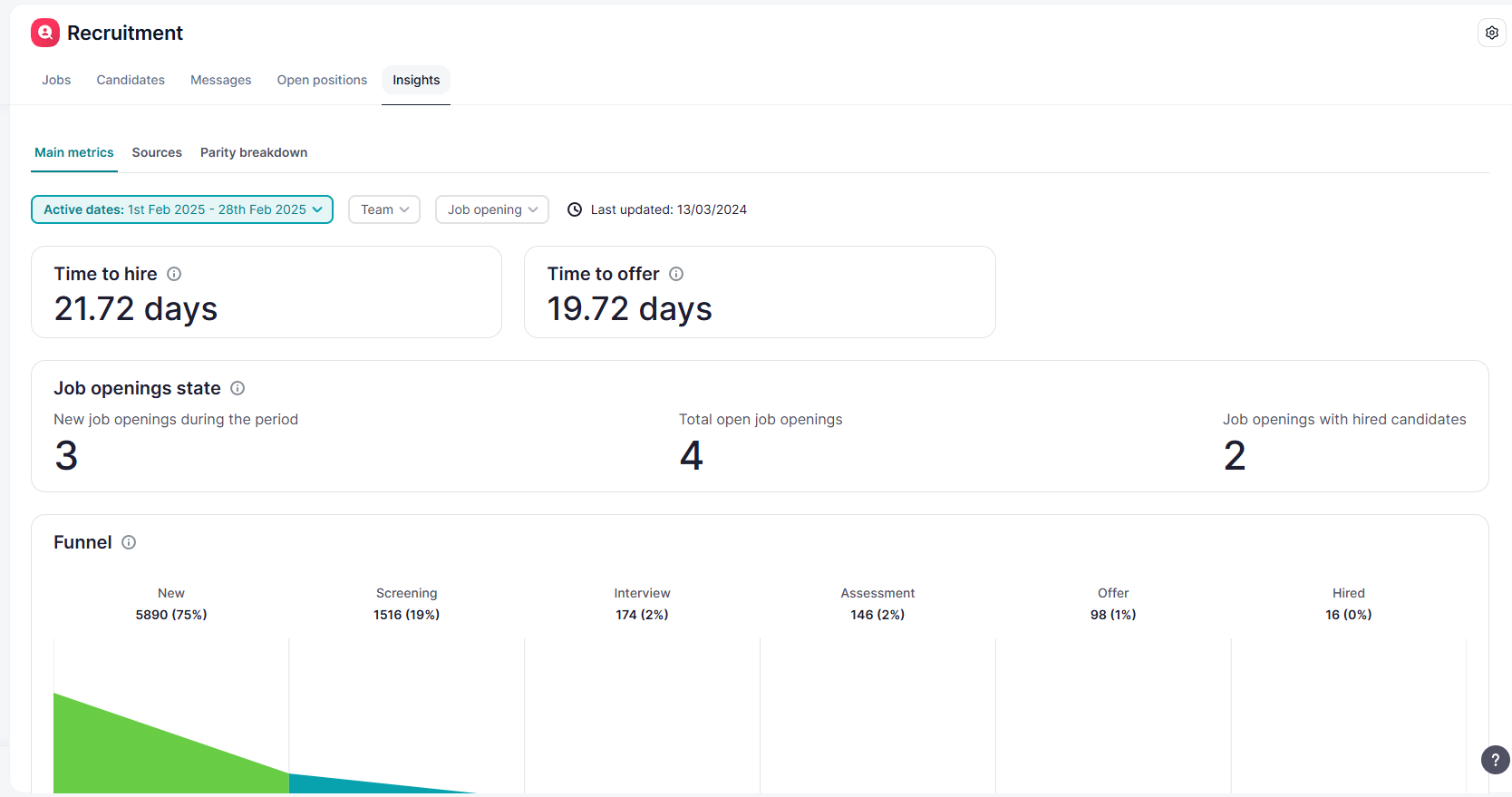
Because it covers multiple areas of HR & business management, its recruitment analytics is part of a broader system rather than a stand-alone analytics tool.
Key Recruiting & Analytics Features:
- Candidate tracking and pipeline management
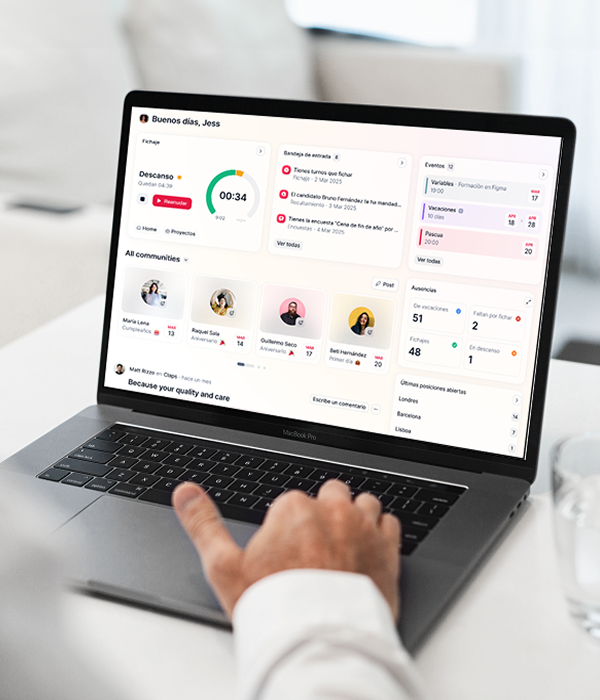
- Reporting and insights built into HR dashboards
- Automation of repetitive tasks (e.g. interview scheduling, notifications)
- Integration across HR functions, meaning recruiting data ties into payroll, performance, etc.
Pros:
- All-in-one solution means fewer systems to juggle
- Smooth connection between recruiting and other HR data
- User-friendly interface, suited for smaller teams
- More affordable than large enterprise systems
Cons:
- May lack specialized features that recruiting-only platforms have
- Some features may require upgrading or add-ons
Price:
Factorial often uses custom pricing, depending on number of employees and modules used.
More info:
For many growing businesses, you want data but with minimal complexity. Factorial gives you analytics inside a broader HR tool, so recruiting insights come naturally without needing a separate system.
2. Recruit CRM
Best for: Recruitment agencies and staffing firms that need an all-in-one CRM + ATS with built-in analytics and pipeline visibility.
Overview:
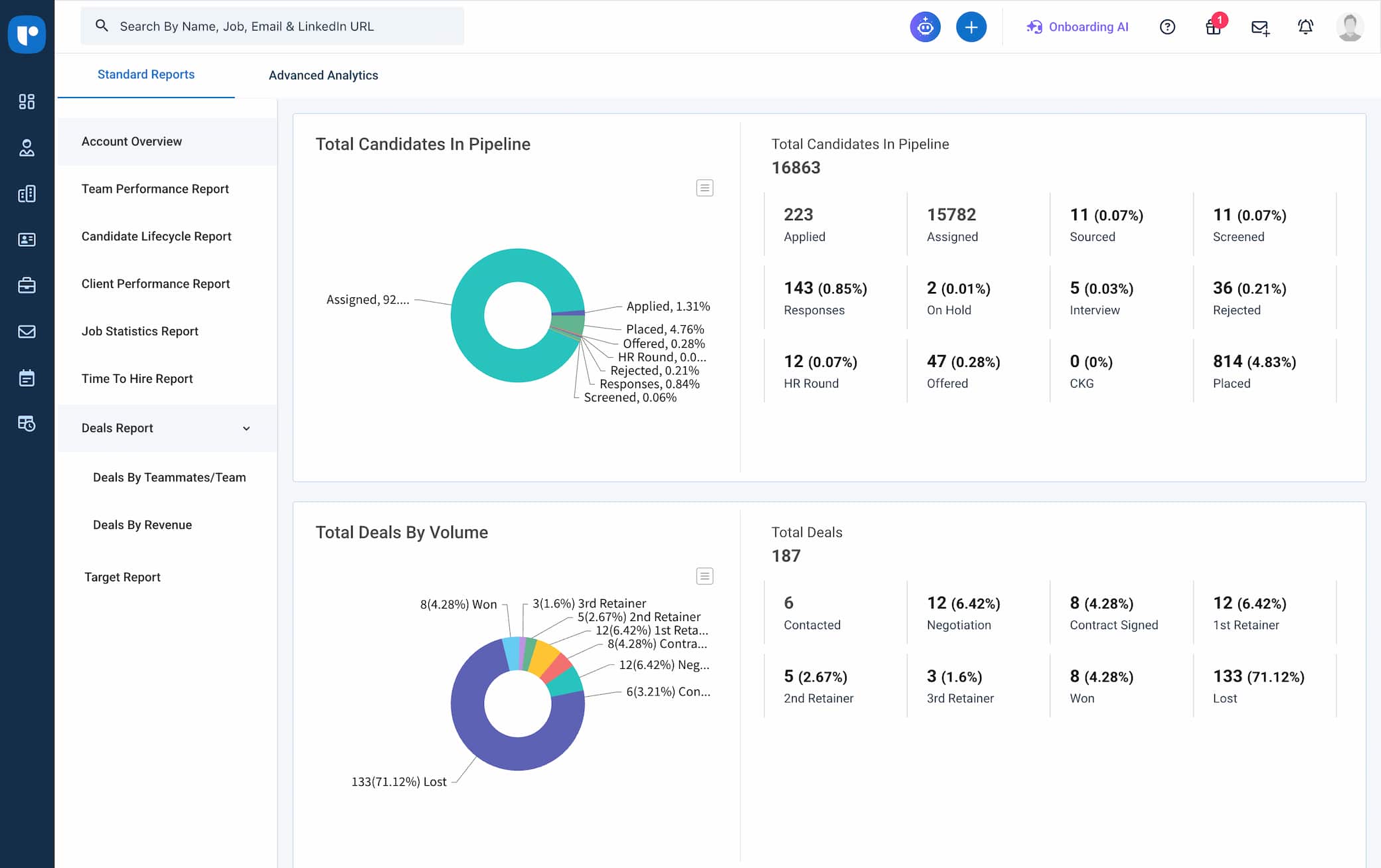
Recruit CRM is a combined ATS and CRM platform built specifically for recruitment and staffing agencies. It brings together visual analytics, AI-powered tools, and candidate and client tracking in one unified workspace.
Key Features (Recruiting & Analytics):
- Visual reports and dashboards tracking key metrics like time-to-fill, placement rates, and pipeline health
- Create your own custom reports with advanced analytics
- AI-powered resume parsing and candidate matching to speed up sourcing decisions
- Kanban-style pipeline views for both candidate and client deal tracking
- Workflow automation to reduce manual tasks like follow-up emails, job postings, status updates, and reminders
Pros:
- Purpose-built for recruitment agencies, so analytics and workflows align with agency needs
- Combines CRM and ATS in one platform, reducing the need for separate tools
- Clean, intuitive interface with a low learning curve
Cons:
- Primarily designed for agencies. Less suited for in-house corporate recruiting teams
- Advanced automation features are available only for higher-tier plans
Price: Recruit CRM offers tiered pricing plans billed per user per month. According to the provider’s pricing page, the Pro plan starts at $85/user/month, the Business plan at $125/user/month, and the Enterprise plan uses custom pricing. A free trial is available.
More info: Recruit CRM is purpose-built for staffing and recruitment agencies. If your team operates as an in-house corporate recruiting function, you will likely find more value in a platform designed for internal talent acquisition, such as Factorial’s integrated Applicant Tracking System, which connects recruiting data directly to HR, payroll, and performance management.
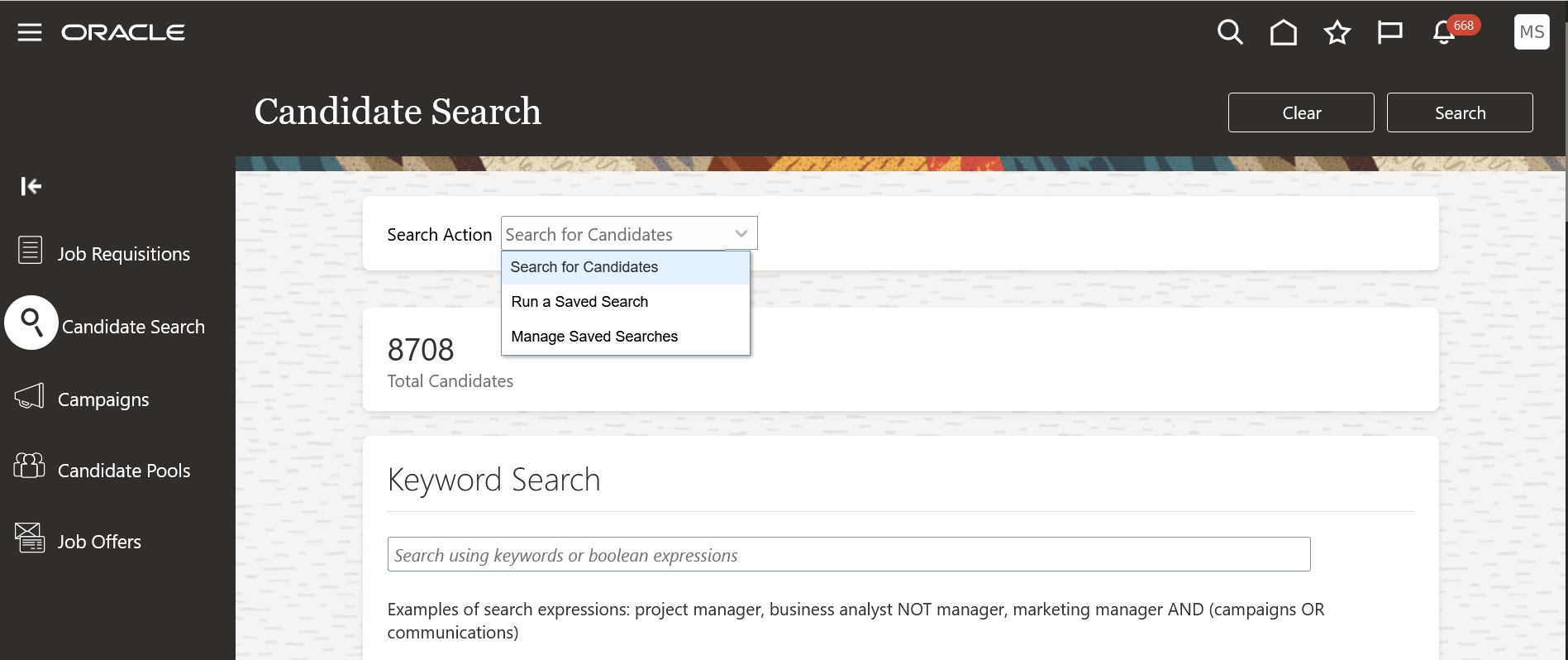
3. Oracle Cloud HCM / Oracle Recruiting
Best for: Large enterprises that need deep analytics, global compliance, and advanced HR capabilities.
Overview:
Oracle’s suite, including Oracle Recruiting as part of Oracle Cloud HCM, uses strong analytics, AI, and integrated HR modules to offer talent acquisition. It links recruiting data to compensation, performance, workforce planning, and more.
Key Features (Recruiting & Analytics):
- Predictive analytics (e.g. estimating time-to-hire) using AI tools
- Prebuilt dashboards, KPIs, and metrics across recruiting and HR operations
- Automation of tasks: job posting, candidate communications, interview scheduling, etc.
- Modular integration: recruiting sits inside the larger HCM system (payroll, performance, etc.)
Pros:
- Very powerful analytics and reporting tools
- Strong ability to handle compliance, global operations, and large-scale recruiting
- Deep integration across HR, making data more connected
- Scalability for large organizations
Cons:
- High cost and longer implementation times
- Requires dedicated training or technical support to access full power
- May be too complex for small or mid-size companies
Price:
Oracle usually offers custom enterprise pricing for its HCM and recruiting modules.
4. iCIMS Talent Cloud
Best for: Organizations with high hiring volume needing strong pipeline insight.
Overview:
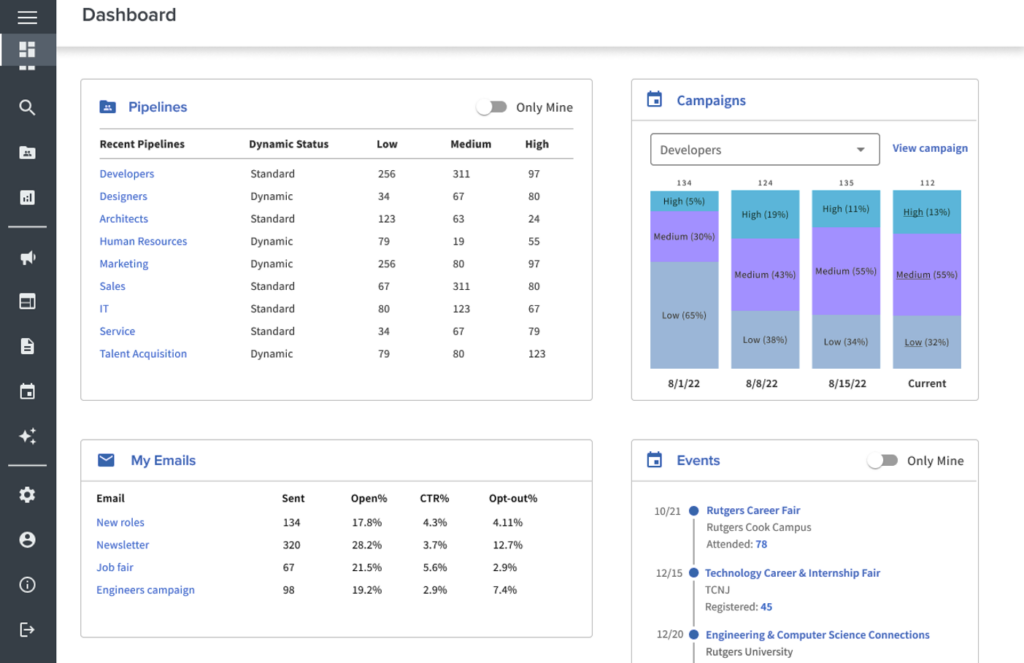
iCIMS Talent Cloud is a mature platform that focuses heavily on talent acquisition and analytics. It helps large recruiting teams manage and measure every stage of the recruiting process.
Key Features (Recruiting & Analytics):
- Funnel tracking: see how many applicants move from stage to stage
- Customizable dashboards and reports
- AI-assisted insights and predictive tools
- Integration with other HR systems and data sources
Pros:
- Very good for recruiting teams with many open roles
- Strong visualization and pipeline insight
- Scalable for large teams
Cons:
- Might be too complex or expensive for small teams
- Some components may require add-ons
Price:
iCIMS generally uses enterprise or custom pricing for its Talent Cloud offering.
5. Visier
Best for: Companies focused on predictive talent planning, retention, and workforce modeling.
Overview:
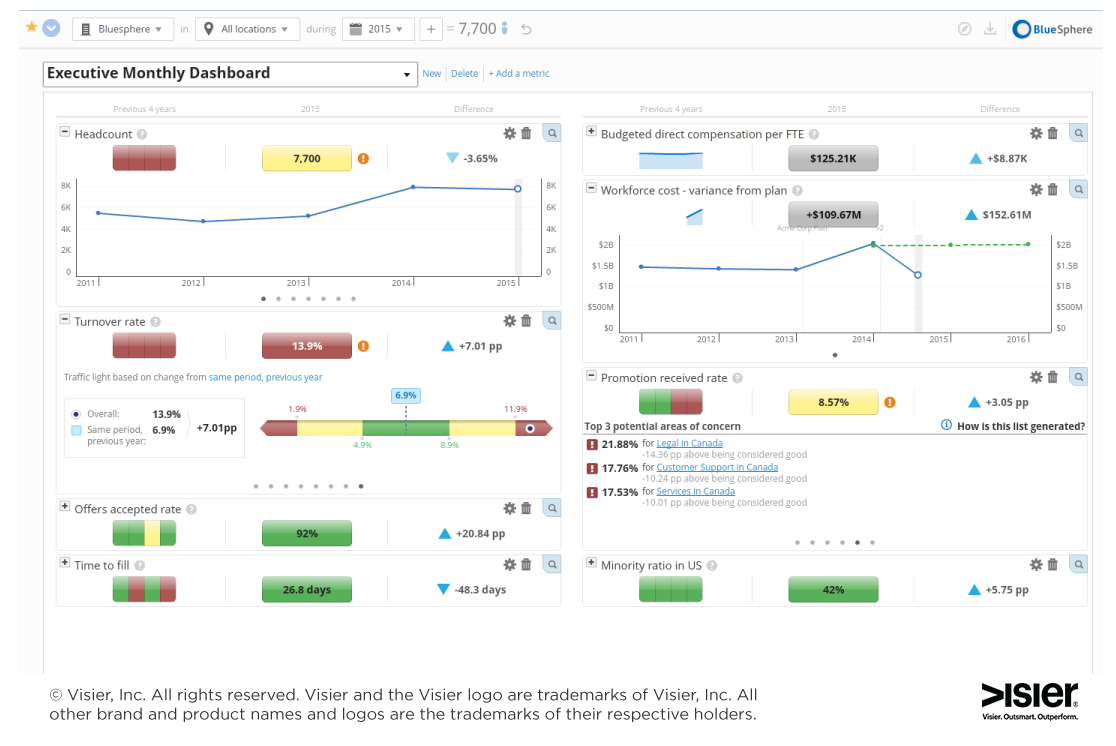
Visier is often thought of more as a workforce analytics tool, but it shines when used for recruitment planning, forecasting, and trend analysis. It’s built for strategy, not just day-to-day dashboards.
Key Features (Recruiting & Analytics):
- Predictive models: forecast hiring needs, attrition, skill gaps
- Advanced data visualization and dashboarding
- Deep demographic, diversity, and performance correlations
Pros:
- Excellent for long-term planning
- Can reveal hidden patterns and risk areas
- Supports advanced strategic decision-making
Cons:
- Steep learning curve
- Requires clean data and potentially a data team
- Cost can be high
Price:
Custom pricing, typically for enterprise or advanced analytics users.
6. Greenhouse
Best for: Growing and mid-size teams that want structure and analytics together.
Overview:
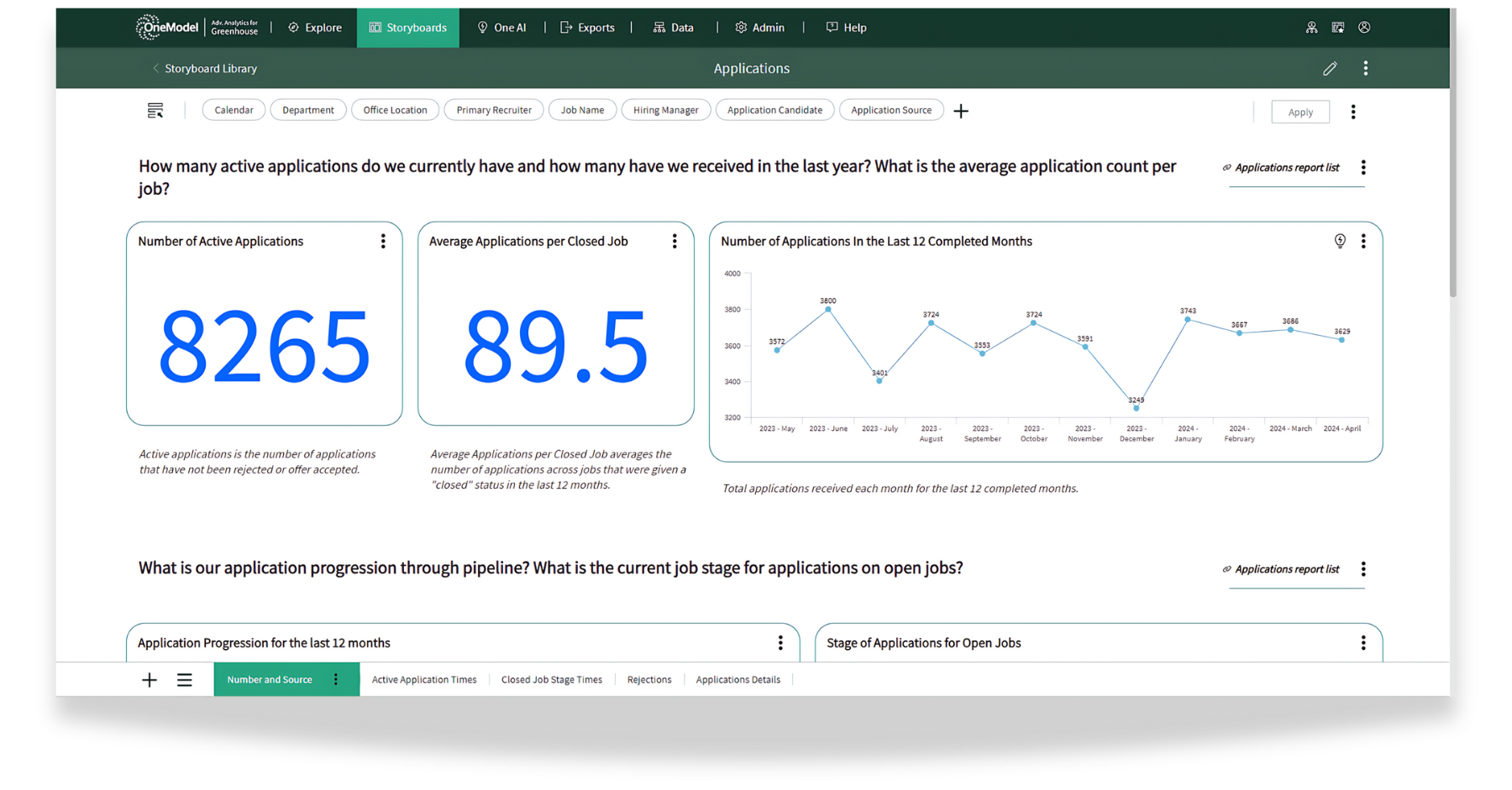
Greenhouse combines a robust ATS with built-in analytics for recruitment teams. It helps structure interviews, reduce bias, and monitor performance from job posting to hire.
Key Features (Recruiting & Analytics):
- Metrics on diversity, funnel conversion, source performance
- Interview scorecards and feedback analytics
- Custom analytics dashboards
- Integration with reporting tools and HR systems
Pros:
- Very user-friendly interface
- Strong in structured hiring and anti-bias features
- Good balance between power and usability
Cons:
- Analytics depth less than enterprise tools
- Add-ons can increase cost
Price:
Greenhouse pricing is custom for enterprise customers.
7. Dayforce HCM
Best for: Companies wanting unified HR, payroll, and recruiting analytics.
Overview:
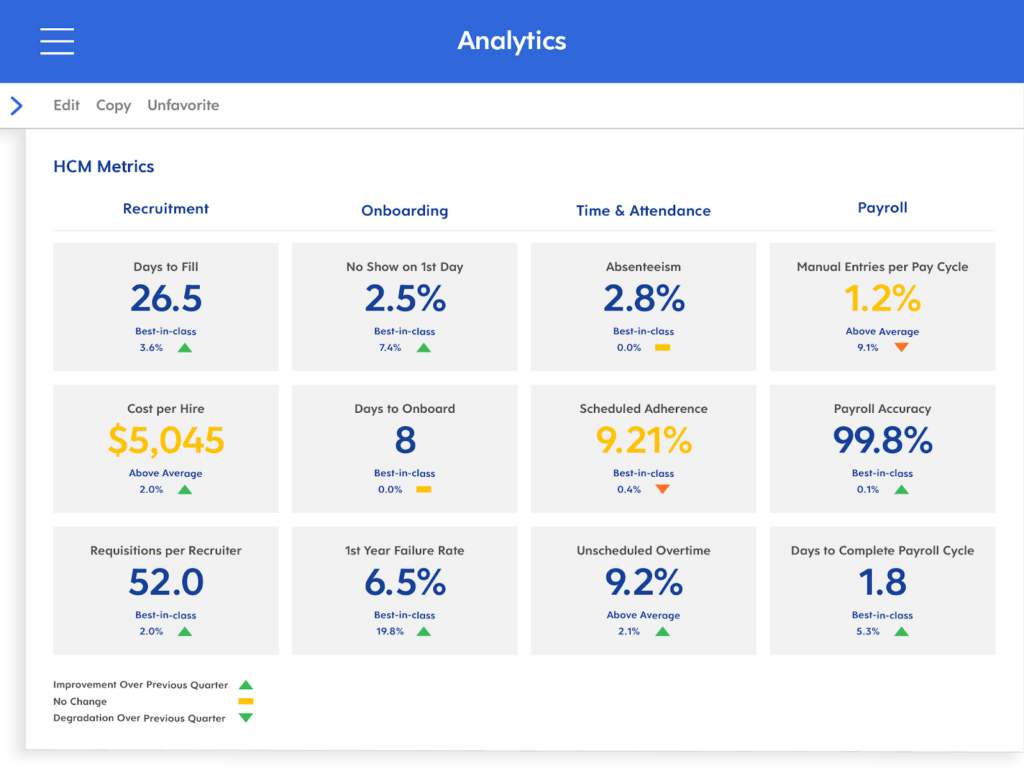
Dayforce is a full HR suite. Its recruiting analytics are built into a system that also includes payroll, workforce management, compliance, and employee life cycle monitoring.
Key Features (Recruiting & Analytics):
- End-to-end analytics from recruitment through employment
- Real-time dashboards and insights
- Compliance, scheduling, and reporting all connected
- Predictive modeling, particularly around turnover or performance
Pros:
- All HR functions in one system
- Strong for companies that don’t want multiple disconnected tools
- Good for cost control and unified data
Cons:
- Implementation complexity
- Might be over-featured for smaller teams
Price:
Custom enterprise pricing, depending on modules and scale.
Top Recruitment Analytics Software Comparison Chart
The table below summarizes how these seven top recruitment analytics software platforms compare across key features, strengths, and pricing to help you make a confident decision.
| Platform | Best For | Key Features / Strengths | Considerations | Pricing / Notes |
| Factorial | Small and mid-sized businesses | HR dashboard and reports, applicant tracking, absence management, document management, analytics integration | Limited advanced analytics compared to enterprise tools | Custom pricing / subscription model |
| Recruit CRM | Recruitment agencies | Workflow automation and analytics that align with agency needs | Less suited for in-house recruiting teams | Tiered pricing plans |
| Oracle Cloud HCM | Large enterprises | Deep analytics, global compliance, integration across HR modules like payroll and talent management | Complex setup, high cost, longer onboarding | Enterprise / custom pricing |
| iCIMS Talent Cloud | High-volume recruiting teams | End-to-end hiring tools, compliance workflows, strong reporting and analytics | May require more resources for setup and training | Enterprise pricing / custom |
| Visier | Predictive workforce planning | Advanced data modeling, forecasting, retention analysis | Requires clean, connected data. Steeper learning curve | Custom pricing |
| Greenhouse | Structured hiring and DEI-focused teams | Interview scorecards, pipeline analytics, DEI tracking, ease of use | Limited HR and payroll integration | Mid to enterprise pricing |
| Dayforce HCM | HR, payroll, and recruiting in one platform | Unified platform with analytics, payroll, compliance, and workforce management | Broader HR tool, less specialized for recruiting | Enterprise / custom pricing |
How to Read This Comparison
No single platform is the right fit for every organization. The table above is a starting point. When evaluating top recruitment analytics software, prioritize the tools that align with your hiring volume, team size, and integration requirements. For growing businesses that want recruiting analytics embedded inside a broader HR system — without the complexity or cost of enterprise platforms — Factorial’s ATS and analytics suite is the most complete solution for small and mid-sized teams.
What Are the Benefits of Implementing Recruitment Analytics Software?
When you switch to recruitment analytics software, you start to run your hiring process on data instead of intuition. Working based on numbers instead of a gut feeling means you can make faster, smarter, and more consistent decisions.
Here are top benefits of using recruitment analytics software:
1. Make Smarter, Data-Driven Decisions
Recruitment analytics gives you the facts: what’s working and what isn’t? You can stop relying on opinions and hunches and base hiring choices on evidence you gather during the hiring process. Data-driven hiring, when tracked through talent acquisition metrics, supports more reliable decision-making and helps measure ROI with people analytics software.
2. Reduce Hiring Costs
Knowing your cost-per-hire is the first step toward controlling it. The U.S. average stands at $4,700–$4,800 per non-executive hire. This figure has risen steadily over the past three years. If your organization’s cost-per-hire exceeds that benchmark, recruitment analytics can help you identify the specific drivers and reduce them.
3. Shorten Time-to-Hire
Speed is everything. Recruitment analytics tools can reveal where your hiring process is slow, which can pose the risk of losing talent to competitors and lead to a poor candidate experience. Fixing workflow issues helps ensure your time-to-hire is optimal for improved candidate satisfaction scores.
The median time-to-fill in the U.S. has reached 44 days— up 33% from 33 days in 2026. Recruitment analytics tools help teams identify exactly where delays occur so they can act before top candidates accept competing offers.
4. Improve Team Collaboration
Analytics software gives your organization a dashboard that everyone can see. This way the entire team of recruiters, managers, and executives is on the same page when it comes to data and results, making it easier to align on goals.
5. Strengthen Diversity and Inclusion
Certain tools track diversity metrics at each stage of hiring, showing how different candidate demographic groups move through the entire process. Using this data, your organization can decide to take action to remove hiring bias during recruitment.
6. Plan for the Future
Analytics lets you forecast future hiring needs based on the growth of your organization, turnover, and skills gaps. This gives you time to plan budgets, set goals for training, and open the positions you need to fill.
7. Boost Employer Brand
When candidates you hire have a good experience during the recruitment process, they form a better opinion of your company. This is reflected on other metrics like eNPS and leads to a good employer brand.
8. Prove ROI to Leadership
Recruitment analytics gives HR teams the data they need to demonstrate business impact. SHRM research shows that 94% of business leaders say people analytics improves the HR profession, and 71% of HR executives who use it describe it as essential to their organization’s HR strategy. When you can show leadership a direct line between recruiting investments and business outcomes — reduced time-to-fill, lower cost-per-hire, higher quality-of-hire — the HR function earns a strategic seat at the table.
How to Choose the Best Recruitment Analytics Software for Your Business
Choosing the right recruitment analytics platform depends on your business size, goals, and resources.
Here’s what to take into account when making a decision:
1. What Are Your Needs?
Make a list of everything you want to measure, such as time-to-hire, cost-per-hire, and turnover. Not every platform tracks all metrics well.
2. How Much Will Your Company Grow?
If your organization is growing quickly, it’s important to choose software that can scale with you. Ask the vendor how easy it is to add new users and what the total cost of implementation is.
3. Will You Integrate with Other Systems?
Recruitment analytics works best when it is one part of a larger system. Think about how you handle other processes and how recruitment data can feed into the software you use for HR, payroll, and performance reviews. Consider the future and how hiring data will impact career progression.
4. How Easy Is It To Use?
If a platform is too complex and confusing, your team won’t use it. Look for simple tools and features that don’t require a specialist to implement it.
5. Is It Worth It?
Calculate how much the platform costs and compare it to how much money it could save you each month. Sometimes, the immediate cheapest option isn’t the one that brings the most value.
6. Does It Address Compliance and Bias Risks?
As AI becomes embedded in hiring workflows, compliance is a growing selection criterion. SHRM research shows that 19% of organizations using automation or AI in hiring report that their tools have overlooked or screened out qualified applicants. When evaluating top recruitment analytics software, ask vendors how their platform handles bias auditing, adverse impact monitoring, and data privacy — particularly if you operate in regulated industries or hire at scale.
Understand your recruitment analytics with Factorial
If you want an easy, all-in-one solution that tracks recruitment KPIs, integrates HR tools, and uses AI for candidate scoring, try Factorial’s Applicant Tracking System. It’s designed for growing businesses that want to find and hire top talent with professional analytics and insights.
Finding and hiring the right people is one of the most consequential decisions a business makes— yet many organizations still rely on instinct over evidence. Top recruitment analytics software changes that equation by turning raw hiring data into clear, actionable intelligence.
Recruitment analytics software helps take the guesswork out of hiring. It collects and analyzes data from your entire hiring process, from job ads and interviews to offers and onboarding. Instead of relying on opinions, it shows you real numbers and trends that help you make better decisions.
For example, the software can tell you how long it takes to fill a position, which job boards bring the best candidates, and how much each hire costs. These insights help you save time, improve efficiency, and hire stronger candidates.
FAQs
The best recruiting software centralizes candidate tracking, automates talent pipelines, and provides built-in analytics. Factorial, an all-in-one business management software, delivers intuitive recruiting tools, AI-powered CV filtering, and comprehensive hiring metrics to help businesses recruit efficiently.
The top applicant tracking systems centralize talent pipelines, automate applicant screening, provide custom hiring workflows, enable team collaboration, and track recruiting metrics. Factorial, an all-in-one business management software, delivers a built-in ATS that smoothly connects recruitment with onboarding and reporting.
The best AI recruiting tools use artificial intelligence to screen resumes, automate communication, and provide hiring analytics. Factorial, an all-in-one business management software, offers AI candidate filtering, customizable recruitment funnels, and centralized talent tracking to simplify hiring in 2026.
Key recruiting metrics for 2026 include time-to-hire, time-to-fill, cost-per-hire, offer acceptance rate, source of hire, and first-year attrition. Tracking these analytics using Factorial, an all-in-one business management software, helps organizations reduce hiring bottlenecks, lower recruiting costs, and improve candidate quality.