Managing time off requests in a company using Excel templates is one of the most common practices in every HR department. In this article, we are going to show you how to create from scratch a vacation tracker Excel template. This will help you track all your employees’ time off through one simple, easy-to-use template.
Key Facts
- Creating a time off request tracker in Excel involves setting up a calendar, listing employees, and using formulas to calculate leave balances.
- In the United States, there is no federal law requiring private sector employers to provide paid time off, making a clear company policy essential.
- Manual administrative tasks like managing leave requests can consume up to 15 hours per week for HR managers in small to medium-sized businesses.
TABLE OF CONTENTS
- Why Use an Excel Template for Time Off Requests?
- What Should a Time Off Request Policy Include?
- How Can Companies Manage Last-Minute Time Off Requests?
- Managing Time-Off Requests with an Excel Template [step-by-step]
- Managing Employee Time in Lieu with Time-Off Request Forms
- Download the Free Time-Off Excel Template ✅
- FAQs
Why Use an Excel Template for Time Off Requests?
The Excel templates as time off management tools are still one of the most common ways to deal with holidays, sick leaves, and other time off request forms in a lot of companies. With a mid- to high-level of Excel skills, it’s possible to create a useful template that can help you count how many days each employee will be out of the office. However, it is not the most efficient tool.
If you already use Excel to manage holiday requests and vacation requests, you will need to complement it with emails to communicate with the employees manually. One of the most complicated tasks for the person in charge of human resources is talking with each employee and recording their requests into an Excel file, while checking that there are no other people already on vacation during the same days and calculating the total remaining days that the employee can still request.
So, depending on your company size, you will need a lot of patience. It may be a good idea to check some tutorials to improve your Excel skills. However, with a free time off calendar template, you’ll be well on your way to successfully managing employee time off requests. When comparing a leave management system Excel solution to more advanced HR software, Excel is cost-effective and accessible but may lack automation and safeguards found in dedicated platforms.
What Should a Time Off Request Policy Include?
No matter whether you use a time off calendar template to track employee time off, or software, you will want to have a time off request policy in place. Creating your policy is simple. All you need to do is outline the stipulations of when an employee can take time off, for how long, and for which reasons. According to the U.S. Department of Labor, the Fair Labor Standards Act (FLSA) does not require payment for time not worked, such as vacations or holidays. These are to be set by an agreement between the employer and the employee. If there are any exceptions regarding when employees can take time off, this must also be included.
Be sure to include your time off policy in your employee handbook.
How Can Companies Manage Last-Minute Time Off Requests?
For the team in charge of human resources, time off management is one of the most time-consuming tasks of the year. Their ability to organize the entire company calendar will help workers take time off and enjoy their holidays while keeping a normal workflow without any decrease in productivity. Creating a time off spreadsheet can help managers with this monumental task.
As the human team grows, this task becomes more complicated and negotiations with each employee can affect an entire department. In addition to the Excel leave tracker file, there are other absence management systems that can help you simplify and automate this process, such as Factorial’s holiday management software.
With the time off software, employees can request holidays through Factorial without the need to exchange cumbersome email chains. The person in charge of the human resources department can easily accept or deny all these requests and see in real time if there are any overlaps with other employees’ holidays or sick leaves. You can access this directly from your browser without needing to download any program or plugin. We are open and operating 24 hours a day, 365 days a year!
Managing Time-Off Requests with an Excel Template [step-by-step]
If you still want to create your own employee vacation tracker, we will explain how to proceed step by step. First, you will need to install Microsoft Excel or a similar program on your computer. Remember that it is a paid program and unless your company provides you with the corresponding license, you can only use it for a limited time. Another option would be using the Google Spreadsheets tool. When setting up your own PTO tracker spreadsheet, follow these steps for an effective template:
- Create a new Excel file and name it so it’s easy to remember. Something like Employee Time off Requests Template [CompanyName] 2026 would be enough.
- Start by immobilizing 4 columns on the left side of the screen.
- Once you do that, combine the cells in the first row. Here we will write the year.
- On the second row, make divisions of 28/29, 30, and 31 days for each month: January, February, March, through December.
- On the third row, you can create a formula that counts the previous number + 1 so that the number automatically appears.
If you followed the steps correctly, you should have something like this:
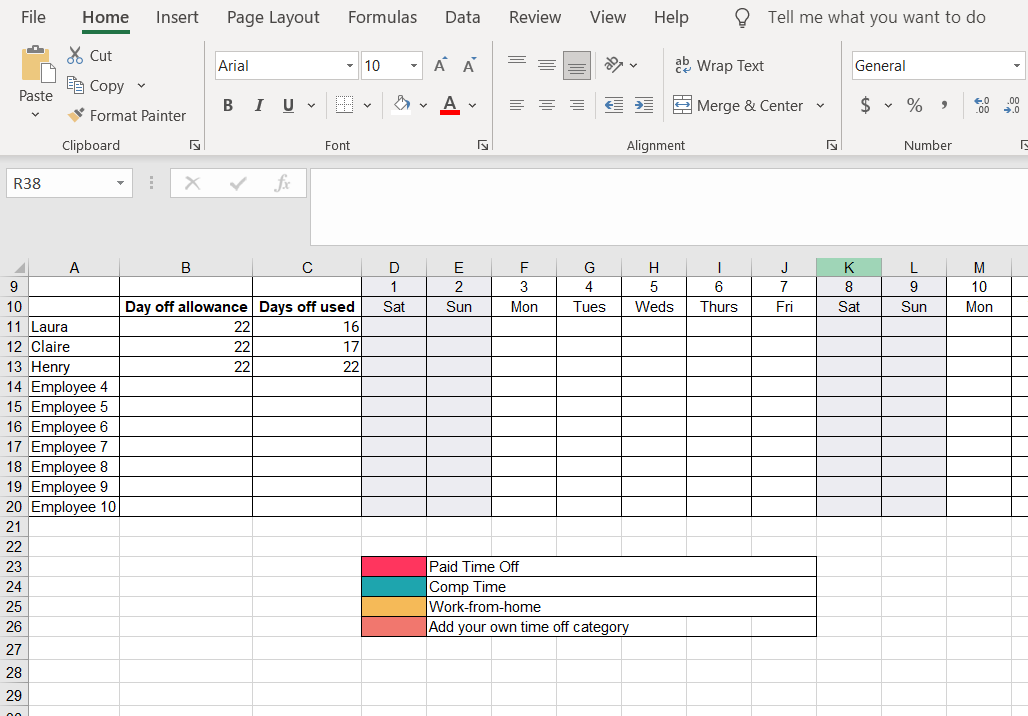
Now, return to the left part of the screen, to the section that we created at the beginning and add all the information that appears in the second screenshot. Team, Employee Name, Total Available Vacation Time, Holiday Days, and Remaining Days. Using an employee vacation calendar template like the time off spreadsheet below is a practical way to organize and manage employee time off.
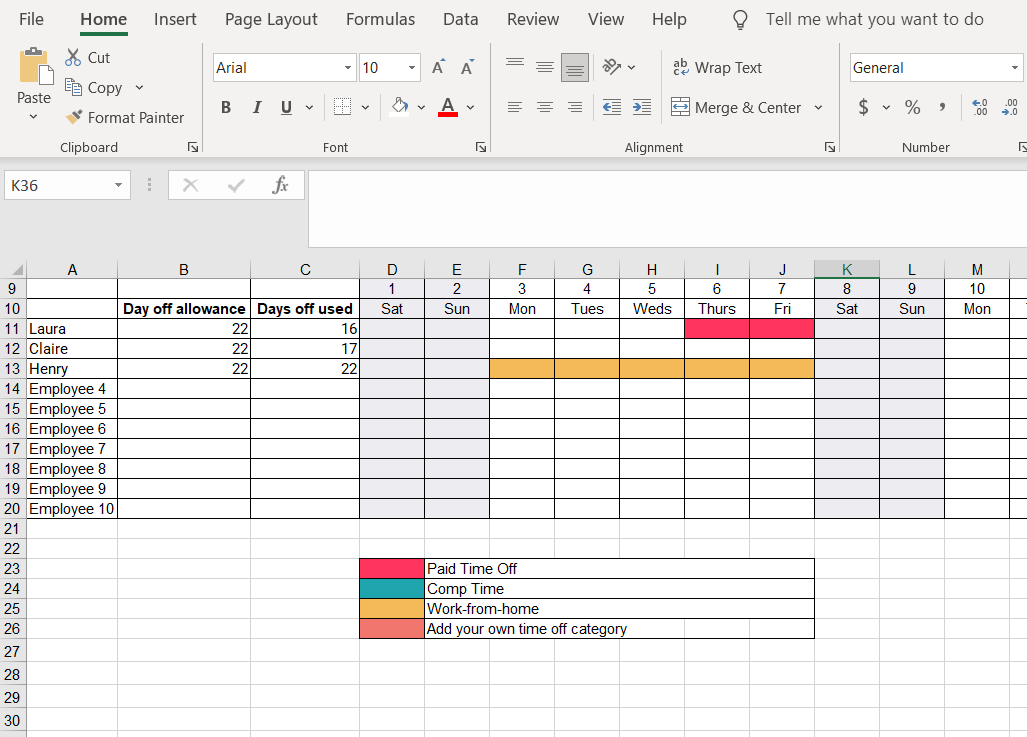
This first version of the Excel template can help you keep track of each employee. If you want to have even more control over the tool, you can always add formulas to improve it.
To address excessive time off requests, it’s crucial to have a clear policy that is applied fairly and consistently to all employees. Document all requests and look for patterns. If an employee’s requests become excessive, address it directly and privately, referencing the company policy and the impact on the team and business operations.
To manage time off requests fairly, ensure your policy is transparent and accessible to everyone. Approvals should be based on consistent, objective criteria, such as notice period and team coverage, rather than subjectivity. Using a centralized system, whether an Excel template or software, ensures all requests are logged and reviewed in the same manner.

Managing Employee Time in Lieu with Time-Off Request Forms
With a simple PTO tracking spreadsheet or employee vacation accrual template you can get by, but what about when things become more complicated? Managing time in lieu isn’t the easiest. Essentially, lieu time is paid time off from work. Rather than an employee receiving pay for overtime hours, an employee would receive additional paid time off.
The challenge with managing time in lieu with a time off calendar template is that things can get very messy, very fast. While an Excel template can be adapted, the risk of manual error increases when tracking non-standard accruals like time in lieu. A dedicated digital system like Factorial’s time off software can automate these calculations, ensuring accuracy and compliance with FLSA overtime rules.
If you’re unsure whether you’re ready to save time, you can stick with an employee vacation accrual template to manage time off and lieu requests, but we wouldn’t recommend it as it is not a hassle-free option.
Download the Free Time-Off Excel Template
If Excel is not your thing, you can use Factorial’s time off management software. By using Factorial instead of the outdated spreadsheet method, you will save between 5-6 hours each month. Forget about formulas, emails, and counting days. Using Factorial you can easily accept or deny each employee’s time off request, check how many days this employee has already requested, or check if the request overlaps with other absences on your team— automatically, with no need to update calendars. You just have to input the information and Factorial will do everything else!
The best way for employees to request time off is through a standardized, centralized system. This could be a dedicated email address with a required form, a shared spreadsheet with clear instructions, or ideally, an employee self-service portal through HR software. This ensures all necessary information is captured upfront and the request is routed to the correct manager for approval, creating a clear audit trail.
If we still have not convinced you, feel free to manage your employee time off requests when you download our free holiday leave template for 2026.

FAQs
How to manage time off requests fairly?
To manage time off requests fairly, establish a clear and consistent policy outlining procedures and eligibility. Using a centralized HR platform like Factorial ensures these rules are applied uniformly to every request, preventing calendar conflicts and maintaining transparency across the company.
How to address excessive time off requests?
Address excessive time off requests by speaking privately with the employee to understand their situation. Review their available leave balance and reiterate the company’s time off policy. This approach helps maintain clear expectations while allowing you to offer support if necessary.
What is the best way for employees to request time off?
The best way for employees to request time off is through a centralized HR software system. This ensures requests are properly logged, automatically checked for overlaps, and routed to the correct manager for approval. A platform like Factorial streamlines the process, eliminating manual emails and spreadsheets.